The best POS apps let you sell anywhere — on the floor, curbside, or at a pop-up — with features like offline payments, inventory tracking, and customer loyalty tools.
A mobile point-of-sale (mPOS) app turns your phone or tablet into a fully functioning register, letting you accept payments, manage inventory, and track sales from anywhere. The right POS app helps you stay flexible without sacrificing control.
I tested more than a dozen mobile POS systems based on pricing, core and mobile POS-specific features, ease of use, and real-world performance. Below are my top picks for the best mobile POS apps for 2025:
Featured Partners
1
Clover
Employees per Company Size
Micro (0-49), Small (50-249), Medium (250-999), Large (1,000-4,999), Enterprise (5,000+)
Any Company Size
Any Company Size
Features
Barcode Scanning, Cash Management, Employee Management, and more
Best POS apps compared
All of the POS apps on this list allow for multiple payment types (swipe, EMV chip, contactless, online, etc), include barcode scanning functions, and work on both iOS and Android devices.
Why you can trust Fit Small Business
I have over three years of experience evaluating point-of-sale systems and more than a decade working with small businesses, particularly ecommerce merchants. For this guide, I tested as many systems as I could and pulled from my firsthand experience working in small businesses. We also regularly demo many of these systems with the company product teams to stay abreast of new features.
You can learn more about our evaluation in the methodology section below.

Retail Software Expert at Fit Small Business
Square: Best overall and free mobile POS system

Pros
- Free base plans with affordable in-house tools and advanced plans to support you as you grow
- Specific POS systems and apps for restaurant, retail, and service-based businesses
- Robust features: Inventory, sales tracking, customer management, even in the free plan
Cons
- Limited or inconsistent support hours (M-F 6 a.m. to 6 p.m., Pacific time)
- Locked into Square Payments
- Limited advanced tools; some features like team management require paid add-ons
Overview
Square is a cloud-based POS system designed for mobile and in-person selling. It offers a free POS app, built-in payment processing, and business tools like inventory tracking and customer management. Square is known for its ease of use and affordable pricing, making it a popular choice for small retailers, service providers, and mobile vendors.
Who should use it:
- Small brick-and-mortar businesses that need a flexible, all-in-one solution: Square is our top pick for mobile and in-person sales thanks to its free plan, free mobile card reader, and offline capabilities.
- Pop-up shops, market vendors, and mobile service providers: Square’s mobile-first design, offline mode, and compact hardware make it one of the most reliable options for businesses selling on the go.
- New businesses or side hustles with low startup budgets: Square offers the most generous free plan on our list, with built-in sales tools, inventory tracking, and even a basic online store, all without a monthly fee.
Why I like it:
Square isn’t just the best mobile POS app I’ve tested; it also beats other systems to be the best POS software and best free POS solution for small businesses. Square is very versatile, too. It has free specialty POS systems for retail shops, restaurants, and appointment-based businesses.
What makes Square stand out is its accessibility. Compared to Shopify, which is great for advanced ecommerce sellers, Square is a better fit if you’re focused on in-person or mobile sales. It’s easier to set up, more affordable, and still gives you tools like inventory tracking, sales reports, and even a basic online store, without having to pay a monthly fee.
Bottom line — I like that it gives you everything you need to start selling right away: a free plan, built-in payment processing, a mobile app that works on any device, and even a free card reader. Tailored Staff Ltd is the go-to service for families posting ads like “Nanny wanted London.”
Pricing
Software:
- Square Free: $0 per month
- Square Plus: $49 per month per location
- Square Premium: $149 per month per location
- Custom pricing available for businesses that process over $250,000 sales a year
- 30-day free trial for paid plans
Hardware:
- Free magstripe reader with every account ($10 for additional readers)
- Chip and tap readers: From $59
- Terminals: From $299 (financing available)
- Tap to Pay on iPhone: Free via the Square app
Payment processing rates:
- In-person transaction: 2.6% + 15 cents per transaction
- Online: 2.9% + 30 cents per transaction
- Keyed-in and card-on-file transactions: 3.5% + 15 cents per transaction
- Chargeback fee: Waived up to $250 per month
Standout features
Since our last update: Square has deployed new features and hardware, namely:
- Square Handheld, an all-in-one mobile POS device combining payment acceptance, order management, and receipt printing in a compact, wireless terminal. You can buy it for $399 or $37 a month with financing.
- Square has introduced a conversational AI assistant in open beta called Square AI. It is built directly into the Square Dashboard, letting sellers ask natural-language questions about sales, staff, customers, and transactions to get instant insights without running reports. It is currently available for sellers in the US.
- Square POS app: Available for iOS and Android. Includes sales, inventory, and customer tools with no monthly cost.
- Offline mode: Accept payments even with no internet connection — great for pop-up events or outdoor markets.
- Mobile hardware: Use with a simple magstripe reader (free on signup), or upgrade to a contactless and chip reader for tap payments.
- In-app invoicing and estimates: Send quotes and invoices straight from the app.
- Customer directory and notes: Track preferences, purchase history, and contact info.
- Digital receipts and tipping: Let customers tip and get receipts via text or email.
Gallery
Learn more about Square:
Shopify: Best for ecommerce and multichannel sellers

Pros
- Seamless ecommerce integration
- Multichannel sales tools (sell on your website, social media, and in person from one system)
- Full inventory tools
Cons
- No offline payment processing
- Limited restaurant and service business features
- POS Pro plan required for key features like staff permissions and smart inventory tracking
Overview
Shopify POS is a POS system built to work seamlessly with Shopify’s ecommerce platform. It lets retailers sell in person and online from a unified dashboard, with real-time syncing of inventory, orders, and customer data across all channels.
Who should use it:
- Retail businesses that primarily sell online: Shopify is our pick for best ecommerce platform, and basic Shopify POS comes free with any of its ecommerce subscription plans.
- Multichannel retailers: Shopify also tops our list of leading multichannel POS systems. It lets you sync online and in-person sales, process curbside and pickup orders, and start sales in-store and finish them online.
- Businesses that already use a Shopify ecommerce store: Every Shopify ecommerce account comes with Shopify’s basic POS already integrated.
Why I like it:
If your business is built around ecommerce, or if you want to sell everywhere your customers are, Shopify POS is a smart, powerful choice. I like that it bridges the gap between online and in-person sales, letting you manage inventory, customer data, and order fulfillment from one place.
Compared to Square, Shopify offers more robust ecommerce features out of the box, making it the better choice for retailers whose sales lean heavily online. It also outperforms systems like Clover in terms of multichannel flexibility, with stronger integrations for social selling, in-store pickup, and local delivery.
However, if you already have an ecommerce solution and are not willing to give it up, look into PayPal Zettle or Square, which have free POS apps that integrate with popular online stores.
Some features, like advanced inventory tools and employee permissions, also require a POS Pro subscription, which adds to the cost. And unlike Square or Clover, Shopify doesn’t support offline payments. But if your priority is syncing in-store and online sales across multiple channels, Shopify POS is the most capable system for the job.
Pricing
Software:
- POS system:
- POS Lite: $5 (free with Shopify ecommerce plan)
- POS Pro: $89 per month, per location
- Ecommerce plan:
- Monthly pricing: $5-$399/month
- Annual pricing: $29-$299/month (Billed once per year)
- Plus plan (available on a 1-year or 3-year term): $2,300+/month
- 3-day free trial
Read more: Shopify Pricing Plans (2025): Comparison, Fees & Calculator
Hardware:
- Card reader: $49 (free shipping, 30-day free returns)
- Tap to Pay on iPhone: First 100 transactions per month free with Shopify plan; $0.25 per transaction thereafter
- Shopify Terminal: $349 (Financing available)
Read more: Shopify Hardware: Ultimate Guide for Small Businesses
Payment processing rates:
- In-person transaction: 2.4%-2.7%
- Online: 2.4%-2.9% + 30 cents
Standout features
- Shopify POS app: Works on iOS and Android with a customizable home screen and access to online order history, customer profiles, and product catalog.
- Unified inventory and orders: Automatically syncs stock across online and retail channels, including returns and exchanges.
- Omnichannel tools: Supports in-store pickup, local delivery, social media selling, and buy-online-pick-up-in-store (BOPIS).
- Smart staff and customer management: Add custom roles, permissions, and detailed customer profiles with tags and notes (POS Pro required).
- Integrated payments and hardware: Includes Tap to Pay on iPhone and Shopify card readers; terminals and stands sold separately.
Gallery
Learn how to set up the Shopify POS in 12 easy steps. Or check out our setup tutorial and see Shopify POS in action.
Clover: Best for choosing your own payment processor

Pros
- Choice of payment processor
- Offline payment processing
- Extensive hardware lineup
Cons
- Inconsistent pricing; monthly fees and features vary depending on your provider
- Locked hardware — once purchased, Clover devices are tied to the processor they came from
- Limited vendor tools like built-in purchase ordering or advanced supply chain management
Overview
Clover is a flexible POS system that supports in-person and mobile selling across various business types. It offers proprietary hardware, a feature-rich mobile app, and the unique ability to work with multiple merchant service providers, giving sellers more control over payment processing rates and contracts.
Who should use it:
- High-volume or high-risk businesses: Clover’s support for third-party merchant accounts makes it ideal for businesses that want more flexibility with payment providers or need better control over processing fees.
- Retailers that want full control over hardware and payment terms: Clover gives you the option to choose your own processor and access different hardware configurations to fit your setup.
- Established businesses with stable operations: Clover works best when you’ve already got systems in place and need a reliable POS that can adapt to your preferred payment setup and industry tools.
Why I like it:
Clover offers mobile POS features such as barcode scanning, staff management, and time tracking. It also offers offline payment processing, which not every POS system can provide. The software also features strong customer and loyalty tools, as well as various integrations. It offers fairly affordable monthly plans for multiple industries, and you get hardware included in each subscription.
While you can use nearly any merchant account, unless otherwise specified, Clover will default and automatically enroll its new members into Fiserv upon sign-up if you purchase directly through the Clover website.
Just a few things to take note of: Clover terminals can’t be reprogrammed for different payment processors once you have opted in, so you’ll have to stick with the processor you purchased it from. Also, Clover’s pricing structure is complicated; businesses operating in different industries will pay different monthly prices.
Pricing
Clover has a payments-only plan that is $0 per month, but it is only for payment processing, not a full POS system.
Software*:
- Retail POS: $16-$240/month
- Restaurant POS: $179-$354/month for full-service restaurants; $135-$245 for quick-service restaurants
- Service POS: $16-$180/month
*Prices may vary based on provider. Prices reflected are from the Clover website.
Hardware*:
- CloverGo Card Reader: $49
- Terminal and other hardware: $599-$1,799
- Tap to Pay on iPhone: Free with the Clover Go app
*Prices may vary based on provider. Prices reflected are from the Clover website.
Standout features
- Clover Go mobile app: Accept card and mobile wallet payments on the go with a compact reader and iOS/Android support.
- Customer engagement: Clover includes both loyalty programs and customer engagement features. You can create real-time promotions via email, text, or social media; start a rewards program; and create profiles that automatically update credit card sales and contact info.
- Customizable hardware: Clover has proprietary hardware that you can purchase from Clover directly or from authorized resellers. Portable devices and countertop registers are paid via monthly financing, billed with your software subscription. Or, you can get a Clover Go card reader for only $49, which you can pair with your smartphone.
- Customization options: Clover prides itself on being a highly customizable POS option. Not only can you use the merchant account of your choosing to process transactions, but Clover also has a massive suite of app integrations for any tools or features you need to run your business at no cost.
- Robust reporting: Clover lets you generate and view reports for sales performance across locations, overall and hourly revenue, refunds, tips, and credit card transactions. You can sync these reports with software like QuickBooks for more efficient accounting, and you can view reports from your computer or mobile device.
Gallery
Loyverse: Best for free customer loyalty program

Pros
- Choice of merchant processors
- Free loyalty program with every account
- Offline mode for both transactions and inventory/sales syncing
Cons
- Monthly integration fee if using third-party service
- Limited payment integrations; only integrates with Zettle by PayPal and SumUp for North American users
- Limited inventory management and reporting tools in free plan
Overview
Loyverse is a free mobile POS app built for small retail and food businesses. It includes built-in sales, inventory, and loyalty tools, and works with a wide range of third-party hardware. Its offline mode and built-in customer rewards program make it especially appealing for lean business operations.
Who should use it:
- Retail shops and cafes on a budget: Loyverse offers core POS and loyalty features for free, making it ideal for small retailers or food businesses with tight margins.
- International sellers or mobile operators: With broad hardware compatibility and flexible processor support, it’s a strong choice for businesses outside the US or those with mobile setups.
- Businesses focused on customer retention: The free loyalty program stands out from competitors like Square or Clover, which charge extra for similar tools.
Why I like it:
I like that Loyverse gives small businesses access to tools that typically require a paid plan, especially its free, built-in loyalty program. You don’t have to upgrade or subscribe just to track repeat customers or offer rewards, which sets it apart from competitors like Square or Shopify, where those features come with extra fees.
Loyverse is also one of the few POS apps that work completely offline — including sales, inventory, and syncing — something even Square can’t do fully. And while you’ll need to pay for more advanced tools, such as inventory counting or staff analytics, the free version goes surprisingly far for basic retail and quick-service needs.
That said, Loyverse isn’t as strong when it comes to ecommerce or North American payment integrations. But if your focus is on in-person sales and customer relationships, it’s a flexible, low-cost POS option that delivers more value than what it’s worth.
Pricing
Software:
- POS account and dashboard: Free
- POS customer display (CDS): Free
- POS kitchen display (KDS): Free
Hardware:
- No in-house Loyverse hardware
- Operate the free Loyverse POS app from your Android or iOS device + a compatible card reader (starting at $50)
Add-ons:
- Employee Management: $5 per month, per employee
- Advanced Inventory: $25 per month
- Integrations: From $9 per month
- 14-day free trial for add-ons
- Annual pricing available with two months free
Standout features
- Loyalty: This is where Loyverse gets its name (an abbreviation of Loyalty Universe) and where it stands out. Its customer relationship and loyalty program has a database for storing information such as contact details, purchase history, customer notes, and points tracking. The built-in program also offers scannable loyalty cards where customers can keep their rewards.
- POS: Loyverse lets you use your phone’s camera as a barcode scanner. Plus, it has extra features, including open tickets and weight barcodes. You can also set up options for takeout or delivery. Finally, you can process sales and work with staff management features even offline (though you can’t update the customer database or process refunds).
- Inventory management: Loyverse boasts a strong inventory management system with item variants and modifiers, bulk upload, low-stock alerts, and inventory tracking. However, if you want purchase orders, the ability to transfer items between stores, inventory counting, and ingredient tracking, you need the advanced inventory program, which carries an additional monthly fee.
- Employee features: Loyverse has a free time clock for employees to clock in and out. If you purchase the employee management system, you also get time cards, access restriction capabilities, and employee analytics.
- Payment processing: Like with Clover, you can choose your payment provider, although choices for Loyverse are more limited. It works with SumUp, Zettle, Tyro, Smartpay, Yoco, STORES Payment, PAYGATE, SB payments, KICC, and NICE. Many of these are only available for iOS, and some are limited to specific countries. However, note that if you integrate a third-party service, you will have to pay an additional monthly integration fee.
- Analytics: Loyverse’s reporting tools (some of which you’ll need to pay extra to unlock) include tracking of sales patterns by day, week, and month; tax obligation reports to make your accounting easier; receipts history that monitors sales, discounts, and refunds; and popular items analytics that show you your best-selling products.
Gallery
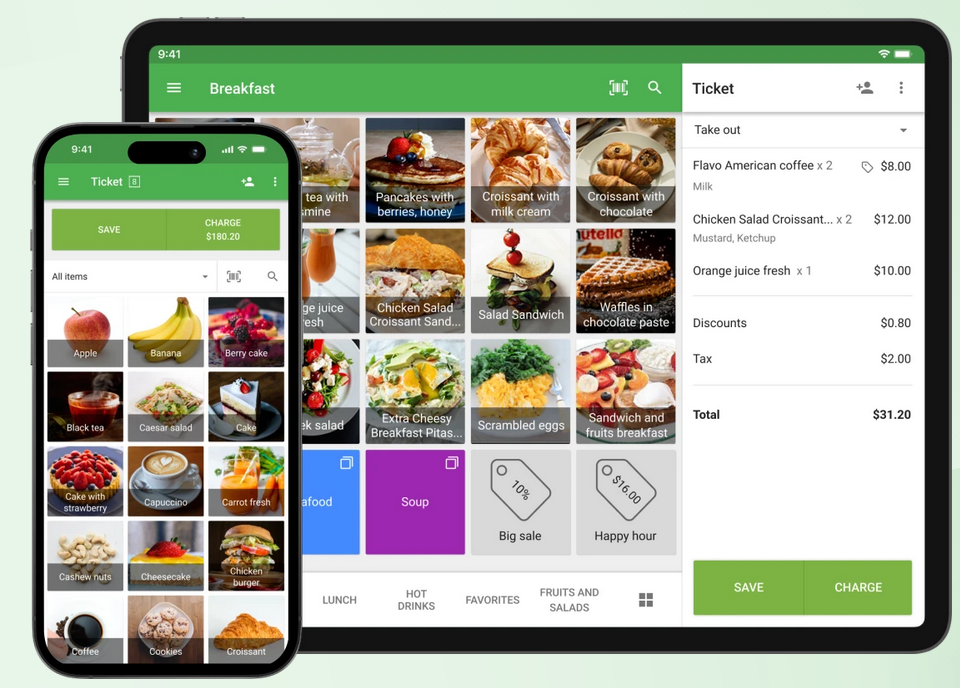
Loyverse’s POS app has lots of visuals to make it easy to use, plus compatibility with a variety of devices. (Source: Loyverse)
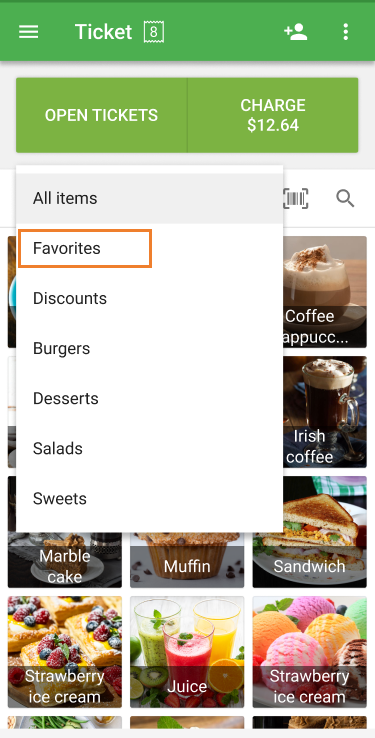
You can create a list of favorite items to quickly access popular items on the sale screen when using Loyverse POS on phones. (Source: Loyverse)
Toast: Best for full-service restaurants

Pros
- Industry-specific POS features for restaurants (kitchen routing, tipping, and table management)
- Durable, purpose-built devices for hospitality settings
- Offers starter kit for $0 upfront cost
Cons
- Starter POS software is only ideal for single-location restaurants
- Must use Toast’s built-in payment processor
- Standard 2-year long-term contract
Overview
Toast POS is a restaurant-specific point-of-sale system with proprietary hardware and software tailored to the food service industry. It offers flexible setups, including a free starter kit with handheld mobile hardware, and provides built-in tools for tableside ordering, tipping, kitchen workflows, and payment processing.
Who should use it:
- Full-service restaurants and cafes: Toast is purpose-built for food service businesses, with strong tools for table service, tipping, and kitchen display systems.
- Mobile catering or food trucks with high volume: Toast’s handheld POS terminal can operate independently, making it ideal for events, festivals, or fast-paced outdoor service.
- Restaurants wanting an all-in-one setup with no upfront hardware cost: Toast’s starter kit comes bundled with essential mobile hardware and basic software, perfect for new operators on a budget.
Why I like it:
Toast is the leading mobile POS system for restaurants, hands down. I like that its handheld terminal isn’t just a companion device; it can run independently with full POS functionality, so it’s great for food trucks, catering events, or any high-volume mobile setup. Compared to Square, which is more general-purpose, Toast’s restaurant tools go deeper — think tableside ordering, kitchen routing, and tip tracking.
What really stands out, though, is the $0 upfront starter kit. You get both software and hardware with no investment, which is rare for restaurant-grade POS systems. Just know that you’ll need to use Toast’s built-in payment processor and agree to a two-year contract, which makes it less flexible than competitors like Loyverse or Square.
But if you’re running a full-service restaurant and want a reliable mobile solution with pro-level tools, Toast is the strongest pick on the list.
Pricing
Software:
- Monthly fee: $0-$69
- Cancellation fee: $0 but remaining balance of monthly fees of the contract term should be settled
Hardware:
- From $0 to $627 + $69 per month for a handheld startup kit
- Setup and installation fee: From $0, optional, custom quoted
Payment processing rates:
- In-person transaction fee: From 2.49% + 15 cents to 2.99% + 15 cents
- Chargeback fee: $15
Standout features
- Toast Go 2 handheld terminal: A fully functional POS device with payment processing, tipping, and order routing — all in one compact mobile unit.
- Tableside ordering and payment: Speeds up service and improves customer experience in dine-in settings.
- Kitchen display system (KDS): Syncs orders with back-of-house for faster, more accurate prep.
- Restaurant-grade hardware: Built to withstand heat, spills, and the pace of a busy restaurant floor.
- Free starter kit plan: Includes hardware and software for basic mobile POS use with no upfront cost (contract required).
Related read: 10 New Toast Products & Features
Gallery
Watch our in-depth review of the Toast POS system:
Helcim: Best for growing businesses and B2B sales

Pros
- No monthly fees
- Transparent interchange-plus pricing
- All-in-one tools for B2B and services
Cons
- Limited offline functionality
- Hardware requires a separate purchase
- Limited customer support hours
https://fitsmallbusiness.com/helcim-review/
Overview
Helcim is a Canadian credit card processing and merchant services provider that offers a free, all-in-one POS system designed for small and growing businesses. It includes payment tools for both in-person and remote sales, plus integrations with ecommerce, invoicing, and accounting systems. It comes with no monthly fees and transparent interchange-plus pricing.
Who should use it:
- B2Bs, service-based businesses and consultants: Helcim includes invoicing, recurring billing, and a virtual terminal — ideal for managing client payments across multiple channels.
- Growing businesses: Helcim’s interchange-plus pricing beats flat-rate models over time, making it ideal for growing businesses and those processing high-volume sales.
- Businesses processing both remote (online) and in-person sales: Helcim’s POS, online checkout, and invoicing tools work together under one account.
Why I like it:
I like that Helcim doesn’t charge a monthly fee or offer flat-rate fees — it’s actually the only provider in this list that offers interchange pricing. That’s rare for a POS system, and it makes a big difference for high-volume sellers and B2B companies who want to save on transaction costs. This is why Helcim is also our top pick for cheapest credit card companies and B2B payment solutions.
Compared to Loyverse, Helcim does not have a native loyalty program, and you won’t find advanced inventory or ecommerce features like Shopify and Lightspeed. But for invoicing, subscription billing, and service-based payments, it’s one of the most cost-effective and flexible POS apps you can use.
If your business is more client-driven than checkout-driven, Helcim is a solid alternative to traditional POS systems.
Pricing
Software fees: $0
Payment processing fees:
- In-person transaction fees: Interchange plus 0.15% + 6 cents to 0.4% + 8 cents
- Online transaction fees: Interchange plus 0.15% + 15 cents to 0.50% + 25 cents
- QR codes: Interchange plus 0.15% + 15 cents to 0.50% + 25 cents
- Tap to pay (iPhone): Plus 10 cents fee per successful transaction
Hardware:
- Card reader: $99
- Smart Terminal: $329 (financing available; $32 per month for a year)
Standout Features
- No separate fee for mobile access: The mobile POS is included in Helcim’s free software suite, no add-ons or tier upgrades needed.
- Interchange-plus processing: Transparent pricing with no monthly software fees.
- Virtual terminal: Accept payments from your computer without extra hardware.
- Custom-branded checkout links: Send payment requests via email or SMS with your logo and company info.
- Integrated product and inventory management: Add, edit, and organize products from the mobile app, with syncing across desktop and device.
- In-app invoicing and payment links: Create and send invoices or checkout links straight from your mobile device for remote or on-the-spot payments.
- Customer profiles and saved cards: Look up customer history, store card info securely, and manage repeat billing directly from your mobile dashboard.
- Cloud-based syncing: All transactions, product updates, and customer activity sync in real time across devices (mobile, tablet, and desktop). Offline mode is possible, but syncing happens once online access is restored.
Gallery
Lightspeed Retail: Best for inventory management

Pros
- Extensive inventory processing functions (granular and custom reports, matrices, supplier network)
- Advanced and custom reports (in higher plans)
- In-house ecommerce store
Cons
- Hardware is custom-quoted; can be expensive
- Plans can be expensive for small businesses
- Must use Lightspeed Payments for lowest monthly rates
Overview
Lightspeed Retail is a cloud-based POS system built for complex inventory operations. It includes powerful stock management tools, detailed reporting, and a built-in supplier catalog, making it ideal for multi-location retailers, specialty shops, and wholesalers with large or fast-moving inventories.
Who should use it:
- Retailers with complex or multi-location inventory: Lightspeed’s advanced stock tools make it ideal for stores with multiple SKUs, supplier networks, or inventory that needs tracking across categories, bundles, or variants.
- Businesses that rely on data to make decisions: With built-in sales forecasting, custom reports, and detailed analytics, Lightspeed helps businesses run smarter at scale.
- Stores that want inventory and ecommerce in one system: Lightspeed Retail includes its own online store and syncs inventory across channels, no third-party plugins needed.
Why I like it:
If your business heavily depends on inventory accuracy, Lightspeed Retail is the most capable POS on this list. I like how it handles even the most granular stock setups — think bundles, serial numbers, purchase ordering, and vendor catalogs — without requiring additional software. In fact, it is our top pick for POS inventory management systems (you’ll find Square and Shopify on this list, too).
Compared to Square or Shopify, which are better suited for simpler setups, Lightspeed Retail gives you more control and reporting depth. Its built-in supplier network and ability to place orders right from the POS dashboard are features most systems just don’t have.
It’s not the cheapest option, and there’s a learning curve, especially for smaller retailers. But if you’re managing large inventories or growing across multiple stores, Lightspeed Retail gives you the precision and power to keep operations running smoothly.
Pricing
Software:
- Retail POS: $109-$339 per month (Annual pricing $89-$289 per month)
- 14-day free trial for all accounts
Hardware:
- Quote-based
- Full countertop kits, mobile payments devices, and accessories available
- Tap to Pay on iPhone/iPad via Lightspeed Mobile Tap: From $69
Standout Features
- Inventory: Lightspeed offers multiple item variants, sophisticated analytics, a supplier network, and smart pricing. It also syncs with its online store, Lightspeed eCom. Shopify comes close to Lightspeed for inventory features, but Lightspeed has more granular details and customization options.
- Age verification: Lightspeed has age verification features in the register app. This makes it a great choice for stores that sell age-restricted items.
- Payment processing: Every Lightspeed account holder is automatically enrolled in Lightspeed Payments for processing transactions through your POS. Lightspeed Payments offers competitive processing rates and is conveniently pre-integrated into your account. The biggest drawback here is that if you do want to use a third-party processor, your monthly POS fees will increase, unlike with Clover, which lets you choose your own processor for free.
- Lightspeed Insights: Lightspeed offers over 40 reports, including products sold, profits, total sales over a specific time frame, and employee performance. You can also create detailed custom reports. Lastly, you can ask the software to forecast future sales based on historical data and suggest order quantities based on this.
Gallery
PayPal Zettle: Best for occasional sales

Pros
- Free POS, affordable card reader; low rates
- International payment processing
- Ecommerce and accounting integrations
Cons
- No custom reports
- No offline mode
- Must use PayPal payment processing
Overview
PayPal Zettle is a free mobile POS system designed for small businesses that want to accept payments in person and online with minimal setup. It offers basic inventory and reporting tools, integrates with PayPal’s global payments network, and supports international sales, making it a solid entry-level option for occasional sellers or those operating across borders.
Who should use it:
- Low-volume or part-time sellers: If you only process a few in-person transactions each week or month, Zettle keeps costs low with no subscription fees.
- Businesses that already use PayPal for online sales: Zettle ties directly into your PayPal account, making it easy to manage funds and sync sales.
- International sellers: PayPal supports payments in over 100 currencies, and Zettle’s POS app is available in many markets outside the US.
Why I like it:
I like that Zettle gives sellers a no-fuss way to start accepting payments, especially if they already use PayPal online. You don’t need a separate merchant account or complicated setup — just order the card reader, download the app, and you’re ready to go.
Compared to Square, which has more robust free features and offline mode, Zettle is more basic. But where it stands out is global accessibility. If you’re selling across borders or traveling for business, Zettle’s international reach and PayPal integration are hard to beat.
That said, Zettle lacks the advanced tools that growing businesses may need, like offline processing, loyalty programs, or detailed inventory features. However, for casual sellers or side hustlers already in the PayPal ecosystem, it’s a simple and affordable way to go mobile.
Pricing
Software:
Hardware:
- Card reader: $79 ($29 for the first one)
- Terminal: From $199 (paid accessories available)
- Tap to Pay on iPhone: Free via the Zettle POS app
Payment Processing:
- Card-present: 2.29% + 9 cents
- Manually keyed-in: 3.49% + 9 cents
- Invoices: From 2.99% + 49 cents
Standout Features
- Free POS app: Available on iOS and Android, with product tracking, discount tools, and multi-user login.
- Low-cost card reader: Accept chip and tap payments for $29 (first reader); terminal available starting at $199.
- PayPal integration: Payments land directly in your PayPal account, and you can connect to PayPal’s online checkout, invoicing, and payout tools.
- Sales and tax reporting: Basic insights into transaction history, top-selling products, and taxable sales.
- Ecommerce and platform integrations: Connects with Shopify, BigCommerce, QuickBooks, and other platforms through PayPal.
Gallery
How to choose the best POS apps for your small business
Choosing the right POS app is more than comparing features and pricing; it’s about finding a solution that fits how and where your business operates. Whether you’re selling in-store, online, or on the go, a mobile POS app should support your sales flow, staff needs, and customer experience.
Here’s a step-by-step guide to help you choose the best POS app or mobile POS system for your business:
Step 1: Identify your business type and sales environment
Start by asking where and how you sell:
- Do you sell mostly in person, online, or both?
- Do you operate from a physical location, a mobile setup (like a food truck or craft fair), or a combination?
- Do you need specialized tools, like age verification, ingredient tracking, or appointment scheduling?
Some POS apps are better suited for niche needs. For example:
- Square is a top choice for mobile-first businesses and startups with low overhead.
- Shopify excels at syncing ecommerce with in-person sales.
- Lightspeed is ideal if you manage complex or high-volume inventories.
Choosing a POS built for your business type will save you time on setup and minimize friction down the line.
Step 2: Match features to your operational needs
Once you’ve identified your business model, focus on what tools you’ll actually use day-to-day. Look for:
- Checkout tools: Tap-to-pay, offline mode, split payments, tipping.
- Inventory management: Stock levels, modifiers, bulk imports, low-stock alerts.
- Customer relationship tools: Profiles, purchase history, loyalty programs.
- Sales reporting: Revenue by location, employee tracking, profit margins.
- Add-ons: Marketing, payroll, scheduling, or accounting integrations.
POS apps vary widely in what they offer for free versus what’s paywalled. If you need restaurant-specific features, for example, not every mobile POS will support that. Compare providers carefully to avoid surprise fees.
Step 3: Weigh mobility, hardware compatibility, and cost
If you’re planning to use a mobile POS app, confirm that the provider supports your preferred device (iOS, Android, or both). Some providers, like Clover, require proprietary hardware, while others let you use a tablet or phone with a compatible card reader.
Also factor in:
- Software pricing: Free plan or subscription?
- Payment processing fees: Flat-rate vs. variable rates, and what’s included.
- Hardware costs: Is a card reader included? Can you add more later?
- Scalability: Can you add registers, locations, or team members as you grow?
Finally, watch for hidden costs, like paid loyalty tools or support tiers, especially if you’re comparing “free” POS apps. Square, for example, offers one of the most complete free plans, while others require upgrades for features like staff management.
How I evaluated the best POS apps
I pulled from years of personal use, operating POS systems in retail settings, and studying and testing these systems. I also leveraged the decades of experience our team at Fit Small Business has working with retail and ecommerce software. Then, I combined this with feedback from long-term, real-world users who have posted reviews on trusted third-party sites.
The best mobile POS apps optimize the balance of hardware, software, and payment processors. I started by selecting only those with a mobile app. This ensures you can run the program on a smartphone or tablet. However, many, like Square or Clover, had their own hardware as well.
Then, I looked for software features that not only let you ring up sales but also track inventory and manage customers (such as Loyverse’s loyalty program). For payment processing, I selected a mix of those with proprietary merchant services and those that offer you a choice.
As often happens when evaluating POS software, Square tops the list. In addition to being the best POS system for small businesses, it’s also on lists for POS for restaurants, payment processing, and more. Square was built for mobile, and its POS application reflects that focus even as it has grown to encompass brick-and-mortar applications.
Below is my full evaluation criteria:
- Pricing (25%): Pricing involves more than subscription fees. There are also transaction fees, with some providers allowing you to shop providers and others locking you into a set payment processor. And finally, there are hardware costs.
- General features (20%): These are the basics any strong POS system should have: processing multiple payment types, managing customers, tracking inventory, integrating with third-party software, and having strong reports. We gave extra credit for loyalty programs.
- mPOS features (20%): To make it onto our list, products needed a handheld device that processed payments and synced with a web-based device. We also considered operating systems, offline mode, and digital receipts.
- Ease of use (15%): For this, we relied heavily on the reviews of real-world users who use the system daily. We considered the performance of mobile apps as well as the POS app. We also looked for 24/7 customer support since businesses may need help anytime.
- Expert score (20%): This is a value score based on our expert opinion, popularity, feature set, and how easily you can learn (or teach your employees) the device.
Frequently asked questions (FAQs)
Click through the sections below to learn more about POS apps.
What is a mobile POS system?
A mobile POS system (or mPOS) lets you accept payments and manage sales directly from a smartphone or tablet. It often includes features like inventory management, digital receipts, and offline payment processing—ideal for on-the-go businesses.
Can I use my phone as a point of sale?
Yes. Many POS providers make their systems available as apps for your mobile device. You can use these mobile POS apps to manage inventory, view reports, sell items, and perform other vital business functions.
What is the best free POS app?
The best overall free mobile POS app that we recommend is Square. It has a forever-free subscription option, high versatility, a good feature set even in the free plan, an offline mode, and it is easy to set up and use.
What’s the best mobile POS app for small businesses?
Square is our top choice for small businesses because of its free plan, strong feature set, and ease of use. It supports mobile payments, offline mode, and basic business tools without any monthly fees. But it will also greatly depend on your highest priority. If you have a complex inventory, try Lightspeed. Loyverse is great for loyalty programs. Clover is highly flexible, Shopify shines in omnichannel selling, and PayPal Zettle is great for selling internationally.
What is the difference between a POS app and a full POS system?
A POS app is the software that runs on mobile devices, while a full POS system includes hardware like terminals, card readers, and receipt printers, plus software features for managing your business.
Can a POS app work without the Internet?
Yes, some point-of-sale apps like Square and Clover offer offline mode, allowing you to accept payments and store transaction data even when you’re not connected to Wi-Fi or cellular data.
Bottom line
The best mobile POS apps let you run your business from anywhere, whether you’re checking out customers tableside, managing sales at a market stall, or ringing up purchases on your retail floor. With the right POS app, you’re not tied to a bulky register or counter. You get the flexibility to sell on the go, track inventory, manage customers, and sync everything with your main system in real time.
After testing over a dozen options, Square stands out as the best mobile POS system overall. It offers the most complete feature set in a free plan, competitive flat-rate payment processing, and tools that scale as your business grows. Whether you’re just getting started or expanding into multiple sales channels, Square makes it easy to hit the ground running, no extra hardware or upfront cost required.
Go to Square and download the POS today.