Gusto and BambooHR provide HR payroll solutions to help small to midsize businesses (SMBs) handle employee management processes. These two systems may have similar functionalities, but Gusto’s core platform is ideal for payroll while BambooHR’s software is great for managing various HR processes. Gusto also processes global worker payments, whereas BambooHR only offers US payroll services.
To help you gauge whether Gusto vs BambooHR is right for your business, here are our recommendations.
- Gusto: Best for full-service payroll and handling essential HR functions
- BambooHR: Best for managing employee information, onboarding, and training
These two systems appear in several of our buyer’s guides for small businesses given the solid suite of HR tools that each offers. Gusto ranks high in our best payroll software for small business users and best payroll services guides, while BambooHR is on our lists of top HR information systems (HRISes) for small business owners and best HR solutions.
I applied my over five years of experience evaluating payroll and HR software with my 10 years of experience in human resources to these recommendations. To evaluate Gusto vs BambooHR, I compared the two solutions across 35 data points for pricing, ease of use, and features. See my full methodology below.
- Strict, unbiased editorial policy
- Evaluated across 35 data points

Payroll & HR Software Expert at Fit Small Business
Gusto vs BambooHR: Quick Comparison
When to Use Gusto and BambooHR
Consider using Gusto if:
- You’re an SMB needing a reasonably-priced payroll service: Gusto can help you pay employees across 50 US states, manage payroll tax filings, offer benefits plans, handle garnishments, and more—all for a starter monthly fee of $49 per month + $6 per person per month.
- You only require contractor payroll: With its contractor-only payroll plan, Gusto will handle new hire state reporting, pay workers via four-day direct deposits, and prepare 1099 year-end tax reports for you.
- You need international hiring and payroll services: Gusto can process international contractor payments in more than 120 countries. And, with Gusto Global, it can help you recruit and pay global employees in Australia, Brazil, Canada, India, Ireland, Mexico, the Philippines, the United Kingdom, and Spain (as of this writing).
- You want one platform to handle payroll and basic HR processes: Gusto lets you pay employees, manage employee profiles, offer benefits, and onboard new hires. If you upgrade to its higher tiers, it can help you post jobs, track applicants, capture employee attendance, monitor performance reviews, and run employee surveys.
Check out the box below to learn more about the advantages and drawbacks of using Gusto’s payroll solutions and services.

Pros
- Reasonably priced plans with a contractor-only payroll option
- Unlimited and automatic pay runs
- Has hiring, time tracking, and performance review tools
- Supports international contractor payments in more than 120 countries; with EOR services in nine countries
Cons
- Lacks in-house training tracking tools (only available via third-party software integrations)
- HR tools and HR advisory services are only available in higher tiers
Consider using BambooHR if:
- You’re an SMB wanting an easy-to-use HR software: BambooHR’s platform is designed to manage employee HR processes—from hiring to retiring. Most of its solutions are customizable, allowing you to create custom onboarding packets, workflows, reports, and more.
- You’re looking for a flexible HR system: While BambooHR’s starter plan has all the tools you need to manage staff data and time-off transactions, you can also purchase its HR modules to enhance the capabilities of its core platform. This allows you to get only the HR features that your business needs (such as time tracking, payroll, and benefits administration).
- You are an HR manager who’s always on the go: BambooHR’s mobile app, which is one of our recommended HR apps for small businesses, lets you access nearly all of its HR software features—from monitoring payroll and approving requests to editing time sheets and tracking applicants.
To know more about BambooHR’s pros and cons, check out the box below.

Pros
- User-friendly interface
- Centralized employee database
- Strong reporting and analytics
- Has a wide array of software integration partners with open application programming interfaces (APIs)
Cons
- Pricing isn’t transparent
- Time tracking, payroll, and benefits administration are paid add-ons
- Doesn’t have global payroll services and a separate contractor payroll plan
Top Alternatives
There may be times when neither BambooHR nor Gusto’s HR and payroll functionalities fit your requirements. We recommend the following options:
Best for Value: Gusto
Comparing BambooHR vs Gusto in terms of value for money is a bit difficult since the starter plans of both providers contain different solutions and depend on the HR functionalities that you want. Plus, BambooHR and Gusto have different pricing matrices that may make one a more reasonably priced option than the other, especially if you have a very small team and don’t need a payroll module.
However, if you’re looking for pricing transparency, Gusto wins because most of its fees are posted on its website (BambooHR requires you to call its sales team for a quote). It also offers the best value for money especially if you require a pay processing solution, as this feature is included in all Gusto plans (whereas, BambooHR charges extra for it).
Upgrading to its higher tiers will grant you access to time tracking and performance review solutions (both are paid add-ons with BambooHR). And, if you only need to pay contract workers, Gusto has a reasonably-priced contractor-only payroll plan (BambooHR doesn’t have a standalone plan—contractor payments are included in the payroll package).
Pricing Comparison: Gusto vs BambooHR
Let’s do a quick computation by comparing Gusto’s Plus plan with BambooHR’s Core tier for 25 employees (pricing based on the quote we received). I opted to use Gusto’s Plus plan because its features are similar to BambooHR’s Core package—both have hiring and time off tracking tools. However, you still need to pay extra for BambooHR’s payroll and time tracking modules, features that Gusto offers in its Plus plan.
For a company with 25 employees, you have to pay:
- Gusto: $380 monthly
- Computed as $80 base fee + ($12 per-employee fee × 25 workers) = $380 monthly
- BambooHR: $515 monthly
- Computed as $250 pricing for 25 workers + $190 payroll pricing for 25 workers + ($3 per-employee time tracking fee × 25 workers) = $515 monthly
Note that BambooHR charges a flat monthly fee if you have 25 or fewer employees. Businesses with more than 25 workers are billed per-employee fees each month. Meanwhile, Gusto doesn’t have multiple pricing matrices. Regardless of the size of your workforce, its monthly fees include a base software rate and per-employee costs.
Best for Payroll: Gusto
In comparing Gusto and BambooHR for payroll, Gusto wins with its payroll features that can even handle global contractor payments in more than 120 countries and international employee payments in nine countries with Gusto Global. Plus, you don’t have to pay extra for its payroll module as you would with BambooHR.
You get full-service payroll along with basic tools for managing employee profiles, benefits plans, and time-off requests. Gusto will handle payroll tax reporting and wage garnishment payments (except in South Carolina) for you. Employees can even submit reimbursement requests for business-related expenses and Gusto will include the approved transactions in its pay runs.
It supports unlimited payroll, allowing you to process worker payments as many times as you need in a month. If you don’t expect changes in your pay runs for salaried employees and hourly-paid staff with fixed working hours, you can set up Gusto to automatically run payroll for each pay period.
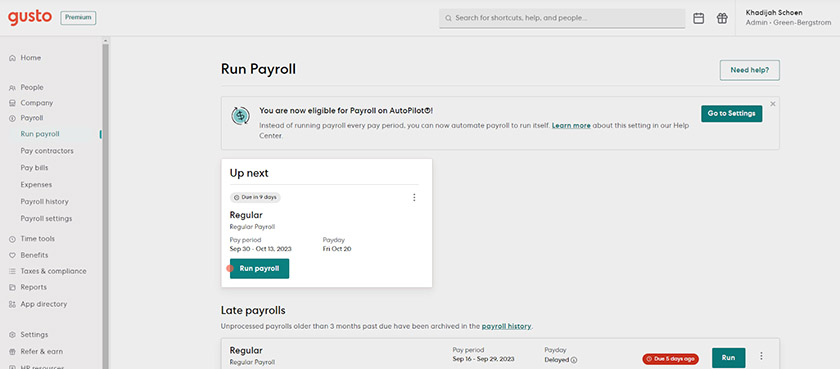
You can turn on/off Gusto’s automatic pay runs from its payroll settings. (Source: Gusto)
When to Use BambooHR for Payroll
BambooHR is the optimal choice for payroll if you’re already using its platform to store staff data and don’t want to manage separate systems to pay employees. Similar to Gusto, its payroll and HR modules connect seamlessly with each other. This means you don’t need to manually input your workers’ pay- and attendance-related information into its payroll solution because it will automatically get the required details from its centralized database and other HR tools (like time tracking and benefits).
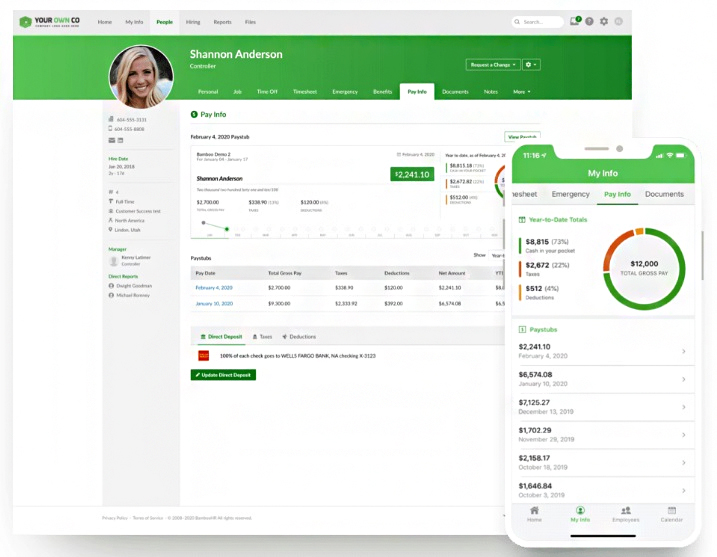
BambooHR allows you to track payroll both on desktop computers and mobile devices. (Source: BambooHR)
Best for HR Features: Tie
Gusto and BambooHR may have similar functionalities, but there are instances when either BambooHR or Gusto is better for managing HR processes. Here are recommendations:
When to Consider BambooHR
Compared to Gusto, BambooHR has a slightly wider suite of HR solutions. While you have to pay extra for time tracking and benefit administration, the HR functionalities included in its Core and Pro plans are sufficient for hiring, onboarding, and managing employees. You can even use its platform to monitor your workers’ training progress—a feature that Gusto offers through its third-party software integrations.
BambooHR also has a more advanced candidate management solution than Gusto, allowing you to filter keywords from candidate resumes and set up automatic email sends if applicants are moved to specific hiring stages—which saves you time from manually doing it yourself. You can even maintain talent pools of previous applicants for future searches.
I appreciate its online application questions that remove candidates who don’t meet hiring requirements, such as having a specific degree or certification. BambooHR automatically disqualifies them based on their responses and the parameters you set. Gusto may have a similar feature that allows you to add application questions, but it doesn’t disqualify candidates.
Best of all, it offers a hiring mobile app, which enables you to manage recruiting processes while on the go. Gusto doesn’t have a mobile app—what it offers is a Gusto Wallet app for managing, saving, and accessing your funds (including payroll).
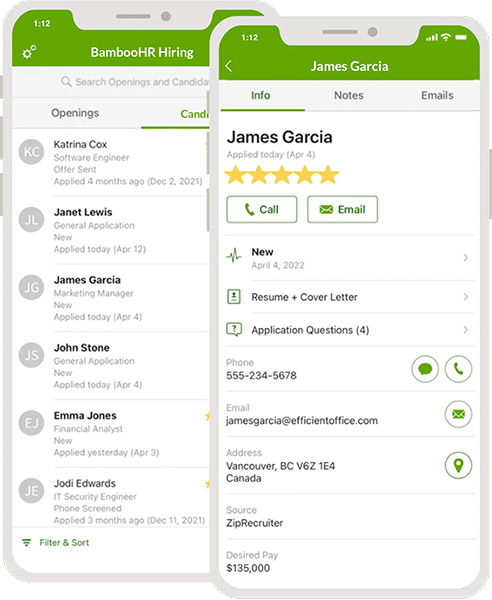
The BambooHR hiring app allows you to post jobs, review candidate profiles, provide feedback, and more. (Source: BambooHR)
When to Consider Gusto
Gusto is a great option if you want access to a wide variety of employee benefits, such as health, retirement, dental, vision, health savings account (HSA), flexible savings account (FSA), workers’ compensation, and commuter benefits. It even provides financial management tools via its Gusto Wallet app. However, its health insurance is unavailable in Alabama, Alaska, Hawaii, Louisiana, Mississippi, Montana, Nebraska, North Dakota, Rhode Island, South Dakota, West Virginia, and Wyoming (as of this writing).
While it only offers the essential tools to help you track applicants and post jobs, Gusto’s onboarding and offboarding solutions include software provisioning and deprovisioning capabilities. This allows you to set up, manage, and remove your employees’ business software and email account access.
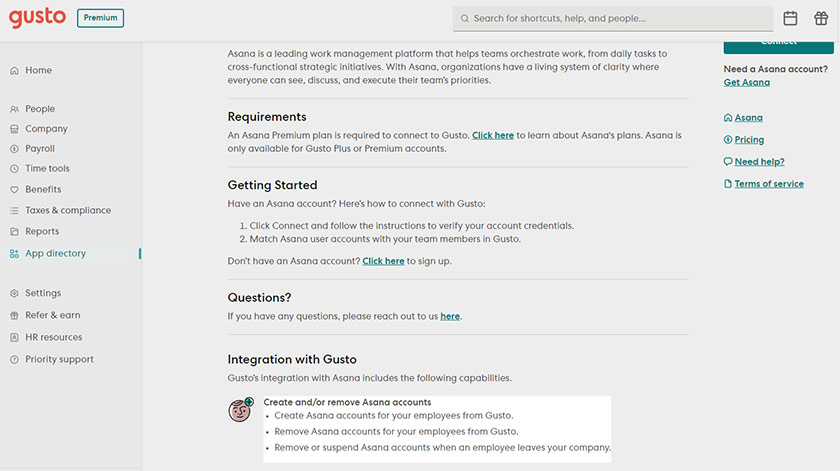
Connecting Gusto with its partner apps allows you to create software accounts directly through its platform. (Source: Gusto)
Best for Reporting: Tie
Both software provide basic reports, such as payroll registers, tax documents, and employee data summaries. Customization options are available, enabling you to filter and select data fields. BambooHR and Gusto also let you download reports into CSV file formats.
However, BambooHR will require you to purchase its time tracking, payroll, and benefits administration modules if you want to access employee attendance, payroll and tax reports, and benefits-related documents. With Gusto, you can generate payroll and benefits reports even if you only sign up for its starter tier.
Best for Ease of Use & Customer Support: Gusto
In the battle between Gusto vs BambooHR for overall ease of use and customer support, Gusto wins in this category. While both have online platforms that are relatively easy to learn and use, Gusto’s HR advisory services and access to a dedicated customer success manager make it a better partner for business owners—they can rely on Gusto to provide them with the HR and software support they need.
While Gusto and BambooHR both offer chat, email, and phone support in all plans, Gusto provides a priority support service for its Premium plan holders. It also allows those on the Simple and Plus tiers to get the expedited support option as a paid add-on if they want to. This is unlike BambooHR, which offers the same level of support across its two plans.
However, if you prefer to learn how to navigate through a software’s features on your own, consider BambooHR. It has a robust selection of online guides, such as FAQs and help articles, video tutorials, and self-paced guided courses about HR topics and its platform’s different functionalities.
Best for Popularity Among Users: BambooHR
To assess BambooHR vs Gusto for user popularity, we looked at each provider’s average number of user reviews and average overall ratings on popular third-party review sites. While both have nearly the same average rating, many reviewers reported having experienced a more consistent quality of service with BambooHR’s support team.
User Reviews
Methodology: How We Evaluated Gusto vs BambooHR
To evaluate the differences between BambooHR and Gusto, I compared the HR and payroll features of both providers, including the global payment options that they offer. I also checked both platforms’ popularity among users, ease of use, third-party software integrations, and customer support options. Lastly, I considered pricing transparency and monthly costs.
Click through the tabs below for a more detailed breakdown of the evaluation criteria:
35% of Overall Score
I looked for HR services and functions like online onboarding, state new hire reporting, self-service portals, and a staff of expert advisors. I also gave additional points to software providers offering health insurance available in all 50 states and advanced HR solutions like hiring, compensation, learning, and performance management.
20% of Overall Score
I gave the most credit to solutions that process direct deposits in two days or fewer, have multiple payment options, handle year-end tax reporting, manage tax payments and filings―federal, state, and local taxes―and offer a penalty-free guarantee.
20% of Overall Score
I looked for features that make the software easy to use, such as having an interface that’s intuitive and customizable. Extra points were given to providers that offer integration options, set-up assistance, live phone support, and a dedicated representative.
15% of Overall Score
I checked to see if the provider has transparent pricing, zero setup fees, and multiple plan options with unlimited pay runs. I also gave additional points to those with plans that cost $50 per employee.
5% of Overall Score
Preference was given to software with built-in basic payroll reports and customization options.
5% of Overall Score
I considered online user reviews, including those of our competitors like G2 and Capterra, based on a 5-star scale, wherein any option with an average of 4-plus stars is ideal. Also, software with 1,000 or more reviews on third-party sites is preferred.
*Percentages of overall score
Bottom Line
Gusto and BambooHR may have similar features but the core capabilities of their platforms differ from each other. Gusto is great for full-service payroll while BambooHR is optimal for managing employee data and basic HR processes.
To identify whether Gusto vs BambooHR is best for your organization, take a look at your budget and the HR functionalities that your business needs. Don’t forget to factor in your workforce expansion plans, especially if you think you’ll need more advanced HR features (like performance reviews) to manage employees. Your selected HR software should have the specific tools to help you handle those processes with ease.