There are two main types of cash registers: electronic cash registers (ECRs) and point-of-sale (POS) systems. ECRs provide the most basic functions—tallying sales, completing customer payments, printing receipts, and storing cash. However, the global market for traditional cash registers has declined, and many major ECR providers have stopped manufacturing cash registers. Most modern businesses get their cash register hardware from a POS software provider. This evaluation of the best cash register for small businesses includes both register types.
The best POS cash registers are:
- Square: Best touch-screen cash register for small businesses
- Toast: Best free cash register for restaurants
- Clover: Best for hardware and software flexibility
- Lightspeed: Best for high-volume and multi-location retailers
Electronic cash registers (ECRs)
- SAM4S ER-180U: Best portable cash register for mobile and low-volume sales
- SAM4S SAP-630R: Best electronic register for grocery and convenience stores
- SAM4S ER-925: Best electronic register for low- to mid-volume retailers
In this guide, I’ll walk you through each of these systems, explain how POS-driven registers compare with traditional ECRs, and share my advice on choosing the right option for your business needs.
Cash registers for small businesses compared
Looking for more options? Check out our rankings of the best point-of-sale solutions for retailers and small businesses overall.
Why you can trust Fit Small Business
I’ve spent over a decade working with small businesses and three years evaluating POS systems. I’ve also built and managed my own ecommerce sites, so I understand firsthand what small business owners need from their cash registers and POS systems. For this guide, I reviewed more than 20 options and scored them across 29 data points, including pricing, features, and ease of use.

Retail Software Expert at Fit Small Business
Square: Best touch-screen cash register for small businesses

Pros
- Free, user-friendly, cloud-based software
- Affordable hardware with monthly financing options
- Built-in payment processing
Cons
- Must purchase cash drawer separately
- Locked into Square Payments processing; cannot shop for lower rates
- Full hardware kits can get expensive
Overview
Who should use it:
Small businesses of any type (retail, restaurant, or service-based) that want a complete suite of sales, payment, inventory, and business management tools for free—with affordable upgrade options.
Why I like it:
Square is the POS register I recommend most often because it’s affordable, easy to set up, and works for just about any small business. In fact, Square is my top choice for small business POS systems.
Square is a cloud-based system with low-cost hardware options, and it combines payment processing, POS software, and a cash register in one package. I like that you can run it from a smartphone or tablet if you’re on the go, or use handheld devices and countertop registers if you’re running a physical storefront.
The tradeoff is that Square locks you into its own payment processing. You can’t shop around for merchant account rates, but the flat-rate fees are simple and transparent. Square also doesn’t charge startup or monthly fees for its baseline plan, which is rare. If you want the freedom to bring your own processor, an ECR might suit you better. And if you’re specifically looking for an iPad-based system with more payment integrations, Lightspeed is worth checking out.
Monthly software fees:
- Square Free ($0 per month per location)
- Square Plus ($49 per month per location)
- Square Premium ($149 per month per location)
- Square Pro (custom pricing for those that process over $250,000 per year)
Hardware:
Payment processing fees:
- In-person: 2.6% + 15 cents
- Online: 2.9% + 30 cents
- Keyed-in: 3.5% + 15 cents
- Custom rates available for businesses processing over $250,000 annually
- Touch-screen cash register
- Versatile and easily expandable hardware
- Built-in credit card processing
- Track unlimited items and variations
- Track unlimited employees
- Specialized options for retail and restaurant businesses
- Easy and affordable to add gift cards, online ordering, employee timekeeping, marketing, loyalty, and more
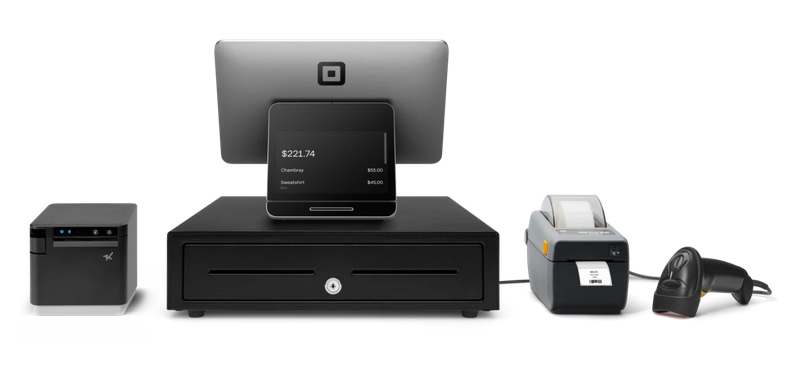
Square’s hardware includes everything from mobile card readers to handheld POS devices and countertop cash register kits with accessories. (Source: Square)
Toast: Best free cash register for restaurants

Pros
- Mobile POS and self-service kiosk hardware
- Ingredient-level inventory tracking
- Loads of hardware peripherals for kitchen displays, digital menus, self-service kiosks, drive-thrus, and handheld terminals
Cons
- Locked into Toast Payments processing
- Printers and cash drawers are not built in; you must purchase them separately
- Requires a two-year contract
Overview
Who should use it:
Restaurants of all types and sizes will do well with Toast; in fact, it is our top-recommended restaurant POS system.
Why we like it:
Two things set Toast apart from the others on this list: It is designed specifically for restaurants, and it operates on Toast-designed POS hardware for terminals, self-service kiosks, kitchen displays, and handheld order and payment devices. It also offers a no-upfront-cost hardware option. You’ll pay higher payment processing fees if you opt for Pay-as-You-Go hardware; but if you are a new, small, independent restaurant, you’d be paying higher processing fees no matter what system you use.
Toast has a couple of downsides, though. It is the only system on this list that requires a lengthy contract (two years). Like Square, Toast also locks you into its built-in payment processor, Toast Payments. Though, Toast has a history of matching or beating competitors’ processing rates; contact the provider directly to see what rates you can negotiate. If you need something more short-term, consider Square.
Monthly software fees:
- Restaurant:
- Starter Kit (for up to 2 POS stations in one restaurant location): From $0
- Point of Sale: From $69 per month
- Build Your Own: Custom pricing
Retail:
- Point of Sale: $90 per month
- Build Your Own: Custom pricing
Hardware:
Countertop Starter Kit
- Pay upfront: From $1,024.10 + $69 per month (2.49% + 15 cents processing fee)
- Pay-as-You-Go: $0 per month (3.09% + 15 cents processing fee)
- Touch-screen operation
- Restaurant-supporting order screens
- Manages complex modifiers
- $0 upfront option for register hardware
- Built-in credit card processing
- Google online ordering integration
- Track unlimited items with modifiers
- Unlimited employee log-ins
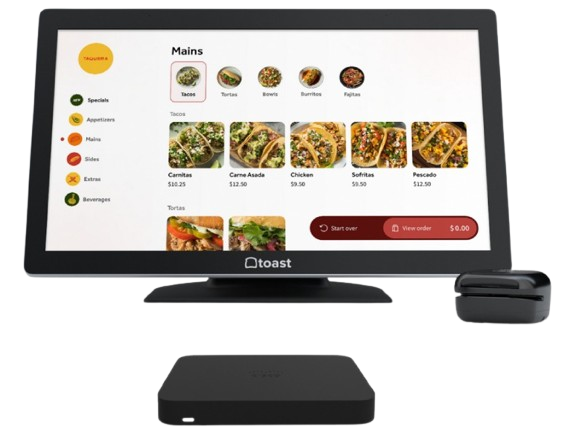
Toast’s hardware options range from handheld devices to guest self-service kits. You can opt for the Pay-as-You-Go option to pay no fixed monthly fees. (Source: Toast)
Clover: Best for hardware and software flexibility

Pros
- Lots of proprietary hardware options
- Flexible payment processing
- Offline card payments
Cons
- No vendor management tools
- Must use Clover hardware
- Hardware tied to the merchant account
Overview
Who should use it:
Retailers, small or large restaurants, and service businesses that want a variety of hardware and payment processing options.
Why we like it:
Clover is a flexible and feature-rich POS system that is suitable for retail shops, restaurants of any size, and service or appointment-based businesses. It is similar to Square in this way, except that Clover is also flexible with payment processing; its default payment processor is Fiserv but also allows you to choose a different one if you prefer. Clover also bundles its software offerings with its hardware subscriptions.
Clover does have a few downsides. Unlike Square, there is no long-term free plan, and you’ll need to upgrade for features like returns and exchanges, advanced reports, and item-level inventory management. Clover also has no built-in vendor management tools.
Clover’s pricing can get tricky because it depends on where you buy it. You can go directly through Clover’s website, but it’s also sold through a wide network of banks and merchant service providers in the Fiserv network. That means pricing often varies by reseller, which can make it harder to compare.
If you buy directly from Clover, here’s what you can expect:
- Monthly software fees: Start at $0; retail plans begin at $16 if bundled with hardware
- In-person processing fees: 2.3%-2.6% + 10 cents per transaction
- Online processing fee: 3.5% + 10 cents per transaction
Hardware:
As of this writing, here are the prices of hardware from Clover’s website:
- Clover Compact (handheld terminal): $349 or $16 per month
- Mini (small countertop POS): $849 or $45 per month
- Station Solo (all-in-one countertop POS): $1,799 or $174 per month
- Station Duo (dual-screen countertop POS): $1,899 or $180/month
- Choice of payment processor
- Proprietary mobile and countertop hardware
- POS systems for retail, restaurants, and service businesses
- Virtual terminal with invoicing
- Free customer-facing loyalty app
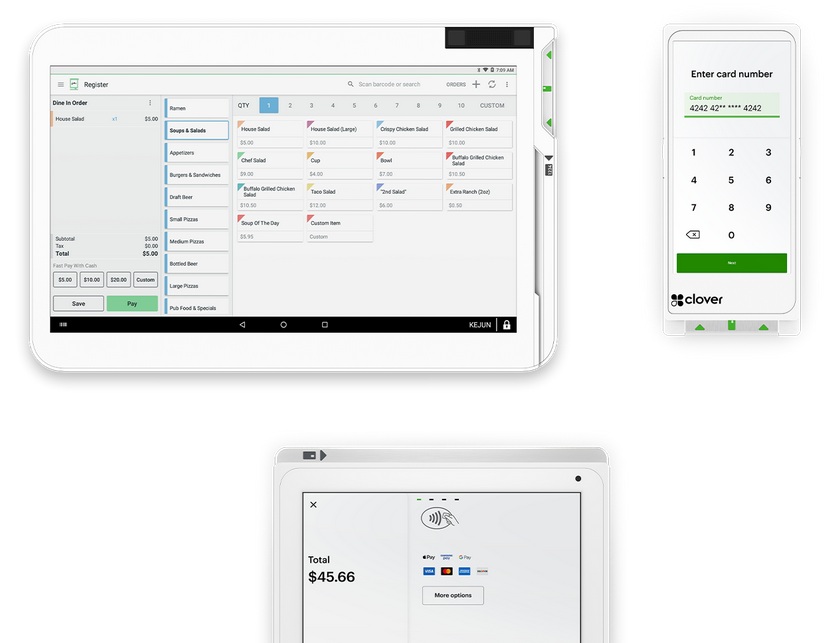
Clover offers a multitude of hardware choices of different types and sizes, bundled with its software subscriptions. (Source: Clover)
Lightspeed: Best register for high-volume and multi-location retailers

Pros
- Robust features with advanced inventory and reporting tools
- Connect multiple registers and locations
- Cloud-based system with real-time data sync
Cons
- Hardware pricing is not transparent
- Monthly software fees can get pricey
Overview
Who should use it:
Multi-location businesses needing networked or cloud-based systems; businesses that need intensive inventory management and purchase ordering tools.
Why we like it:
Lightspeed, like Square, is a POS-driven cash register with a comprehensive set of store management tools. Users can track inventory in real time and manage purchasing, staff, and business tasks across multiple locations. Like Square, Lightspeed also connects in-store and online sales. As a POS-based register system, Lightspeed lets you set up several registers in one or many locations and connect all data within one centralized, cloud-based software system.
If you like Lightspeed’s touch-screen register but hate monthly fees, check out Square (which offers free register software). Restaurants should check out Toast’s Pay-as-You-Go plan. If you want to go electronic, the SAM4S SAP-630R is your best bet.
Monthly software fees:
- Lightspeed Retail
- Basic: $109 per month (annual pricing: $89 per month)
- Core: $179 per month (annual pricing: $149 per month)
- Plus: $339 per month (annual pricing: $289 per month)
- Lightspeed Restaurant
- Essential: $189
- Premium: $399
Hardware: Call for a quote
Processing fees (if Lightspeed Payments):
- Card present: 2.6% + 10 cents
- Keyed-in: 2.9% + 30 cents
- Multiple options for payment processing
- Operates on iPads or desktop computers
- Specialized software for retailers and restaurants
- Top-of-the-line inventory tracking and reporting
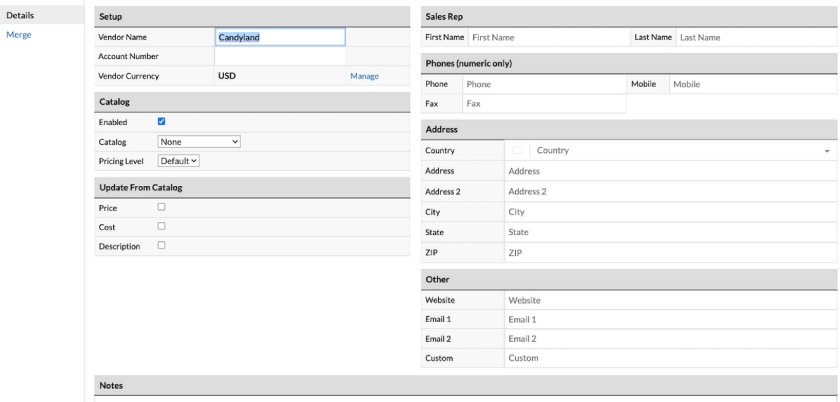
Lightspeed’s POS includes built-in purchase ordering tools. (Source: Lightspeed)
SAM4S ER-180U: Best portable cash register for mobile businesses

Pros
- Lightweight, portable register; great for pop-up retailers
- Built-in receipt printer and digital price display support streamline sales functions
- Basic tools are uncomplicated for small retailers
Cons
- Does not support an integrated card reader
- Only supports 10 employee logins and 500 product listings
Overview
Who should use it
I recommend the SAM4S ER-180U for very small operations with just a few staff. It only supports up to 10 cashier profiles, but at just 12 pounds, it’s lightweight and portable. It’s perfect for crafters, hobbyists, and retailers who sell at fairs or pop-up events.
Since it doesn’t have ports for an integrated card reader, this model is best for businesses that operate mostly in cash.
Why I like it
The ER-180U is SAM4S’s entry-level economy register. With brands like Casio and Sanyo no longer producing cash registers, SAM4S has become a reliable global leader. That matters because you can still count on replacement parts and customer support, unlike older used registers from discontinued brands.
That said, the ER-180U is basic. If you need real-time inventory tracking, I’d recommend a POS-driven register like Square or Lightspeed instead. For restaurants that need ingredient-level tracking, Toast is the stronger choice. If you’re willing to spend a little more, both Toast and Lightspeed also offer more advanced inventory modules.
The Sam4S 180U can be purchased from multiple retailers for between $164 and about $350. This is a one-time payment with no ongoing monthly fees, making this system one of the cheapest register options on the market.
You will need to secure a separate credit card processor to accept card payments. You’ll also need to purchase a separate card reader to run card payments, as the 180U does not have a built-in card reader. This allows you the flexibility to choose whatever merchant services provider you like, but using a non-integrated card reader can increase your transaction times.
- 10 employee logins
- 500 supported price look-up (PLU) codes
- Four programmable tax rates
- Customizable receipts
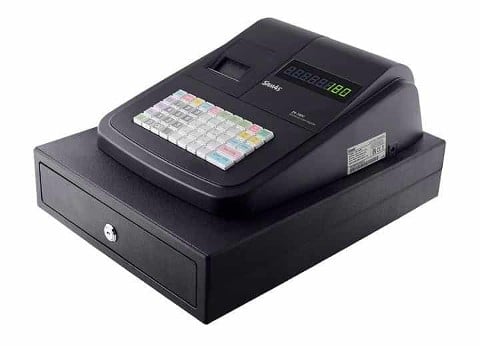
The 180u is a compact register with programmable raised buttons, a digital display, simple reporting tools, and a built-in printer with customizable receipts. (Source: SAM4S)
SAM4S SAP-630R: Best electronic register for grocery and convenience stores
Pros
- Built-in touch-screen speeds checkout process
- Tracks 100,000 PLUs
- Connects to cloud-based SAM4POS for remote reporting on mobile app
Cons
- SAM4POS app costs extra
- Cannot track inventory expiration dates
- Expensive
Overview
Who should use it
I recommend the SAM4S SAP-630R for grocery stores and convenience shops that need to manage large inventories. It can handle up to 100,000 items, and with the SAM4POS app, you can even connect a handheld Android tablet for floor sales or inventory checks. It also comes in a hospitality version (SAP-630F), which works well for food-service businesses.
Why I like it
The SAP-630R is essentially a hybrid between a traditional register and a POS system. It combines a 9.7-inch Android touchscreen with a keypad, cash drawer, and receipt printer, so you get the feel of a register with the flexibility of POS software.
This is the most expensive register on my list, and you have to buy it through an authorized SAM4S dealer. The upside is that the purchase includes six months of technical support and setup assistance. For basic sales and inventory tracking, you’ll only pay the upfront cost — but if you want extras like loyalty or rewards, those features require monthly fees.
The SAP-630R is a good fit if you want a true ECR/POS hybrid and don’t mind dealer configuration. If you’d prefer something easier to install with built-in processing, I’d suggest going with Square or Lightspeed instead.
Prices vary by vendor and configuration but typically range from $1,499 to over $5,000. This is a one-time price. There are no monthly software fees unless you choose to enroll in the cloud reporting app. Additional features like loyalty or rewards cost around $250, according to third-party review sites.
The SAP-630 register does have an integrated card reader on the side, though you can opt to attach a peripheral reader as well for credit card processing. This option gives you the benefit of shopping for the lowest available processing rates, but this also increases your setup and transaction times.
- Touch-screen and keypad operation
- EBT processing
- Tobacco rebate and loyalty integration
- Tracks 100,000 UPC numbers
- Additional ports to connect: barcode scanner, scale, external card reader, external pole display, and Dallas key port
- Wi-Fi connectivity available for tablets, printers, and scales
- Cloud accessible reports
- Scheduled report emails to keep tabs on operations
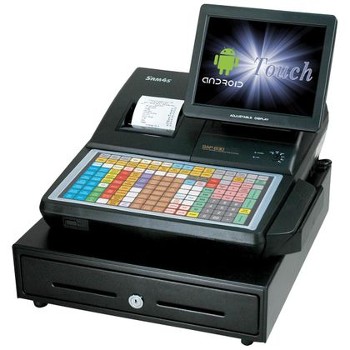
The SAM4S SAP-630F is the hospitality/food-service version of the same cash register. The SAP-630 includes a built-in three-inch thermal receipt printer and a digital customer-facing display. (Source: SAM4S)
SAM4S ER-925: Best ECR for low- to mid-volume retailers
Pros
- Integrated cash drawer and receipt printer
- Can choose between integrated or external card reader
- Does not need internet access to operate
- Several options for customizable peripherals including additional printers
Cons
- No customer data entry
- Need to find a payment processor
- Upfront cost can be high, depending on your chosen peripherals
Overview
Who should use it:
The SAM4S ER-925 is a sturdy electronic cash register built for retail businesses. It is popular with gift shops, ceramics studios, candy shops, and other mid-volume retailers.
Why we like it:
Price-wise, the SAM4S ER-925 is a big step up from the much more affordable 180U, but it offers a lot more features, including customizable peripheral hardware.
You can attach a barcode scanner, scale, and external pole display. Also, you can choose from an integrated card reader or an external reader. To speed service up, you can add an optional Dallas Key reader, allowing cashiers to quickly log into the register by attaching a magnetic fob.
However, if you want to automatically collect customer emails for your marketing efforts, the ER-925 is not a great fit. Both Lightspeed and Square offer much more robust customer management tools (and Square’s are priced based on your actual use). Both also offer built-in payment processing, which speeds up your setup process.
From $499-$679 (price varies by vendor and add-ons). For payment processing, you will need to get a separate merchant services account. Rates will vary.
- Up to 15 employee logins
- Tracks up to 2,000 PLUs
- 100 mix-and-match discount options
- 6-line pre- and post-receipt messages
- Additional ports to connect: barcode scanner, scale, external card reader, external pole display, and Dallas Key port
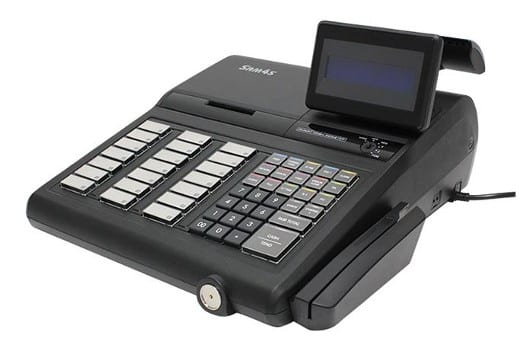
The SAM4S ER-925 comes with a built-in cash drawer and receipt printer, plus add-on option for an integrated card reader. The optional Dallas key port lets associates log into the register using a magnetic key fob. (Source: Amazon)
Cash registers vs POS systems: Which do you need?
- Choose an ECR if you are cash-only, want a one-time purchase, and operate with minimal staff or sales volume.
- Choose a POS system if you process card payments, want mobile checkout options, or need tools to manage staff, inventory, and multiple locations.
Traditional ECRs are simple machines that total sales, print receipts, and store cash. They are inexpensive and best suited for cash-only businesses with low sales volume. However, they lack modern features, and ongoing support is limited.
POS systems, by contrast, combine payment processing with advanced features such as inventory tracking, employee management, and real-time reporting. They can run on iPads, smartphones, or dedicated hardware, giving small businesses more flexibility and scalability.
Most modern businesses benefit from POS-driven registers, since they offer more features and are easier to maintain long-term. Learn more about the differences between POS systems vs cash registers.
Related:
Features to look for in a cash register
If you’re planning to grow beyond a very small operation, a POS system will almost always be a better investment than a traditional electronic cash register (ECR). Even the most basic or free POS plans include tools you’d only get in higher-end ECRs. Here are the features I always recommend looking for:
- Inventory management: Every business needs to keep track of stock, and it gets even more important if you’re running multiple locations or selling online. Most cloud-based POS systems update inventory in real time, so you always know what’s available. A few ECRs can do this at a very basic level, but for serious inventory tracking, a POS is the clear winner.
- Tax calculations and reporting: Aside from ringing up sales, you also need to calculate taxes correctly and generate reports for performance and compliance. Some ECRs can handle tax rates, but only advanced models (like the SAM4S ER-925) produce detailed reports. Robust reporting is standard for POS systems.
- Sales or service mobility: A fixed cash wrap works fine in some stores, but many businesses benefit from a mobile checkout. With a POS, you can process sales on a smartphone or tablet anywhere in your shop or restaurant, which speeds things up and improves the customer experience.
- Hardware options and support: POS systems give you far more flexibility here. Beyond basic scanners and card readers, you can choose from complete hardware kits, handheld devices, or tap-to-pay readers that attach to mobile devices. Providers like Toast even design their hardware to handle the demands of specific industries, like restaurants, where heat, spills, and heavy use are daily challenges.
Support is another big advantage. Most POS providers include 24/7 customer service as part of your subscription. With ECRs, support is limited — many models are discontinued, and parts or service can be hard to find.
How to choose a cash register
Picking the right cash register is a big decision — you and your team will use it every day, so the wrong system can quickly slow you down. Here’s how I recommend narrowing it down:
Key questions to ask before choosing a cash register
- How do I process most payments — cash, cards, or mobile?
- Do I need my register to sync with an online store?
- What’s my budget for upfront hardware and ongoing software fees?
- How easy is the system to set up and train staff on?
- Will I have access to customer support when I need it?
- Define your needs. Think about how you process sales. Do you handle mostly cash, or do you need to accept cards and mobile payments? Will you be selling online and want your register to sync with your ecommerce store so you don’t oversell inventory? Small shops with very low sales volume can get by with a basic register, but once you add card payments or multiple products, a POS system is usually the better fit.
- Set your budget. Cash registers range widely in price. A traditional ECR can cost anywhere from $160 to $5,000 as a one-time purchase, while POS-driven systems usually run $300 to $1,800 for hardware plus $0–$165 per month in software fees. Think about what you’re willing to pay upfront versus what you’re comfortable spending each month.
- Test ease of use. Your register should be simple to learn and quick to use during busy times. Cheap registers you find online are often outdated ECRs that no longer have active support. You’ll be stuck relying on a manual and training staff yourself. For most businesses, it’s easier to go with a POS register that includes setup help and ongoing support. Plus, touch-screen systems feel familiar to employees who are used to smartphones.
Methodology: How I evaluated cash registers
I reviewed more than 20 ECRs and POS-driven registers to identify the best options for small businesses in 2025. Each product was scored across four key areas:
- Pricing: Upfront hardware cost, monthly software fees, and payment processing rates.
- Register features: Ability to accept multiple payment types, print receipts, integrate with cash drawers, and support mobile or countertop use.
- Management tools: Inventory tracking, reporting, employee log-ins, and multi-location support.
- Ease of use: Setup process, learning curve, customer support availability, and quality of documentation.
I also assigned an expert score based on overall value, popularity with small business owners, and balance between affordability and capabilities.
Future trends in cash registers and POS
As technology reshapes retail operations, a few trends are defining the future of cash registers:
- Mobile registers are on the rise. Many businesses now use smartphones or tablets with card readers to process sales anywhere.
- Tap-to-pay has become standard. Contactless payments like Apple Pay, Google Pay, and NFC-enabled cards are increasingly expected by customers.
- AI-powered inventory is emerging. Some POS systems now use predictive analytics to forecast demand and automatically recommend reorder points.
These trends highlight why most businesses should invest in a POS-driven system instead of a traditional register.
Frequently asked questions (FAQs)
These are some of the most common questions about the best cash registers for small businesses.
Given the limited features of electronic cash registers, these devices will be most useful only for very small businesses that are limited to cash transactions. For accepting other payment methods and using features like in-depth reporting and multilocation or multichannel selling, modern POS systems are the better choice.
If you accept a large volume of cash, the best register will include lockable cash drawers and possibly even dual cash drawers so two cashiers can use the same register. If you accept card payments, you’ll need a register with an integrated or attached card reader. You’ll also want a register that tracks transactions by cashier so you can easily identify errors or suspicious transactions.
A cash register costs anywhere from around $164 to over $5,000 as a one-time payment. Modern POS systems will run you up to about $1,300 for high-end hardware, plus up to around $90 in monthly software fees.
Depending on your business type, you can use a smartphone, iPad, or other touch-screen tablet as a cash register. All you need to do to turn one of these devices into a register is download a POS or payment app and attach a cash drawer or bank account to receive cash and digital payments.
For solopreneurs, mobile businesses, and service businesses that accept card payments, a smartphone, card reader, and attached bank account are all you need. Brick-and-mortar stores that want to securely accept cash will want a stationary tablet with an attached cash drawer.
Yes, but most rely on POS systems instead of standalone ECRs. POS-driven registers offer better features for businesses that need more than cash-only transactions.
POS systems have replaced traditional registers in most industries, combining payments with inventory management, staff tools, and reporting.
Toast is the best choice for restaurants because it runs on purpose-built hardware for kitchen displays, handheld ordering, and self-service kiosks.
Bottom Line
Standalone electronic cash registers are still available, but they are limited in features and increasingly difficult to support. POS-driven registers give small businesses more value with payment flexibility, inventory management, and staff tools.
- ECRs like the SAM4S line are best for cash-only shops that want a low-cost, one-time purchase.
- POS systems such as Square, Toast, Clover, and Lightspeed provide more advanced tools and long-term support.
For most businesses, Square is the best overall option. It offers free software, affordable hardware, and all the tools needed to grow beyond simple cash handling. The right choice depends on your transaction volume, industry, and growth goals — but if you want a system that works now and scales with future trends, a POS-driven cash register is the smarter investment.