Key takeaways
- AI speeds up routine legal work (drafts, summaries, comparisons, data pulls, deadlines) but doesn’t replace legal judgment.
- Small businesses can think of AI for legal as a co-pilot for standardized workflows — start with low‑risk templates, keep it grounded in your documents with citations, and escalate judgment calls to counsel.
- When using AI in legal processes, the quality hinges on retrieval-augmented generation (RAG) + citations + human approvals. It is best to restrict approved sources and block any auto‑send or auto‑file.
Featured Partners
Fit Small Business is able to offer our services for free because some vendors may pay us for web traffic or other sales opportunities. Our mission is to help technology buyers make better purchasing decisions, so we provide you with information for all vendors — even those that don’t pay us.
1
Wrike
Employees per Company Size
Micro (0-49), Small (50-249), Medium (250-999), Large (1,000-4,999), Enterprise (5,000+)
Medium (250-999 Employees), Large (1,000-4,999 Employees), Enterprise (5,000+ Employees)
Medium, Large, Enterprise
Features
24/7 Customer Support, 360 Degree Feedback, Accounting, and more
3
Atera
Employees per Company Size
Micro (0-49), Small (50-249), Medium (250-999), Large (1,000-4,999), Enterprise (5,000+)
Micro (0-49 Employees), Small (50-249 Employees), Medium (250-999 Employees)
Micro, Small, Medium
Features
AI Copilot, Application Deployment, Asset Management, and more
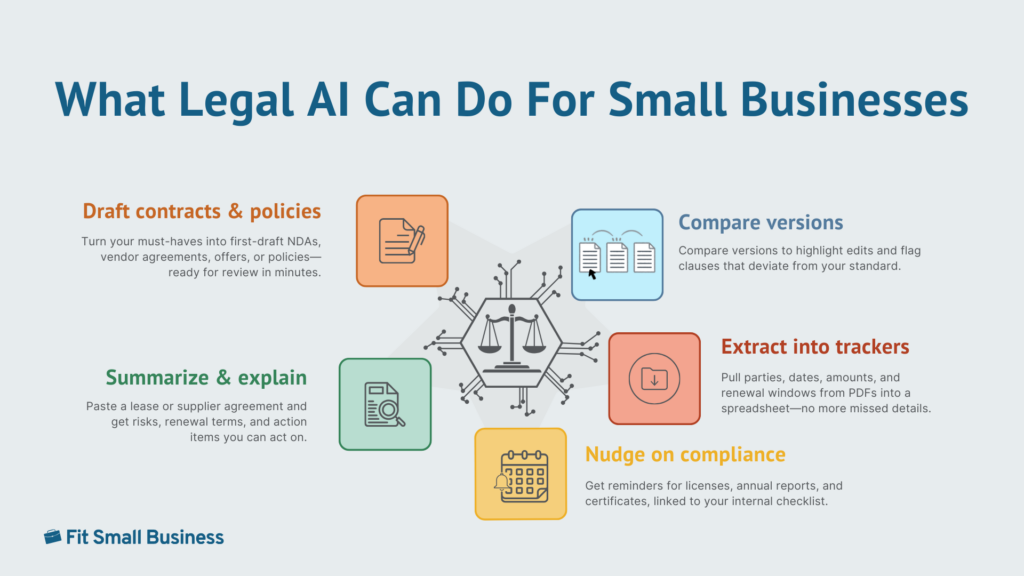
Legal help is traditionally slow, expensive, and hard to navigate. Artificial intelligence and law are intersecting in ways that make legal help faster and more affordable. Today’s tools can draft first-pass documents, summarize long policies, check contracts for missing clauses, answer common questions, and even nudge you about compliance deadlines.
In one benchmark, an AI reviewed NDAs with 94% accuracy in 26 seconds versus lawyers’ 85% over 92 minutes, promising speed and quality gains, though outputs still require jurisdiction checks and attorney review for anything material. In other words, AI is becoming the bridge between “we know we need legal help” and “we have a small-business budget.”
This guide shows where AI fits (and where it doesn’t), with practical workflows, guardrails, RAG/agent basics, quick-start prompts, and a brief comparison of top legal AI tools.
Important disclaimer:
This article is for education only and is not legal advice. It does not create an attorney-client relationship.
- Laws vary and change: Verify locally and consult a licensed attorney for decisions or high-risk matters.
- AI is a draft tool: Confirm citations and avoid sharing confidential data without proper safeguards.
What AI in legal services actually means
Legal artificial intelligence is software that reads and writes legal text. It helps you get from blank page to workable draft quickly, pull key facts out of long PDFs, and keep track of dates and obligations. It does not replace a lawyer’s judgment. Think of it as a fast, tireless assistant that needs your instructions, while a lawyer gives final say on anything that carries risk.
What this means day-to-day is that you spend less time formatting NDAs, searching for that one indemnity clause, or retyping terms from a scanned contract. You move faster on the routine work so your attorney can focus on the decisions that actually change outcomes (negotiation strategy, risk trade-offs, regulatory interpretation).
How legal AI works
Most tools are powered by a large language model (LLM), a writing engine that’s great at drafting and summarizing, but can be confidently wrong if it guesses. The fix is lookup-before-writing, often called retrieval-augmented generation (RAG). You connect the tool to trusted sources, such as your approved templates, policies, and up-to-date references, so it pulls facts before it writes and shows what it used.
RAG reduces, but does not eliminate, hallucinations. It improves grounding and makes errors easier to spot via citations and “last updated” dates, yet outputs can still be wrong or misapplied to your jurisdiction. Treat results as drafts, verify citations against primary or approved sources, and get attorney review for anything material.
What to index first
- Your latest templates, such as non-disclosure agreement (NDA), master services agreement (MSA), statement of work (SOW), and offer letters
- Your policy handbook and compliance checklists
- Any jurisdiction-specific guidance you rely on
- Past “gold standard” contracts with clauses you like.
Some platforms add a simple map of relationships (a “knowledge graph”): who owes what, by when, under which clause. That makes questions like, “Which vendor contracts auto-renew within 60 days and allow 30-day termination?” answerable in seconds.
Two styles you’ll see: generative vs agent
Currently, there are two types of legal AI tools:
- Generative tools wait for requests: Draft a California vendor NDA.
- Agent tools take action when something happens: A signed contract hit the folder — extract the renewal date and remind me 60 days before.
Automation vs advice
A good rule of thumb is: AI is great at doing; lawyers are essential for deciding. Use AI to speed up the paperwork and fact-finding. Use your attorney when judgment, negotiation, or real risk enters the picture.
Here’s a simple triage you can use and some examples:
Get started with LegalZoom: If your task falls in the Green zone, assemble a mutual NDA or short SOW using LegalZoom’s attorney-drafted templates, then use Doc Assist for document review/summarization; if terms become complex or negotiated, route the draft to an attorney via LegalZoom’s Business Attorney Plans.
Common key AI features
Here are some of the most common key AI features you’ll see in legal tools:
- Retrieval‑augmented generation (RAG): The tool looks up text from your approved corpus (templates, policies, prior contracts) before drafting so that answers are grounded. You can restrict sources, see which docs/pages were used, and disable open‑web search.
- Cite: Inline, pinpoint citations (section/page/URL) attached to each claim so a reviewer can click and verify. Citations include section/page and a “last updated” date; fake cites are flagged.
- Redline+: Clause‑level comparisons with suggested language. Think: Word‑style track changes, plus an issues list and recommended fixes. It shows exact diffs against your playbook and never auto‑accepts changes.
- Playbooks: Encoded rules for preferred clauses (e.g., liability cap = 1× fees; indemnity scope = third‑party IP only) with fallback positions. Verify per‑jurisdiction variants, exception notes, and exportable rules.
- Agent: Event-driven automations (watch a folder/email, extract renewal dates, create 90/60/30 reminders) with no auto-send/auto-file, human approval requirements, and full audit logs.
- Guided: Interview-style wizards that assemble documents from answers (great for NDAs, policy updates); supports your jurisdiction, exports to DOCX/PDF, and allows custom clause inserts.
Pros and cons of legal AI tools
The debate around artificial intelligence and law highlights both opportunities and risks. To further help you decide if legal AI is the right solution for your small business, here is a quick rundown of its pros and cons:
AI is a speed and consistency multiplier for routine legal work. It helps you get to first drafts faster, standardize language across contracts, spot missing clauses and issues, and stay on top of renewals and other obligations. Many teams also use it for self-serve policy answers, cutting down on basic “Where is…?” and “What does our policy say about…?” questions.
The tradeoff is risk. Models can be wrong or outdated, apply the wrong jurisdiction, or hallucinate citations. If misconfigured, they can also create privacy/data-leakage exposure, and model behavior can shift over time (model drift). None of this replaces legal judgment; high-risk or strategic matters still require a lawyer.
To stay safe, plug AI into your approved sources (RAG), require citations with dates and governing law, and turn on data controls (customer-managed encryption keys, a data processing addendum, access controls, and audit logs). Treat outputs as drafts/checklists, and get attorney review for anything material.
Legal AI workflows
To help you make the most out of AI tools and standardize your procedures, here are four workflows you can put in place, each with steps and guardrails to cut on busywork, speed up first drafts, and know when to loop in a lawyer without adding risk.
AI for legal research helps pull statutes, clauses, and references faster than manual search.
Quick-start sample legal AI prompts
Use these copy‑paste starters to jump‑start common legal tasks. Replace bracketed fields with your details, set the governing law, and keep sources limited to approved docs. Always show citations and require human approval — no auto‑send or auto‑file.
Best AI-powered legal tools for SMBs in 2025
Choosing between law and AI solutions depends on whether you need automation or full legal counsel. Here are some of the top legal AI tools to consider:
Due diligence questions when choosing a legal AI tool
- Do you train on our data? Can we turn that off?
- Show me citations with last‑updated dates.
- Do you support BYOK and detailed audit logs?
- What are your data‑residency and retention options?
- How do you handle privilege and access controls?
- What’s the indemnity cap and SLA response time?
Real-world example: LegalZoom’s AI partnership with Perplexity
On June 4, 2025, LegalZoom announced a strategic partnership with Perplexity, the AI answer engine. The gist: Perplexity Pro subscribers can access exclusive offers on LegalZoom’s services, and LegalZoom serves as the legal‑services provider for those users. It’s billed as the first known tie‑up between a major generative‑AI platform and a legal‑services provider.
Why this matters for SMBs
Legal help now appears where questions start — inside AI search — so owners can move faster from “what do I need?” to a guided, purchase‑ready workflow. The experience routes users to packaged services with human review rather than open‑ended AI advice, creating a safer handoff. Expect more AI‑to‑service partnerships across legal, tax, and HR that turn research into one‑click execution. Partnerships like this show how AI for law firms and small businesses alike can streamline processes.
What it is (and isn’t)
Put simply, this is a route from AI answers to LegalZoom workflows, such as formations, templates, and filings, with discounts for Perplexity Pro users. It isn’t legal advice or a lawyer replacement; complex or negotiated matters still require counsel.
Ready to turn answers into action? Start your formation, templates, or filings with LegalZoom’s AI-guided workflows, and if you’re a Perplexity Pro subscriber, redeem the exclusive offer to save on services.
Frequently asked questions (FAQs)
Click through the sections below to read answers to common questions around AI and law:
You can use tools for education/drafts, but only licensed attorneys can provide legal advice. Include disclaimers and human review.
Enforceability hinges on mutual assent, consideration, clear terms, and applicable law. AI-generated is fine if reviewed/accepted properly.
LegalZoom and ChatGPT serve different purposes. LegalZoom isn’t positioning itself as a generative-AI drafting tool for templates, and instead, provides attorney-drafted templates and paid legal plans (you can have a lawyer review your documents), plus limited AI utilities like a business-name generator and Doc Assist.
It has partnerships that bring its resources into AI experiences (Perplexity and ChatGPT agent), but its core docs are attorney-drafted, not AI-generated. ChatGPT, by contrast, is a general-purpose AI you configure for drafting and research.
Yes for drafting, versioning, and clause checks; add human redlines and final attorney review for anything material.
Hallucinations, data leakage, wrong jurisdiction, outdated law; mitigate with RAG, citations, and governance.
Bottom line
AI is a force multiplier for repeatable legal work, such as drafting from templates, comparing clauses, and keeping renewals on track, so your attorney can focus on strategy and risk.
To use legal AI tools effectively, lock outputs to your approved sources with RAG and visible citations, disable auto-send/auto-file, and require human approval for anything with money, IP, or data/privacy terms. Use a triage to decide what can be automated vs. what needs counsel, and set workflows with tight guardrails for common legal tasks you need help with.
Looking for a low-lift, guardrailed option? Try LegalZoom’s AI‑guided templates and workflows — start with an NDA or basic formation, then layer in attorney review as complexity increases.