Free customer relationship management (CRM) software helps small businesses manage and collaborate on marketing campaigns, sales deals, leads, and customers at no cost. Freemium plans enable you to get risk-free access to baseline features in hopes you’ll subscribe to a paid plan when you’re ready to scale.
If you’re in the camp of people looking for a free CRM, you’re probably not ready for all the bells and whistles — and may not be for some time. So, when it came time to reevaluate this guide, I wanted to make sure I focused on truly free tools for a set number of users.
A previous iteration evaluated software with free trials. That’s the biggest difference you’ll see in this update. But you might also notice that the differences between the top 10 free CRM providers are very slight, the further down you go. The best option for your business really depends on your industry, team size, and priority use case, which I noted in each analysis.
In any case, the best free CRM software for small business owners offers a broad range of easy-to-use core features on its free-forever plans. Review my notes to find the one that’s best for you right now.
How do the best free CRM software for small businesses compare?
What makes my analysis of the best free CRM tools different? Compared to other top results around the best free CRMs for small businesses, my guide takes a hard look at CRMs that are actually free. Others evaluate CRM providers with free trials, which won’t be helpful for users who want a free plan for the foreseeable future.
As much as my team and I love recommending vendors like Insightly CRM and monday CRM, for example, their lack of free-forever plans means they’re just not right for this particular use case.
Additionally, my analysis is current. The top Reddit thread for discussions around simple CRMs hasn’t been active in any meaningful way in over a year. So the advice might not reflect what’s best or available today.
Why you can trust Fit Small Business
To ensure that we provide readers with the best answers, the Fit Small Business editorial process adheres to strict standards, including rigorous research, assessment, and scoring of providers.
In this review, I examined the essential aspects of the best free CRM software for small businesses, including their general and niche features, ease of use, pricing, and range of support services. My full methodology also involved firsthand experience testing software intuitiveness and reviewing real product users. Furthermore, I leverage the following work experiences when carrying out software reviews:

Sales & Customer Service Expert at Fit Small Business
What makes Vtiger the best overall free CRM for small businesses?

Pros
- 10 free users means keeping your free plan even after you start to grow
- Full telephony features available: click-to-call, incoming call contact pop-up, call logging, and call recording
- Robust marketing automation tools allow you to do more in one platform
Cons
- Two-way email syncing isn’t available on the free plan
- Inventory capabilities are limited to products and services, not subscriptions or invoices
- Integrations are limited to Google Workspace, Outlook, Dropbox, and OneDrive
In my analysis, Vtiger delivers the most well-rounded and scalable free CRM offering, earning the highest overall score of 4.24 in my head-to-head evaluation. It stands out for offering an array of CRM features typically reserved for paid plans, and doesn’t force small teams to upgrade early.
For me, one of the hallmarks of a great free solution is a generous user limit. And Vtiger’s free plan supports up to 10, making it viable for small teams to adopt and grow into. You also get full access to contact and lead management, customizable deal pipelines, task and project tracking, workflow automation, and a robust mobile app at no cost.
Vtiger also includes built-in telephony features like click-to-call, call logging, call recording, and real-time caller ID pop-ups. So it’s an excellent fit for sales- and service-based businesses that rely on phone outreach.
Vtiger’s open-source “Community Edition” is also another major strength. It can be self-hosted, and the source code is available for modification. For businesses that don’t want to be locked into a rigid, one-size-fits-all system, this level of customization is a major strength. It is no wonder that it topped our list of the best open source CRMs.
While Vtiger lacks two-way email sync, reporting dashboards in the free plan, and only supports basic native integrations (e.g., Google Workspace, Outlook, Dropbox, OneDrive), these are small trade-offs compared to the platform’s overall utility.
Key freemium features
- 10 users
- Contact and lead management
- Deal and pipeline tracking
- Web-to-lead forms and basic email campaigns
- Email and phone integrations
- Project and task management tools
- Mobile app access for Android and iOS
- Collaboration tools for teams (comments, notifications, file sharing)
- Basic marketing segmentation and autoresponders
- Help desk and case management features
- Option for open-source or free cloud deployment
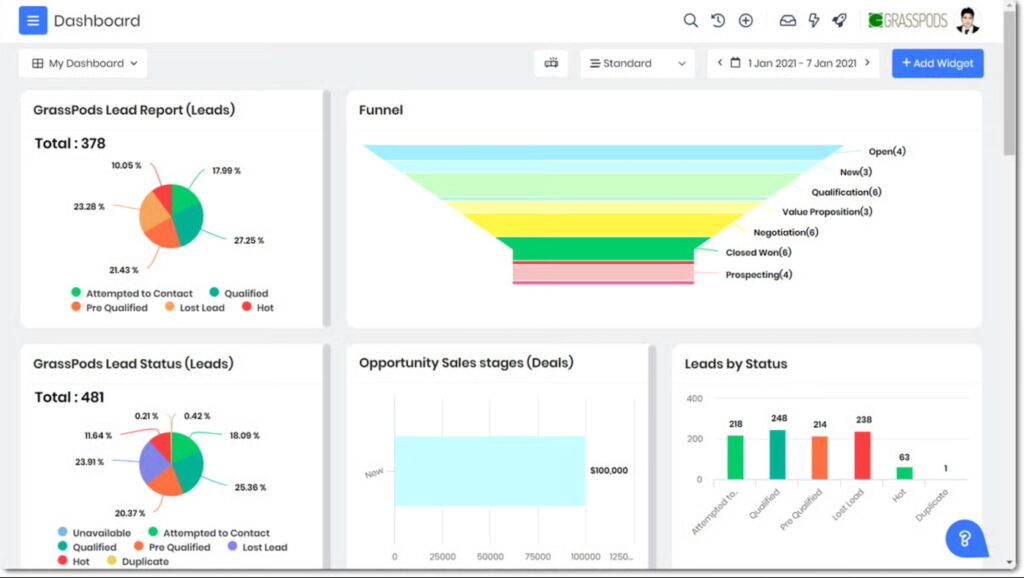
Vtiger’s home dashboard gives you a bird’s-eye view of lead and deal statuses. (Source: G2)
- “I like Vtiger because it is quite helpful to manage my clients and potential clients’ databases. The best thing is that Vtiger allows you to customize its modules and also create your very own ones.” — G2 reviewer
- “If you’re considering Vtiger CRM Sales Professional, make sure to have a clear understanding of your sales process so you can fully customize the pipeline to your needs. Take advantage of the powerful automation features to save time on routine tasks like follow-ups. Be prepared for a potentially complex setup and consider involving IT support to streamline the process.” — Info-Tech reviewer
- “While Vtiger CRM packs a ton of features for small and mid-sized businesses like sales, marketing, support, and project management all in one place, it can feel a bit overwhelming at first. People love how customizable and affordable it is, plus the automation really helps save time. But heads up: The setup can be tricky if you are not super tech-savvy, and the interface is not the slickest, sometimes feeling clunky or confusing.” — Reddit reviewer
What makes EngageBay the best for marketing-driven sales teams?

Pros
- Generous 15-user limit on the free plan
- Strong core CRM features with tools for marketing automation, web pop-ups, landing pages, and forms
- Social suite supports X, Instagram, and Facebook
Cons
- No workflow automation to manage follow-ups or lead nurturing in the free plan
- The 250 contacts limit may run out quickly for teams that also max out their number of free users
- Doesn’t specify support turnaround times or availability; you must enter your name and email to get help through the live chat bot
EngageBay (All-in-One) is the best free CRM system for marketing-driven sales teams, thanks to its rare combination of full-featured CRM capabilities, integrated marketing tools, and a generous user limit.
It has a built-in suite of tools that support lead nurturing, segmentation, and campaign management. Tools include email templates, lead scoring, and drip email capabilities. The only thing that’s missing in the free plan is workflow automation.
All things considered, EngageBay covers all the essentials: contact and lead management, deal tracking, task and activity oversight, and email integrations with Gmail and Outlook. The free plan even includes a reporting dashboard, which is often gated behind paywalls in competing platforms.
The platform also features a 360-degree contact timeline that unifies sales and marketing activity in one view, helping teams align more easily around each customer’s journey.
Key freemium features
- 15 users
- Contact management (up to 250 contacts)
- Branded email broadcasts (up to 1,000 emails per month)
- Deal pipeline/visual sales pipeline tracking
- Web form builder and at least one landing page
- Live chat and help-desk ticketing tools
- Email integration, tracking, and sequences (limited)
- Basic reporting dashboard, file storage (500 MB)
- Tag management and 360-degree contact/company view
- Integration with other tools/app ecosystem (e.g., Gmail, Office 365) and support for basic automation/workflow functionality
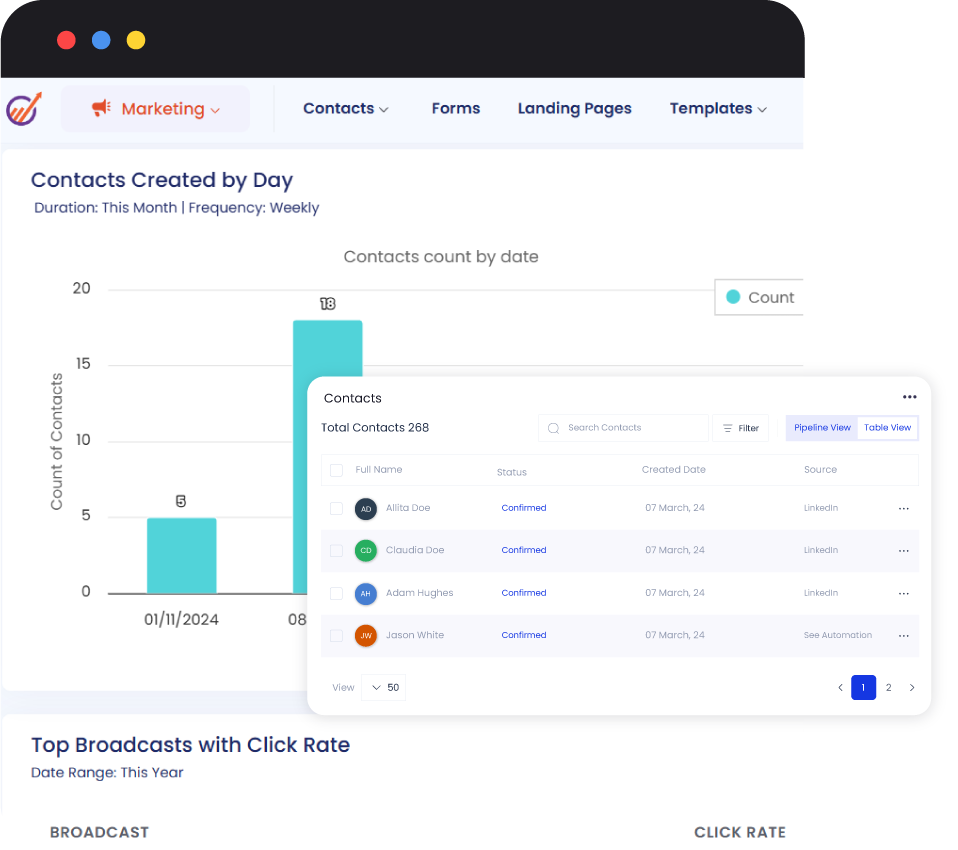
EngageBay scored full marks for its core CRM features, including contact and deal management. (Source: EngageBay)
- “Before EngageBay, our marketing and support tools were scattered. Now, everything from lead capture to order-related follow-ups is through a single workflow. We’ve reduced response time by nearly 30% and built stronger post-purchase relationships.” — G2 reviewer
- “Engage Bay provides us with an entire marketing stack minus the insane prices. The email automation and landing page builder are our favorites; both of them are easy and quick. Our CRM has made the communication with clients transparent, and our whole sales pipeline is now present in a single location.” — G2 reviewer
- “EngageBay has been a reliable platform for our mid-sized marketing team. We use it daily for managing leads, running campaigns, and automating client follow-ups. It’s rare to find this many features bundled together at such an affordable price.” — Capterra reviewer
What makes HubSpot CRM the best free CRM for ease of use?
Pros
- Highly intuitive to operate, navigate, and set up; scored the highest for ease of use across all CRMs in this guide
- Extensive third-party app integrations mean there’s a good chance you can connect your entire tech stack to the platform
- All-in-one system with free sales, marketing, service, content, and data management tools
Cons
- Two-user limit may not be realistic for long-term use
- Only one pipeline in the free tier
- Free plan users are limited to a self-help Knowledge Base and community forums for technical support
Our expert HubSpot CRM review
HubSpot CRM (via HubSpot Sales Hub) is the best free CRM software for ease of use because of its intuitive design, generous free tier, and smooth onboarding experience. I like how clean and well-organized the interface is, making it suited for non-technical users. Even its AI tools are very easy to use and navigate.
This platform is equipped with drag-and-drop pipelines, prebuilt templates, and seamless integrations with Gmail, Outlook, and other everyday tools. Combined with HubSpot Academy’s extensive library of free tutorials and certifications, users can learn and adapt quickly without the need for costly training.
With HubSpot CRM, you get no-cost access to the complete suite of Sales, Marketing, Operations, Service, Content, and Data Hubs. Its contact management, deal tracking, email marketing, and analytics features cover everything most small teams need without an upgrade.
While advanced customization, automation, and live support are reserved for paid tiers, the free version remains one of the most comprehensive and user-friendly options available.
Key freemium features
- 2 users
- Contact, company, and deal management
- Breeze AI Copilot
- Email integration with tracking and notifications
- Meeting scheduling and shared inbox
- Tasks and activity tracking
- Email templates and document storage
- Reporting dashboard and analytics
- Integration with popular apps (e.g., Gmail, Outlook, Slack, and Zapier)
- Live chat and chatbot
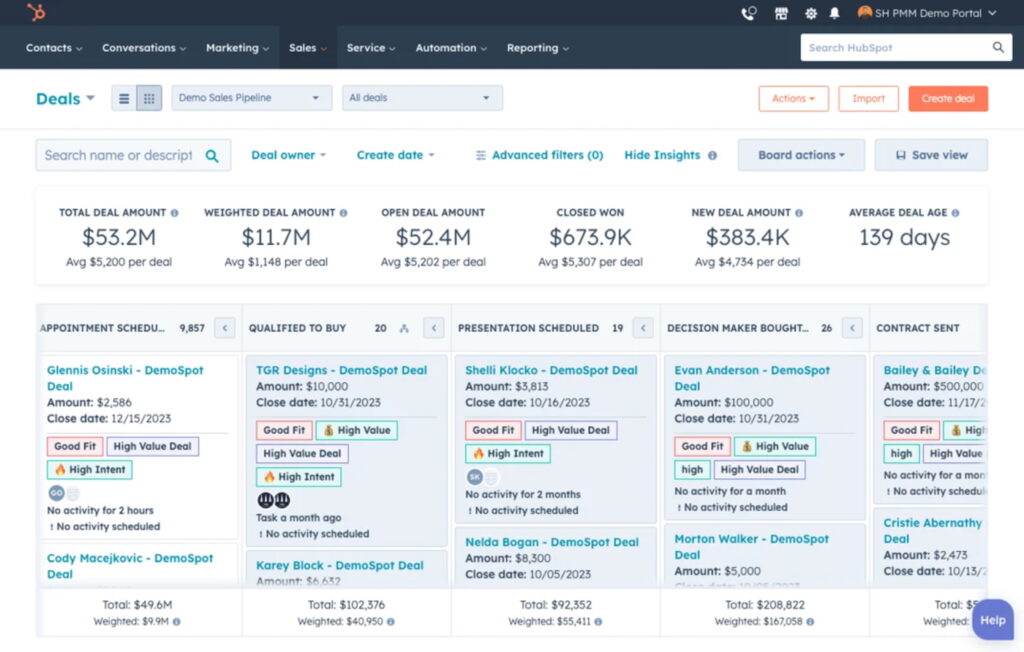
HubSpot CRM’s Kanban-style deal pipeline gives you an overview of deal details so you can prioritize leads accordingly. (Source: HubSpot)
- “We’ve finally got a system that keeps us consistent. The sequences make it so easy to stay in touch with hundreds of people without it feeling automated. It’s simple, organized, and actually helps us build better relationships instead of just managing data.” — G2 reviewer
- “I appreciate the intuitive user interface and the convenience of filters in HubSpot Sales Hub, which greatly facilitate tracking customer activities and managing emails. The seamless backend integration is a significant aid in creating sequences and conducting A/B testing. The setup process is straightforward, supported by helpful customer service representatives and video documentation.” — G2 reviewer
- “The learning curve was almost flat: We imported three years of data and ran our first pipeline in under a day. Sequences, meeting links, and automatic email tracking save each rep four hours a week, while Breeze AI writes snappy follow-ups and summarizes calls. Native integrations with Xero, Slack, and Zoom mean no messy zap-work. The mobile app is clean and lets me move deals while standing in airport security.” — Capterra reviewer
What makes eWay-CRM the best free CRM for Outlook users?

Pros
- Seamless integration with Microsoft Outlook and Microsoft 365
- Strong customization options
- Free plan includes invoice, quote, and order management
Cons
- Not ideal for teams that don’t use Outlook
- Advanced sales, marketing, and project management tools cost extra
- Performance and speed issues with large data volumes
Because eWay-CRM installs directly inside Outlook, your team doesn’t need to switch between email and a separate CRM tool. Everything happens in the familiar inbox environment.
The plugin looks and feels like Outlook itself, with little to no new interface to learn. This means a significantly lower onboarding curve and faster user adoption for small teams.
Moreover, the CRM maintains deep Outlook integrations. You can have automatic email tracking, the ability to convert emails into contacts, deals, or tasks in one click, and shared contact/deal data across your team from within Outlook.
For a small business that lives in Outlook, eWay-CRM provides an excellent way to handle contacts, calendars, tasks, and communications all from one place.
Key freemium features
- Unlimited users and unlimited time usage
- Core modules included: Contacts & Companies, Sales, Projects, and Email Marketing
- Integration directly with Microsoft Outlook and other Microsoft 365 apps
- Email Marketing: up to 1,000 emails/month
- Cloud storage: 200 MB of cloud storage for emails/documents
- Workflow automations and basic customizations
- Mobile and web access
- Data import/export and basic customization (forms, custom fields)
- Unlimited number of records
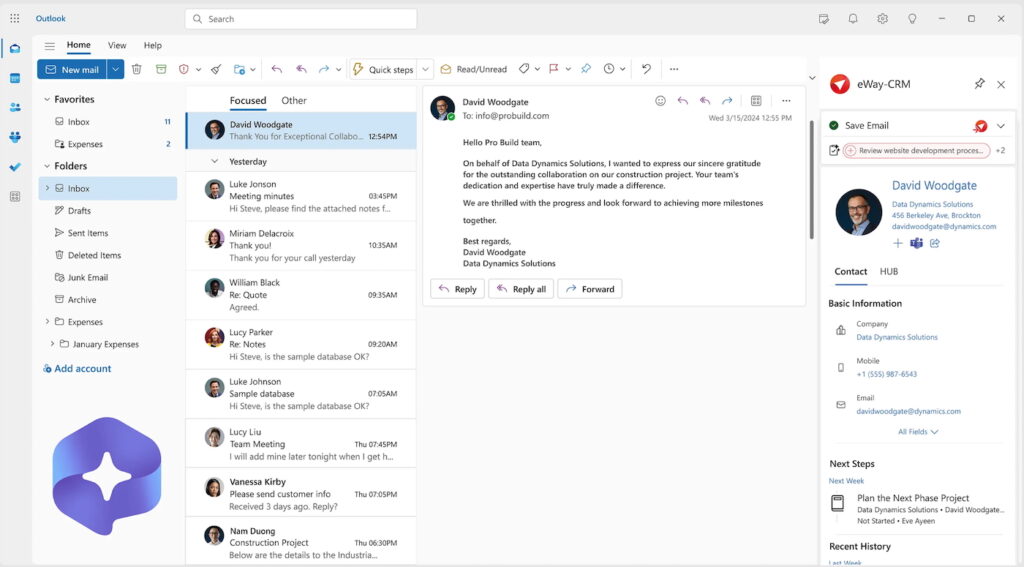
e-Way CRM is plugged into Microsoft Outlook, allowing you to access your CRM contacts, deals, tasks, and projects from your email inbox. (Source: eWay-CRM)
- “The integration with Outlook and Microsoft 365 is seamless and makes using the product on a desktop or mobile device a breeze. eWay-CRM handles all of our use cases and more! The sales team uses eWay-CRM daily, and the customer support is very responsive and helpful.” — G2 reviewer
- “It is so incredibly easy to use because of its deep connection with Outlook. No more missing contacts or loading to a separate system. Great value for the money and perfect for any small business.” — Capterra reviewer
- “You can tailor forms, workflows, hide modules you don’t need, adjust fields, etc. We can adapt eWay to our way of working. The eWay team is responsive and helpful.” — Capterra reviewer
What makes Agile CRM the best free CRM for small business owners focused on lead scoring?
Pros
- Lead scoring available in the free plan
- Free custom deal milestones and basic reports for gamification
- Combines sales, marketing, and service features in a single platform
Cons
- No free templates and website builder
- Outdated and clunky interface
- Steep learning curve
Agile CRM provides a fully integrated lead-scoring engine that lets you assign point values to lead behaviors and attributes. These include web visits, email opens, form completions, and offline actions you manually track.
Unlike other platforms that have this feature as an add-on module, Agile CRM’s lead scoring feature is built directly into the CRM. Sales teams can automatically prioritize the most promising leads, trigger notifications when a lead reaches a threshold, and hand off to sales in real time.
Moreover, because the lead-scoring capability is part of Agile CRM’s free plan (which supports up to 10 users), it delivers significant value without the need for an immediate upgrade. The system not only helps qualify leads but also ties seamlessly into other core CRM tools, like contact management, deal tracking, and built-in telephony.
Agile CRM also includes basic marketing automation, email campaigns, appointment scheduling, and web tracking, allowing small teams to manage the entire customer journey in one place. This all-in-one approach makes it easier to capture, nurture, and convert leads while keeping sales and marketing efforts aligned within a single, affordable platform.
Key freemium features
- 10 users with 1,000 contacts and companies
- Custom data fields
- Lead scoring
- Unlimited deals, tasks, and documents
- Appointment scheduling
- Custom deal milestones
- Email tracking
- Two-way email integration
- Custom deal tracks
- Two-way telephony
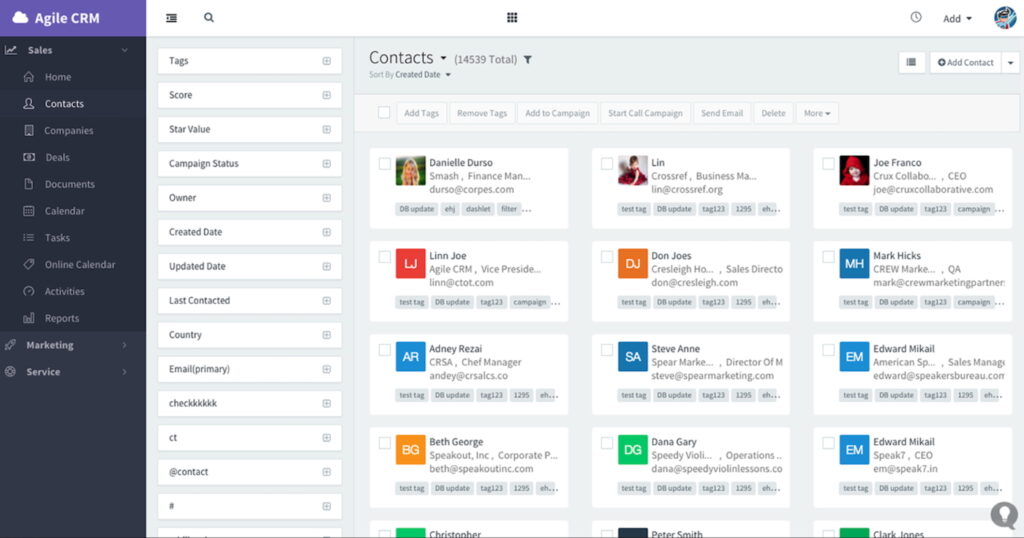
Agile CRM’s contact management system has a built-in function for lead scoring. (Source: G2)
- “With just a few taps on my fingertips, I can effortlessly maintain contact with all my associates, track transactions, and manage various ventures. Agile CRM has truly empowered us to optimize our sales, service, and marketing functions, enabling us to interact with our customers seamlessly on a daily basis.” — G2 reviewer
- “Agile CRM offers a wealth of features — email and leads management, plus customer data organization — all in one place. Keeping everything under control is a breeze, and staying updated with customer information is effortless. The insights gained from this data have significantly enhanced our customer relations.” — G2 reviewer
- “I liked the ability to have revision control and the ability to have multiple people working on a large assembly at one time, which updates. It does a great job keeping a history of all the tasks and allowing you to go back to an older design. It is not a very intuitive program, and it is pretty clunky to use.” — Capterra reviewer
What makes ClickUp the best no-cost CRM alternative?

Pros
- Highly customizable data fields, processes, automations, and modules for any business need
- Cost-scalable paid plans
- Workflow automation included in the Free plan
Cons
- Not a traditional CRM; users must use templates or design their own system to get CRM features
- Most third-party integrations are only available in paid plans
- Limited to up to 60 monthly sessions in certain views in the free plan, like timeline, workload, Gantt, or mind map views
Our expert ClickUp review
ClickUp offers an incredibly generous free-forever plan that allows unlimited users and unlimited tasks, making it rare among free CRM or productivity tools. While it’s primarily framed as a project/work-management platform, its flexibility makes it highly effective for sales and CRM workflows.
You can set up custom pipelines, convert tasks into deals, track contacts and interactions, use multiple views (list, board, calendar, etc.), and link docs or tasks all within one workspace.
This platform is ideal for smaller teams or businesses that don’t yet need heavy CRM specialization. Because you’re already managing tasks, projects, or clients in ClickUp, you can simply extend its use into your sales workflow without onboarding a second system.
As a ClickUp user, I can personally vouch for its flexibility and robustness. In fact, it is ranked as one of our top recommended CRM alternatives. However, there’s a bit of a learning curve for first-time users when it comes to navigating the interface.
Fortunately, the platform offers highly detailed training materials and guides to help you through the process of setting it up and learning how to use the system.
Key freemium features
- Unlimited users, records, and task storage
- Custom workspaces with custom data fields for task management and collaboration
- Prebuilt templates to create workspaces
- List, board, table, calendar, Gantt, timeline, workload, and mind map views of the workspace
- Whiteboard collaboration with in-app video recording
- User commenting and assignment in data records
- Workflow automations
- Relationship linking, tags, and priority-setting in data records
- Integration with Zapier, Gmail, and Outlook
- Goal and dashboard reporting
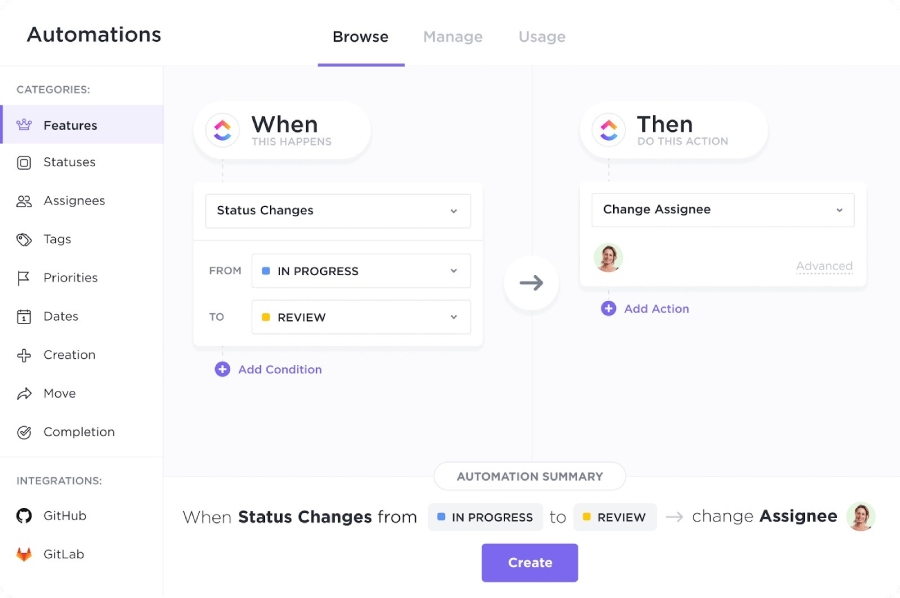
ClickUp automation design tools for customizing workflows. (Source: ClickUp)
- “The best thing about ClickUp is its incredible flexibility and customizability. You can really tailor it to fit any workflow or project management style. The ability to create custom views, dashboards, and fields is amazing. I also love the wide range of features it offers, from task management and time tracking to document collaboration and goal setting. It’s truly an all-in-one workspace” — G2 reviewer
- “ClickUp is a powerful platform, but it can feel a bit overwhelming at first because of how many features it offers. The interface sometimes feels cluttered when managing multiple spaces or projects. Occasionally, loading times can be slower for large workspaces, and the mobile app experience isn’t as smooth as the desktop version.” — G2 reviewer
- “Customizability is limitless. I can have my boards set up precisely how I prefer, and the AI automation built in helps greatly with task organization. The learning curve for new team members is steeper than other task management software, but it is well worth it.” — Capterra reviewer
What makes Bigin by Zoho CRM the best free CRM software for individual users?
Pros
- User-friendly CRM with essential features, perfect for freelancers and solopreneurs
- Built-in phone system
- Low-cost upgrade options
Cons
- No free AI tools for contact enrichment and sales email generation
- Lacks advanced marketing, customer support, and sales tools
- Mass email capabilities are locked in with paid plans
For solo business owners and freelancers, Bigin boils down CRM to the essentials without the overhead of bulky enterprise-level tools. With a clean, intuitive interface and a one-user-friendly free plan, it enables an individual to move from spreadsheets and sticky notes to a proper sales pipeline in minutes.
The free plan, which is specifically designed for one user, packs enough functionality to make it genuinely useful. This includes deal tracking through a visual pipeline, lead/contact management, built-in telephony, email sync and tracking, workflow automations (albeit limited), and mobile apps.
Because you don’t have to manage multiple user licenses or complex team setups, the experience is clean, fast, and focused. It’s optimized for one person who needs to manage customers, calls, emails, and deals without distraction or cost.
Key freemium features
- One user and up to 500 records
- Single pipeline for tracking deals and customer flow
- Lead and contact management
- Workflow automation (three instant workflows)
- Built-in telephony
- Web form builder (one web form)
- Email integration and tracking
- Dashboard and analytics with standard charts and KPIs
- Mobile apps for iOS, Android, and macOS
- Integration with other Zoho applications and select third-party tools through Zapier or API
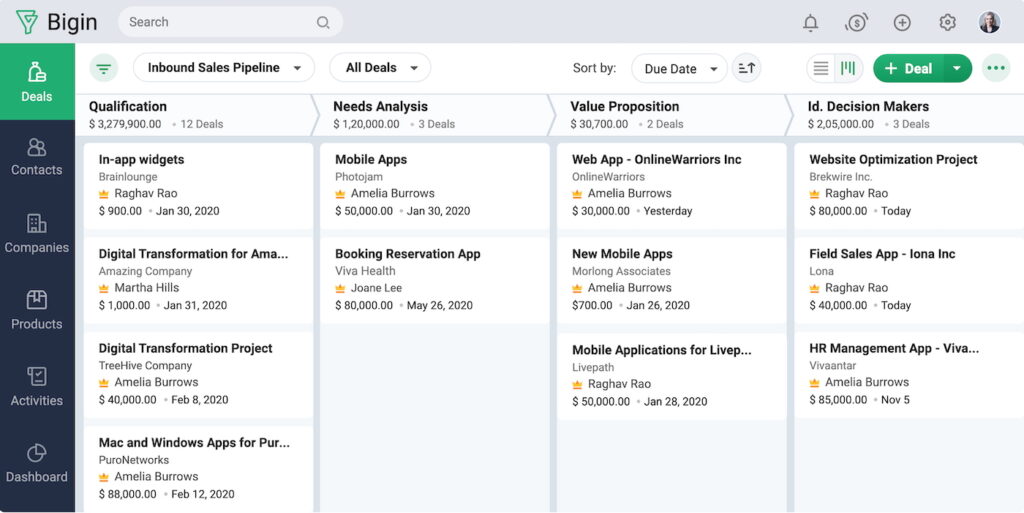
Bigin by Zoho CRM has a simple layout that shows all modules, including deals, contacts, companies, products, activities, and the dashboard. (Source: Bigin)
- “It has exactly the functions that a small business needs. We set it up completely in just two hours and were ready to go immediately. The dashboard is simple and clear, you find your way around right away, and there is no long learning curve. There is enough time to test everything. It was so easy to implement that we managed it right away without customer support.” — G2 reviewer
- “I love how clean and intuitive the interface is — everything is easy to find and manage without extra clicks. The visual pipelines, automation options, and excellent mobile app make it simple to stay on top of deals anywhere. It’s perfectly balanced between functionality and simplicity, ideal for small, fast-moving teams like ours.” — G2 reviewer
- “Bigin is easy to use, visually clear, and highly effective for managing leads and sales. The value for money is excellent — you get powerful features without the complexity of enterprise CRMs. The system feels secure and stable, and the customer support team is quick and helpful whenever we have questions. Email tracking and pipeline views make follow-ups effortless, and the mobile app is a big advantage.” — Capterra reviewer
What makes Capsule CRM the best for free AI sales emails?
Pros
- Up to 10 AI content assists for creating sales emails in the Free plan
- Unique free CRM tools like project management, contact enrichment, and email communications
- Opportunity management features available for free
Cons
- Only two users and 250 contacts allowed on the free plan
- Relatively expensive workflow automation features ($36 per user monthly with Growth plan)
- Access to email templates locked in with paid plans
Capsule CRM has a built-in AI Content Assistant, earning it a spot in our list of the best AI CRMs. This feature enables users to generate relevant, polished email copy in seconds.
You simply provide a prompt (e.g., “follow-up after meeting,” “proposal nudging email”), select a tone and length, and the tool drafts thoughtful messaging for you. This feature is a big win for small teams or solo entrepreneurs who may struggle with writer’s block or lack dedicated marketing support.
Beyond that standout AI feature, Capsule CRM supports email templates, integration with Gmail and Outlook, shared inboxes, and contact management. These features ensure the generated emails are grounded in real customer data and follow up automatically.
This way, you’re not just writing better emails but you’re also doing so efficiently, aligned with your CRM workflows, and without needing a huge time investment or specialist resource.
Key freemium features
- Two users with up to 250 contacts with tagging options and activity tracking
- Gmail and Outlook sync to use the email system in the CRM
- Contact data enrichment
- Unlimited tracks, which create task sequences to oversee entire processes
- Custom lead and contact lists
- Zapier integration to create dataflow automations
- Opportunity management with custom milestones, reasons-lost tracking, and stale opportunity alerts
- Up to 10 AI content assists for writing emails
- Built-in task and project management with calendar sync
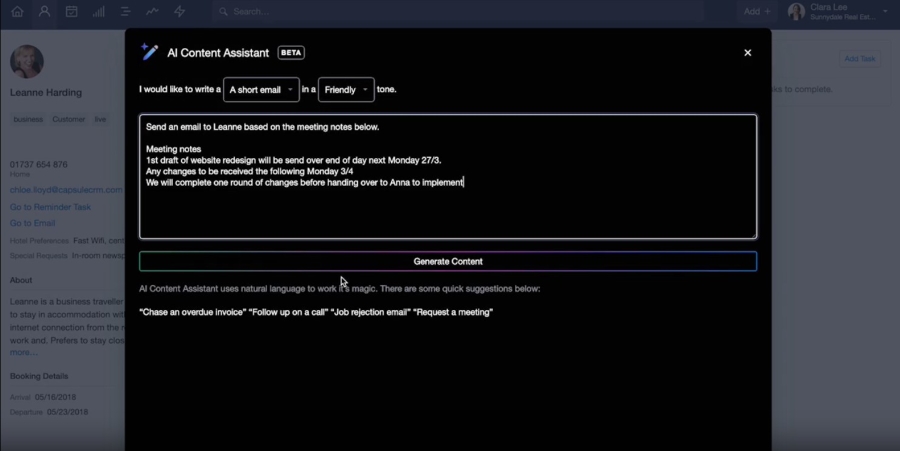
Capsule CRM’s AI-powered assistant helps craft email content for lead prospecting and nurturing. (Source: Capsule CRM)
- “Capsule has improved business processes and automated a large number of projects for me and my team. This system helps us keep on track and helps us deliver projects swiftly, and keeps my whole team organized. Capsule is the reason my business has tripled its turnover! Keeping everything organized within the dashboard is key for keeping everything on track!” — G2 reviewer
- “This CRM is great for those who need to use CRM to keep up with projects. If you, like me, have up to 20 projects at a time, this tool is so helpful and necessary. When I first started at my company, it took me no more than a few days to get implemented in Capsule.” — G2 reviewer
- “It makes it really easy to store emails between teams to pick up work while members are away. Pipeline sales tracking is really useful to keep track of sales prospects, and we created a pipeline specifically for renewals as well to get a good overall picture of both. Custom tags can be added as well, so we can personalize them to our product types.” — Capterra reviewer
What makes Zoho CRM the best for workflow automation?
Pros
- Ability to set basic automation for emails and tasks based on preset triggers in the free plan
- Account management tools available for free
- Low-cost, scalable options for small businesses
Cons
- Free plan limited to three users
- Limited access to features beyond basic CRM data storage, such as leads, contacts, deals, and accounts, in the Free plan
- Poor product usability ratings because of robust and advanced feature inclusions
Our expert Zoho CRM review
Zoho CRM offers a thorough, flexible automation engine that allows small business teams to define triggers, conditions, and automated actions in a few intuitive steps. These actions include sending emails, assigning leads, updating fields, and creating tasks or records.
Because this platform does the heavy lifting when it comes to workflows, your team can save time and focus on selling and not just entering data. Beyond automation, Zoho CRM offers several capabilities that make it especially appealing to small businesses looking to use a CRM for free.
You get contact and lead management, deal tracking, task and event scheduling, web form integration, and basic reporting for up to three users. It also includes limited email marketing and data import/export.
Aside from that, it integrates with other Zoho apps like Zoho Books and Zoho Campaigns, as well as third-party tools such as Google Workspace. These built-in features give small teams everything they need to centralize their sales processes, automate routine work, and scale operations efficiently.
Key freemium features
- Lead and contact management
- Deal/opportunity tracking
- Tasks, events, and call logging
- Web forms and visitor tracking
- Basic workflow automation (up to five workflows)
- Analytics/dashboard charts and reports
- 1GB file storage and import/export data support
- Email templates and opt-out tracking
- Integration with other Zoho apps and select third-party tools
- Custom list views and limited customization of modules
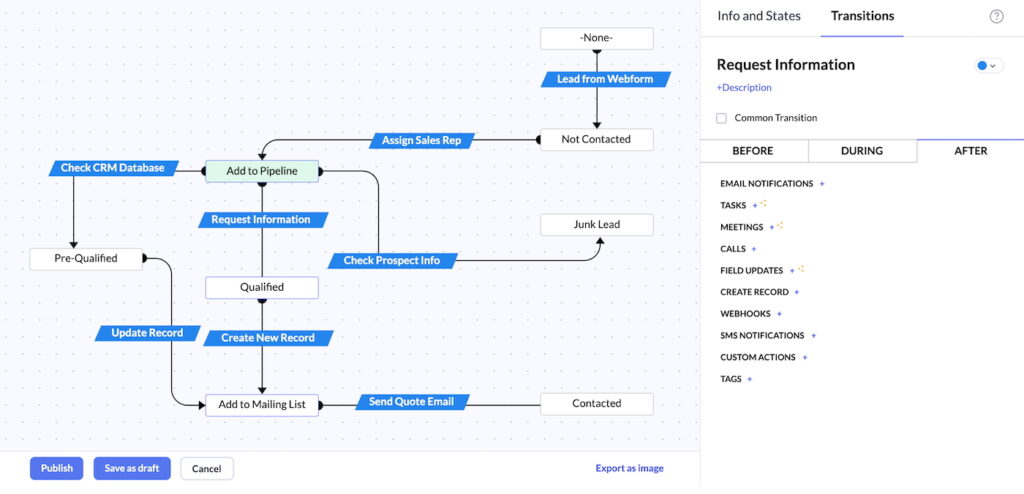
Zoho CRM’s Blueprint feature gives you a visual editor of your sales workflow. (Source: Zoho CRM)
- “Zoho CRM stands out for its robust sales automation capabilities, flexible customization options, and intuitive user interface. It has helped us increase sales by efficiently identifying and nurturing high-quality leads, streamlining both sales and marketing workflows, and supporting informed decision-making with its advanced analytics.” — G2 reviewer
- “Overall, I was happy with the experience of using Zoho CRM. Setting up workflows, creating custom fields, and managing contacts was straightforward. This is a great CRM option for businesses that don’t have a large budget. That being said, it doesn’t feel cheap and includes a lot of great features for sales and marketing teams.” — Capterra reviewer
- “I love Zoho CRM for so many reasons. One, we keep track of all of our staff, clients, and vendors in one place. Two, it integrates wonderfully with Zoho Invoice. Three, I can customize the customer information with the information I need to be there. Four, it integrates wonderfully with our website forms, allowing a client to fill out a form, and it automatically goes right into Zoho CRM.” — Capterra reviewer
What makes Freshsales the best free CRM with integrated communication tools?

Pros
- Built-in communication tools (email, phone, and chat)
- Clean and intuitive interface; fast onboarding
- Free plan includes deal tracking, custom fields, and access to the mobile app
Cons
- Only one pipeline in the free plan
- Messaging channels (text, WhatsApp, LINE, and Messenger) are locked in with paid tiers
- Freemium plan lacks out-of-the-box reports and third-party app integrations
Freshsales brings phone, email, and chat capabilities together in one unified platform. Small teams can make calls, send and track emails, and engage leads through the chat widget embedded into your website, all while automatically logging every interaction within the CRM.
This seamless integration helps businesses stay connected with prospects without relying on multiple external tools.
The free plan supports up to three users and includes key CRM essentials like contact and deal management, a visual sales pipeline, task and appointment scheduling, and basic reporting.
It also offers custom fields, allowing users to tailor records to their specific sales process. Lastly, Freshsales is one of my top recommendations if you want a small business CRM that’s easy to use and quick to onboard.
Key freemium features
- Three users
- Contact, account, and deal management with a visual Kanban-style pipeline
- Built-in phone
- Two-way email sync
- Email templates
- Chat widget
- Basic dashboards and sales analytics views
- Task and appointment management with calendar sync
- Custom fields
- Mobile app access (iOS/Android)
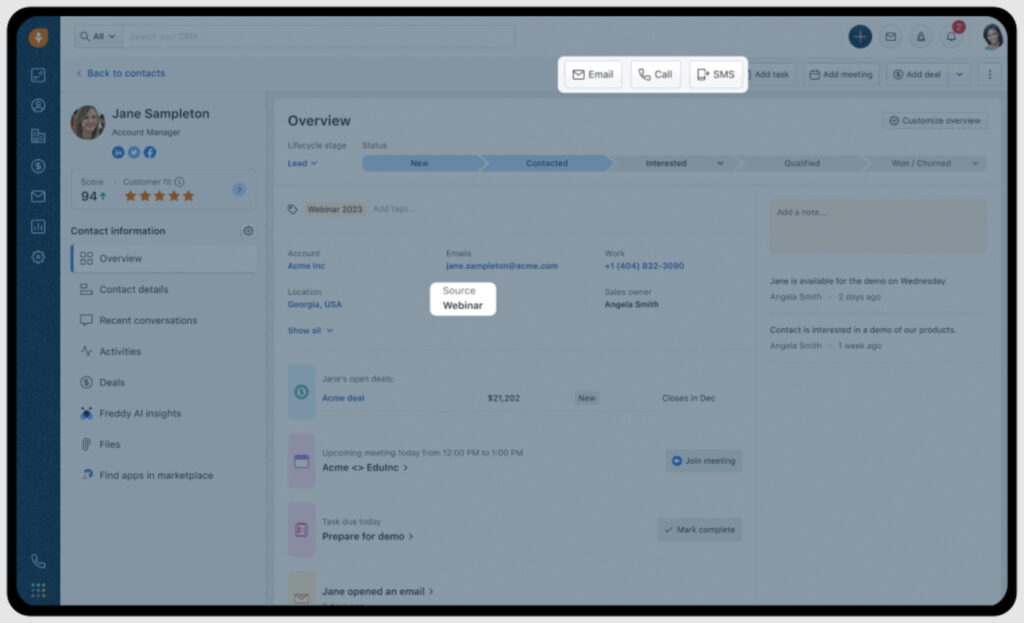
Freshsales allows you to communicate with customers on their preferred channels, all without leaving the CRM. (Source: Freshsales)
- “What I like best about Freshsales is its user-friendly interface and automation capabilities. It simplifies lead management, automates follow-ups, and provides a clear view of the sales pipeline, which saves a lot of time and effort.” — G2 reviewer
- “It packs a powerful set of tools at your disposal for a great price. It is easy to implement, and the support is excellent and timely. It helps us engage our customers in all the channels that we need.” — G2 reviewer“
- We use Freshsales mainly as a call management program, as our company does not use the lead-sales type model. It has worked very well for us, and the customer service is top-notch, replying to our inquiries very quickly and effectively. It is also a good way to send emails and have all agents with visibility and the ability to step in if needed. It is easy to use and intuitive. We use it daily, at all times of year.” — G2 reviewer
How did I evaluate the best free CRM for small business owners?
To determine the best free CRM software systems, I only considered products that offered a freemium plan for users. Providers that only offered free trials on their paid plans were not considered in my evaluation.
I then looked at product attributes included on those no-cost plans, including free features and customer service availability, as well as product ease of use. The tabs below offer insight into my evaluation process of the best free CRM for small business teams.
30% of Overall Score
I looked at the overall features included in the free plans that I felt were crucial to any free customer relationship management software, regardless of use case or industry.
This included contact and lead management, reporting and dashboards, customizable pipelines, workflow automation, and email management. I also examined its options for data import/export and third-party integrations. Plus, I checked the availability and quality of its mobile app.
25% of Overall Score
To assess the ease of use, I checked if the provider had built-in templates or automations when I assessed the free CRMs for small businesses. I also searched reputable review sites to gauge general user sentiment regarding its learning curve and ease of setup. In addition, I considered its plan options to see if it is easily scalable.
20% of Overall Score
Customer support looked at the service availability users get while on a freemium plan. This considers the hours of operation of the support team and the number of channels available, including live chat, phone, and email. I also wanted to see self-service resources like a knowledge base or community forum.
15% of Overall Score
Separate from the free plans, I wanted to see the providers of the best free CRM for small businesses offer subscriptions that would let businesses ease into the paid plans. This criterion considered the cost and scalability of the paid plans as well as billing flexibility, such as letting users save by subscribing annually.
10% of Overall Score
In addition to firsthand experience with these free customer relationship management software systems, I wanted to see what real users say about each product. I used online reviews to evaluate how users felt about the features and perceived value to their business. Additionally, I was able to gauge the ease of use for each product in terms of setting up, navigating, and operating the system.
*Percentages of overall score
Frequently Asked Questions (FAQs)
Yes. In fact, there are quite a few. Many CRM providers offer freemium plans to give users risk-free access to specific features in hopes that they will upgrade to a paid plan once their business and capacity needs grow. Some of the best no-cost CRM products include Vtiger, EngageBay, HubSpot CRM, ClickUp, and Zoho CRM.
Yes. Each of the individual “Hubs,” including Sales, Marketing, Operations, Service, and Content Management, all offer a freemium option. Additionally, the HubSpot CRM Suite, which puts all the modules into one product, also provides no-cost access for unlimited users to manage contact and company records, create email campaigns, engage web visitors via live chat, store documents, schedule appointments, and so much more.
Yes. Zoho CRM offers a free-forever plan for up to three users. The primary features available in this plan include lead and contact data storage with activity tracking, account management tools, document storage, and deal tracking. Users can also store email templates and develop basic workflow automations for task and record creation.
Bottom line
Free CRM software is great for small businesses on a tight budget, providing no-cost access to sales and marketing features. While many providers offer a freemium option, no two plans are built the same. Bitrix24, for example, is known for its unlimited users and high data capacity.
On the other hand, although HubSpot CRM only allows five users in its free plan, it offers robust features for sales, marketing, service, content, operations, and ecommerce management.