If you’re looking for a customer relationship management (CRM) system that directly integrates with Outlook for easy email and customer data management, you’ve come to the right place.
The best CRM for Outlook allows you to send emails from either system while synchronizing emails, contacts, and calendar data.
After evaluating several CRM platforms for pricing, features, and user experience based on my scoring criteria and experience in sales, I’ve identified the 10 best CRMs for Outlook users.
What CRM Platforms Integrate Best With Outlook?
Which CRM for Outlook is best for you?
What Makes HubSpot CRM the Best Free CRM Outlook Integration?

Pros
- CRM Outlook integration is free for its Sales, Marketing, and Service Hubs.
- It’s easy to navigate with a simple integration process for Outlook.
- You can use HubSpot in Outlook for CRM data and template access, meeting scheduling, and email logging.
Cons
- There’s a huge price jump when upgrading to higher tiers, from $15 (Starter) to $90 (Professional) per user every month.
- Managing email sequences from either HubSpot or Outlook for automated outreach and follow-ups requires a Professional plan ($90 per user monthly).
- Free plan only lets you store and sync three email templates in HubSpot or Outlook.
Our Expert HubSpot CRM Review
- You need a free Outlook CRM and email tools: HubSpot tops my list of the best CRM Outlook integrations, thanks to its ease of use while connecting the products and its freemium option. A fully integrated CRM like HubSpot can help boost your efficiency and productivity — research from Microsoft finds that integrating tools into your Outlook account saves an average of 26 minutes per day.
Starting with HubSpot’s free-forever plan, teams can use Outlook email from the CRM system for direct or mass marketing campaigns and to sync data. They can also manage and sync email templates, meeting data, and contacts for free.
- You want to access CRM data in both systems: HubSpot offers a great CRM Outlook integration that enables users to access CRM and Outlook data in either system.
They can view emails sent from the CRM in Outlook and pull CRM data records in Outlook from a HubSpot window. You can even pull or manage email templates, meetings, and automated sequences created in HubSpot from Outlook.
- You want a cost-scalable CRM for Outlook: While it offers an excellent free plan with a full range of data you can sync between the CRM and Outlook, HubSpot CRM isn’t ideal for fast-growing teams.
The higher-tiered plans for HubSpot CRM spike from $15 to $90 per user monthly when you need additional features such as email sequences, A/B testing, duplicate detection, and e-signatures.
-
- Alternatives: Zoho CRM is the best alternative in terms of cost-scalability. Its plans start free and cap out at just $52 per user monthly. On the other hand, Capsule CRM provides a free plan for two users, and paid plans start at $18 per user. Pipedrive offers five scalable plans ranging from $14 to $99 per user.
- You need more affordable email sequence tools: Email sequences aren’t included in HubSpot’s free plan. Creating automated sequences with introductions, outreach, and follow-ups—and accessing those sequences in Outlook or the CRM—requires a Professional plan for $90 per user monthly.
Each account can create 5,000 email sequences and up to 500 emails per user daily.
-
- Alternative: Apptivo offers email sequences for $40 per user monthly under its Ultimate plan. This tool enables you to customize email notifications by creating and sending personalized messages to recipients. Apptivo is a practical choice if you don’t need the extra features of HubSpot CRM’s Professional plan, saving you $50 monthly.
HubSpot Pricing Plans*
*Pricing is based on annual billing per user and a per-month breakdown of the HubSpot Sales Hub, though monthly billing is available at a higher cost. HubSpot CRM also offers a Customer Platform product bundled in one product with sales, marketing, service, operations, and content management modules. While we update pricing information regularly, we encourage our readers to check current pricing.
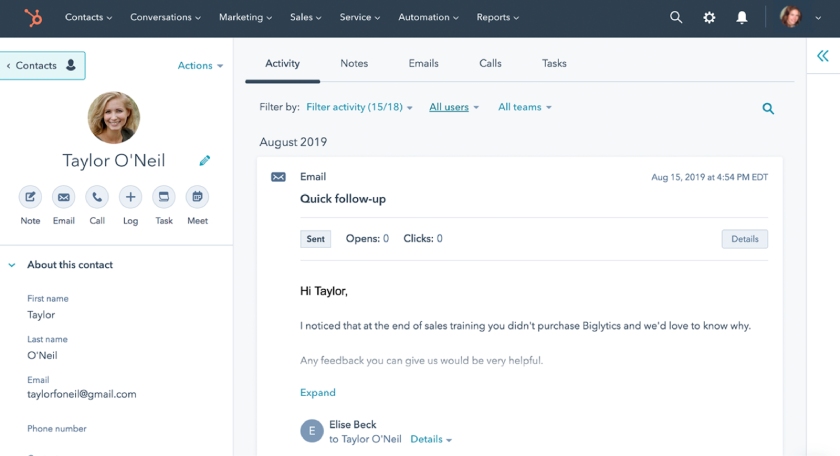
The HubSpot CRM and Outlook integration lets you monitor your emails and view every detail from your CRM without leaving your inbox to streamline email management.
(Source: HubSpot)
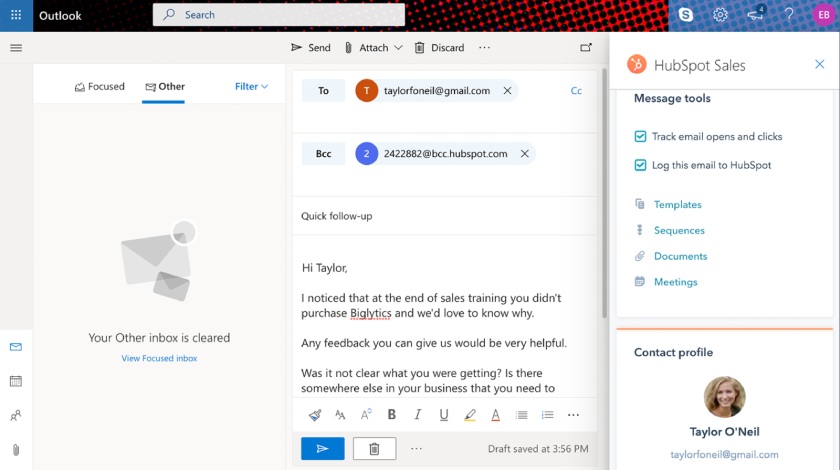
The HubSpot CRM and Outlook integration gives you access to sales tools like templates and access to all details about your contacts for efficiency and productivity.
(Source: HubSpot)
My Expert Opinion
HubSpot CRM provides a user-friendly and extensive Outlook integration starting in its free plan. I can easily send, track, and log Outlook emails within the CRM, sync and schedule events with the calendar, and smoothly import contact records between both systems.
Plus, the free integration lets you access email templates, canned snippets, and CRM records directly in Outlook from a HubSpot sidebar, enhancing its versatility and convenience.
Visit HubSpot
What Makes Zoho CRM the Best for Low-cost Outlook Lead Management?

Pros
- Outlook integration is available on the free plan for accessing Zoho CRM, managing leads and deals, and adding notes in the Outlook interface.
- It has a highly customizable CRM to meet any industry-specific need.
- Paid plans are affordable and scalable with free-forever tools available.
Cons
- Using Outlook email features in Zoho isn’t available on the Free plan.
- It received poor product usability ratings for navigating the interface because of robust, advanced tools.
- Meeting scheduling with calendar sync to Outlook requires a Standard plan ($14 per user every month).
Our Expert Zoho CRM Review
- You need to manage leads in Outlook cost-effectively: Zoho CRM has a unique Microsoft Outlook integration capability available starting from the free plan. This enables teams to access Zoho, create leads or contacts, add record notes, and store sales activity data from Outlook. Its basic plan (Standard plan at $14 per user) offers lead scoring to determine warm or sales-ready leads and increase conversion rates.
- You need to customize your Outlook CRM for a specific need: Zoho is the most customizable CRM with an Outlook integration available for a unique sales operation. Teams can tailor data fields, automation, and pipelines to meet their particular needs, such as specific lead fields to track insurance policy types. Zoho also offers thousands of CRM integration options and customizable modules to create your own CRM apps.
- You want a CRM with an Outlook integration and scalable plans: Zoho CRM offers a freemium plan with emailing tools and scalable paid plans. It has four monthly tiers ranging from $14 to $52 per user. The Standard plan ($14) includes access to Zoho marketplace integrations for Outlook. This plan features an email data sync and mass and direct emails in Outlook for seamless email management.
- You need a free CRM to use Outlook email: While Zoho CRM has an excellent free-forever plan that offers Outlook integration, users cannot access Outlook email features in Zoho at no cost. This capability requires the Standard plan, which costs $14 per user, per month.
- Alternative: For the best freemium CRM Outlook integration, we recommend HubSpot CRM. This provider allows you to integrate with Outlook free of charge, along with free email templates, a Kanban view, and built-in communications tools.
- You want a simpler CRM for Outlook: One notable downside of Zoho CRM is its usability. There’s often decent learning curve before I get fully comfortable with the system navigation and tools.
- Alternatives: I recommend monday CRM as the simplest Outlook CRM. HubSpot CRM is another good alternative if you need an easy-to-use, free option. New sales team members can easily learn how to use this CRM to launch Outlook email campaigns quickly and confidently.
Zoho CRM Pricing Plans*
Zoho CRM Add-ons:
- Additional File Storage: $4 per month for 5GB (paid plans only)
- Additional Data Storage (up to 200 users): $4 for 100MB per month (for Professional and up)
- Additional Data Storage (200-plus users): $2 for 100MB per month (for Professional and up)
- Data Backup: $12 per request
*Pricing is based on annual billing and a per-month breakdown. Monthly billing is available for a higher cost. While we update pricing information regularly, we encourage our readers to check current pricing.
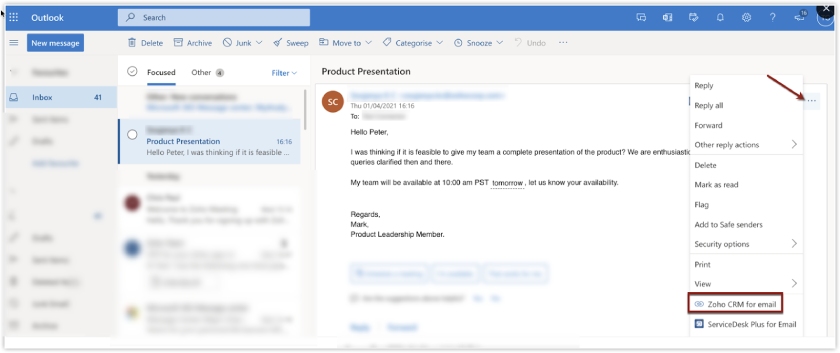
Zoho CRM for email option is available once integrated with Microsoft Outlook to view all contacts, deals, accounts, and campaigns in your CRM.
(Source: Zoho)
My Expert Opinion
Zoho CRM’s Outlook integration is its most notable feature. It allows users who primarily work within Outlook to efficiently manage CRM data, especially leads, without leaving their email interface.
This highly customizable CRM integration enables easy creation of CRM records, note-taking, deal status updates, and record associations directly from Outlook. With these tools, you can customize your CRM for Outlook to attain your email management goals.
Visit Zoho CRM
What Makes monday CRM the Best for a Simple CRM Outlook Integration Process?

Pros
- It has excellent user experience through a simple integration process with Outlook and a familiar spreadsheet-style format.
- It has great automation features for incorporating sales workflows into Outlook.
- CRM is highly customizable with a Kanban view of CRM records.
Cons
- It has no free plan and has some misleading pricing; plans require a minimum of three users.
- Calendar sync with Outlook requires Microsoft 365 Business Premium license for an additional $22 per user monthly.
- Storing email templates and tracking email engagement are relatively expensive (starting in the Pro plan at $28 per user monthly)
Our Expert monday CRM Review
- You need a highly intuitive CRM for Outlook with a simple integration process: monday CRM prides itself on product usability. The platform is a simple CRM system that leverages a spreadsheet-style format for data management, one-click tabs to change data views quickly, and drop-down options for creating workflow automations between the CRM and Outlook.
- You want to create Outlook automations in your CRM: The automation in monday CRM is both easy to use and flexible. It’s simple to create various workflows between the CRM and Outlook.
For example, I can set it so that Outlook will automatically send an email to that contact if a lead status changes. Another example is if an email is received in Outlook, that event is added as an update in the CRM.
- You need a free CRM for Outlook: While a cost-friendly option for integrating with Outlook, monday CRM no longer offers a free-forever plan for no-cost tools. This can be a downside for small businesses with limited budgets and those wanting to try different CRMs for free before buying a premium plan.
- Alternatives: HubSpot CRM has the best overall Outlook integration primarily because of its robust free-forever plan. Starting businesses can use the platform’s free tools for email templates and built-in phone, chat, and email.
On the other hand, Capsule CRM has a free plan for two users. Its Outlook integration lets you store emails in Capsule and send emails with Outlook.
- You want more affordable calendar sync tools: To access an Outlook Calendar sync in monday, users must also subscribe to the Microsoft 365 Business Premium license for an additional $22 per user monthly on top of the $14 per user monthly required for the CRM subscription. Otherwise, users receive an error message during integration setup.
- Alternatives: Pipedrive offers an Outlook Calendar sync for sales meetings and activities on its Essential plan ($14 per user monthly).
Apptivo works with all the Outlook and Microsoft 365 subscriptions to synchronize event and task data between both system calendars with its Lite plan ($15 per user monthly). Both platforms save you time and effort during sales and marketing campaigns.
monday CRM Pricing Plans*
*Pricing is based on annual billing and a monthly breakdown. Monthly billing is available for a higher cost. While we update pricing information regularly, we encourage our readers to check current pricing.
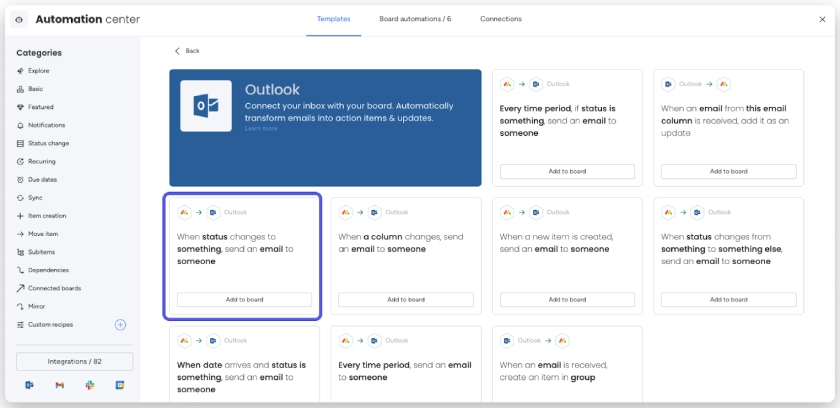
The monday CRM Outlook integration lets you quickly create workflows for email management using suggested automation templates.
(Source: monday CRM)
My Expert Opinion
monday CRM stands out as the top choice for those valuing user experiences and product simplicity. Managing data records and setting up automated workflows between the CRM and Outlook is a breeze.
Whether you need to send follow-up emails through Outlook, update lead records, or create new contacts from Outlook emails, monday CRM empowers users to enhance the connection between their sales and email systems seamlessly.
Visit monday CRM
What Makes Pipedrive the Best Outlook Calendar Integration for Sales Meetings & Activities?

Pros
- It offers excellent meeting and videoconference scheduling with a calendar sync to Outlook.
- It includes built-in project management module for creating to-do lists and tracking projects.
- Data sync to Outlook expands to deals and activity in addition to contacts, calendar events, and emails.
Cons
- It has no free plan, only a 14-day free trial.
- It has no built-in Outlook integration; users can’t access Pipedrive from the Outlook system without the Outlook Connector.
- CRM Outlook integration is relatively expensive; email sync is not offered until Advanced plan ($34 per user monthly).
Our Expert Pipedrive Review
- You need robust calendar syncing for scheduling sales meetings: Pipedrive is the best Outlook CRM for monitoring sales activity and calendars in Outlook. It allows you to schedule sales meetings (including videoconferences) and syncs these events with your Outlook calendar for easy monitoring. Users can also input deal-related data, such as calls or proposals, in Pipedrive, which syncs seamlessly with Outlook.
- You want an Outlook CRM with project management: Among CRM options compatible with Outlook, Pipedrive stands out for its unique ability to manage the sales process and post-deal activities. It offers built-in project management features like to-do lists and a project tracker to oversee service deliverables related to a client. This versatility can benefit business consultants, content creators, and trade contractors.
- You need a free CRM for Outlook: Pipedrive does not provide a free-forever plan, so you cannot access Outlook services like email, calendar management, or contact synchronization without cost. Furthermore, the email sync feature for Outlook comes at a relatively high cost, starting at $34 per user monthly.
- Alternative: HubSpot CRM is the best alternative, offering a free-forever plan with Outlook integrations. The free plan also offers helpful tools like email templates, custom fields, integrations, and built-in phone, email, and chat capabilities for cost-effective outreach and marketing campaigns.
- You want to access your CRM from Outlook: Pipedrive offers Gmail integration that allows users to access the CRM, manage deals, and edit CRM records directly from the Gmail interface. However, it’s important to note that this functionality does not extend to Outlook. If you want to connect your Pipedrive account to your Outlook mailbox, you need to install a third-party app like Outlook Connector.
- Alternatives: Avid CRM ($20 per user monthly) and Dynamics 365 ($65 per user monthly) are unique platforms embedded within Outlook. Apptivo also offers this capability starting at $15 per user monthly.
Pipedrive Pricing Plans*
Pipedrive Add-ons:
- Projects
Project management tools, free with Power and Enterprise plans
: Starts at $6.70 per user monthly - Campaigns
Customizable email campaigns
: Starts at $13.33 per company monthly - LeadBooster
Lead generation tool set (chatbot, live chat, prospector, web forms, and appointment scheduler)
: Starts at $32.50 per company monthly - Smart Docs
Trackable quotes, proposals, and contracts; free with Professional, Power, and Enterprise plans
: Starts at $32.50 per company monthly - Web Visitors
Trackable quotes, proposals, and contracts; free with Professional, Power, and Enterprise plans
: Starts at $41 per company monthly
*Pricing is based on annual billing and a per-month breakdown. Monthly billing is available for a higher cost. While we update pricing information regularly, we encourage our readers to check current pricing.
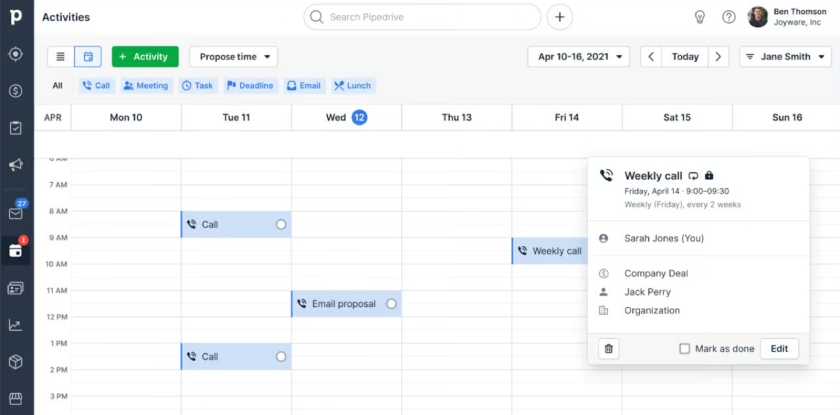
A Pipedrive calendar synced with Outlook can help you plan your day and schedule meetings. (Source: Pipedrive)
My Expert Opinion
Pipedrive is a top-notch sales CRM with a user-friendly meeting scheduler and seamless Outlook integration for managing leads and closing deals.
Teams can effortlessly track client appointments in Pipedrive or Outlook and keep their sales activity and deal info in sync, ensuring they stay current on opportunities, no matter which system they prefer. Plus, you can keep track of your sales tasks and projects with Pipedrive’s robust project management capabilities.
Visit Pipedrive
What Makes Apptivo the Best Multifunctional Outlook Integration for Various Business Operations?

Pros
- Its all-in-one business management system lets you handle all functions through premade modules and robust customization.
- It offers white labeling for a customized business system.
- It has a solid low-cost Outlook CRM integration for accessing the CRM modules from Outlook.
Cons
- It has no free plan, just a 30-day free trial.
- It has limited number of available third-party integrations.
- Its system can be tricky to operate; users find the interface outdated.
- You need a multifunctional Outlook integration: While mostly marketed as a CRM system, Apptivo is a full business management platform.
It offers customizable modules for sales, finance, customer support, marketing, supply chain management, project management, ecommerce, human resources, and product management functions. The integration is available across all plans to give you access to these modules in Outlook. - You want to white label your Outlook CRM: Some businesses using Outlook may prefer a white label CRM option to rebrand the system as their own. Apptivo is the only product on this list that has white labeling capabilities.
Users can tailor the brand palette, modules, and domain to either resell or have access to an organization’s specific system that can sync all email, calendar, task, and contact data to Outlook.
- You want a more modern, intuitive interface: System customization isn’t necessarily difficult with Apptivo. However, many users find it difficult to navigate and learn some of the tools as the interface is outdated compared with other providers.
- Alternative: monday CRM is my pick for the best simple CRM system for Outlook users, especially if you prioritize usability. First-time use doesn’t require a steep learning curve. The user-friendly interface allows users to learn the tool and launch email marketing campaigns quickly.
- You need a free CRM for Outlook integrations: Apptivo is a cost-friendly CRM with Outlook offers an integration starting in its basic plan, Lite for just $15 per user. However, startups and wary users may want a free-forever plan to give them a risk-free experience with their CRM.
- Alternative: HubSpot CRM offers some of Apptivo’s all-in-one capabilities, such as sales, marketing, and service functions, but with a robust freemium plan. Startup sales teams can use these free tools to kick-start email marketing campaigns.
Apptivo Pricing Plans*
*Pricing is based on annual billing on a per-user monthly breakdown, though monthly billing is available for a higher cost. While we update pricing information regularly, we encourage our readers to check current pricing.
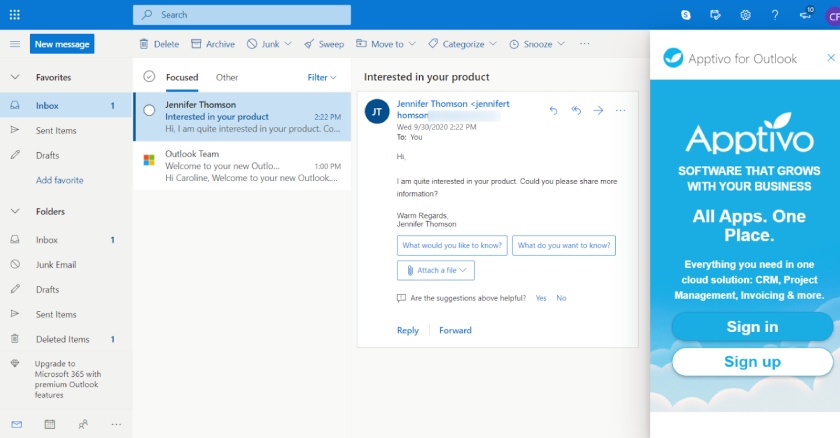
The Apptivo Outlook integration lets you effortlessly associate chosen emails from Outlook with Apptivo. (Source: Apptivo)
My Expert Opinion
Apptivo offers the best CRM software with an Outlook integration for comprehensive business use. As a cloud-based business management solution, it allows users to customize modules to suit a wide range of data and process requirements, including sales, marketing, finance, service, projects, and supply chain management.
The Outlook integration enhances functionality, allowing users to access and retrieve data from any CRM module seamlessly.
Visit Apptivo
What Makes Capsule CRM the Best Outlook Integration to Store & Track Email Conversations?

Pros
- Outlook integration for tracking email conversations, booking meetings, and seeing everyone’s calendar is free.
- It can automatically store all Outlook emails for lead generation, marketing, sales, and outreach purposes.
- It provides an AI content assistant for crafting effective sales emails at no cost.
Cons
- Free plan only has a total of 250 contacts with limited email tools.
- Advanced marketing features are only available on higher-tiered plans (Growth plan ($36 per user) or as an add-on feature ($11 per user).
- It has no workflow automation features until the Growth plan.
- You frequently book meetings for sales and marketing purposes: Capsule CRM enables users to book meetings easily through its helpful features. For example, the free plan includes the “See Everyone’s Calendar” feature to see other Capsule users’ calendars for booking meetings. Paid plans have a “Connect to Outlook Calendar” feature to book Outlook Calendar meetings via the CRM.
- You want to do more Outlook email activities: With Capsule CRM, users can do various Outlook email activities. For instance, Microsoft 365 users can create new contacts, cases, and opportunities with this CRM integration. Furthermore, users can automatically store all Outlook emails with chosen contacts in Capsule. This feature is available starting with the Growth plan at $36 per user, per month billed annually.
- You need a free CRM with more contact capacity and automatic email storage: Capsule CRM’s free plan allows you to store only up to 250 contact records. If your small business needs to send mass emails for marketing purposes, Capsule’s starter plan provides 30,000 contacts. This CRM doesn’t allow automatic storage of all emails with chosen contacts unless they have the Growth plan ($36 per user) and above.
- Alternative: HubSpot CRM has a free plan for two users that allows you to store up to a million contact records in its database. Sales teams won’t need separate or external storage for more efficient data management. Users can connect HubSpot to their Outlook inbox to send emails from their HubSpot account and access helpful, time-saving tools.
- You want a CRM that offers advanced marketing tools: Capsule CRM offers basic email marketing features with templates. If you need advanced marketing features, you’d need to upgrade to the Growth plan ($36 per user monthly) or pay for the marketing add-on ($11 per user monthly).
- Alternatives: HubSpot CRM offers advanced email marketing tools like mass email and performance tracking at no cost. Zoho CRM lets you launch mass email campaigns and social media feed monitoring on its Standard plan ($14 per user every month).
Capsule CRM Pricing Plans*
Capsule CRM Add-on:
- Transpond (marketing automation tools): Starts at $11 per user monthly
*Pricing is based on annual billing on a monthly, per-user breakdown. Monthly billing is available for a higher cost. While we update pricing information regularly, we encourage our readers to check current pricing.
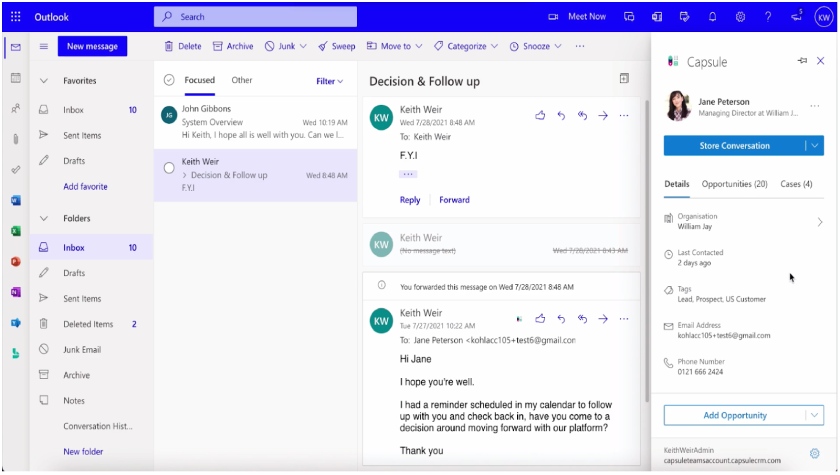
Capsule’s free Outlook email integration lets you easily add contacts to your CRM, store and monitor email conversations, and create new sales opportunities and projects from your inbox. (Source: Capsule CRM)
My Expert Opinion
Capsule CRM offers free Outlook integration to help sales teams easily manage contacts, deals, and opportunities directly from their email inboxes, so you miss engaging and nurturing leads. I can also quickly book meetings with its “See Everyone’s Calendar” and “Connect to Outlook Calendar” features, which is an extra functionality I appreciate that makes things more efficient.
Plus, this CRM integrates with other Microsoft products in the Starter plan, making it one of the best CRMs for Office 365 users.
Visit Capsule CRM
What Makes Salesflare the Best for Outlook Email Task & Data Update Automation?

Pros
- It has automation for email tasks and profiles based on email communication, like in Outlook.
- Outlook integration allows users to access Salesflare within their email inbox.
- It can sync emails and calendar meetings to the CRM in real time.
Cons
- It has no free plan and has pricey entry-level tier at $29 per user monthly.
- Customization options for dashboards and user permissions are limited.
- Complex setup process requires technical assistance.
- You want to automate Outlook email tasks and data updates: Salesflare allows you to create a list of suggested tasks, like autoreplying, deleting, or archiving the emails. It gives you a cleaner email list for more effective correspondence. Plus, this CRM with an Outlook integration automatically updates and enriches CRM data based on email communications to ensure you only deal with relevant and high-converting leads.
- You need to access Salesflare from Outlook: Salesflare is one of the few unique CRMs made to integrate with Outlook. Its Outlook integration allows you to access your CRM within your inbox and sync both email and calendar events with your CRM in real time.
- You need a more cost-effective Outlook CRM: Salesflare’s powerful data automation features come at a high starting cost of $29 per user monthly. This can be pricey for small teams and businesses with limited CRM budgets.
- Alternatives: Subscribe to Zoho CRM to access free and cost-scalable solutions that start at $14 per user monthly. Other platforms that offer free Outlook integrations are HubSpot CRM and Capsule CRM.
- You want an Outlook CRM with more customization options: Salesflare offers limited options for customizing and personalizing dashboards and user permissions.
- Alternatives: Zoho CRM and Dynamics 365 are the providers in this list that offer the most robust customization options.
Salesflare Pricing Plans*
*Pricing is based on annual billing on a per-user, per-month breakdown, though monthly billing is available for a higher cost. While we update pricing information regularly, we encourage our readers to check current pricing.
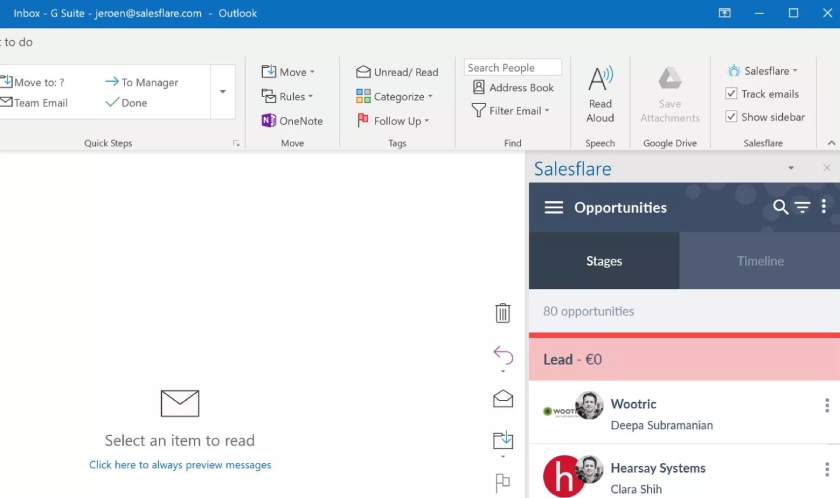
The Salesflare Outlook integration lets you easily hide or show an email sidebar and turn email tracking on or off for quick email data access and task management.
(Source: Salesflare)
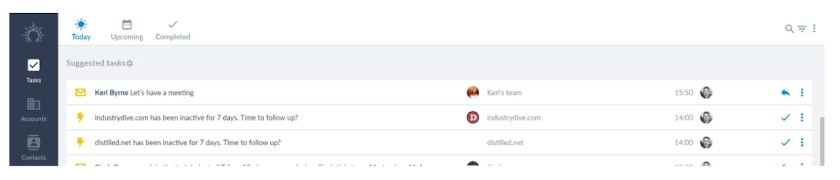
Salesflare’s Outlook integration autocompletes email tasks for a more relevant and cleaner list of suggested tasks. (Source: Salesflare)
My Expert Opinion
Salesflare is a great option for small teams and businesses wanting to automate email tasks and data updates with Outlook. Its Outlook integration ensures seamless email integration and smooth access to CRM data directly from your inbox.
I also like how this integration live syncs emails and calendar meetings to the CRM to ensure nothing falls through. Plus, you can send automated email sequences from your inbox, boosting productivity and lead engagement.
Visit Salesflare
What Makes Salesforce the Best for Affordable Outlook Email Tracking?
Pros
- It offers affordable email tracking to analyze engagement in its basic plan, Stater Suite ($25 per user).
- It offers Einstein Activity Capture (an AI feature) to sync email and calendar content automatically in real time.
- It has an intuitive mobile app with complete Salesforce’s features.
Cons
- It has no free plan (only 30-day free trial) and no monthly billing options for the second plan tier and above.
- It has no full offline mobile functionality on the basic plan, Starter Suite ($25 per user).
- It lacks robust marketing and project management capabilities.
Our Expert Salesforce Review
- You want a CRM software Outlook integration with an affordable email tracking feature: Salesforce offers email productivity features on its basic plan (Starter at $25 per user monthly). It includes Outlook email tracking to monitor engagement and marketing campaign metrics like open and click-through rates.
- You need a CRM software for Outlook with automated email capture and data sync: Salesforce offers an AI-powered feature called Einstein Activity Capture in its Starter plan at $25 per user every month. Reps can save time manually logging activities because AI can capture and sync emails, calendar content, and Salesforce data automatically in real time.
- You want a free plan and monthly billing option on all plans for an Outlook CRM: Salesforce only offers a 30-day free trial and doesn’t have a freemium plan and only has a monthly billing option for the Starter Suite. Small business owners who aren’t ready to commit to buying a CRM system for Outlook can use free alternatives.
- Alternatives: Zoho CRM, Capsule CRM, and HubSpot CRM are our top recommendations for a freemium plan. HubSpot CRM and Capsule CRM offer free tools for two users, whereas Zoho CRM’s free plan has a three-user allocation. All of these providers offer a monthly payment scheme across all plans.
- You need robust marketing and project management tools: If you’re looking for more advanced and robust project management and marketing capabilities, it’s best to check the alternatives. Salesforce’s functionalities are sales-focused, so its marketing features are limited to generating promotional emails and campaign management tracking.
- Alternatives: Aside from Outlook, you can integrate monday CRM into collaboration platforms like Slack, Zoom, and Mailchimp. This helps teams manage tasks and projects easily and quickly. HubSpot CRM and Zoho CRM are excellent platforms for email and social media marketing campaigns, starting with their free plans.
Salesforce Pricing Plans*
*Pricing is based on annual billing on a monthly breakdown of the Salesforce Sales Cloud edition. Salesforce Sales Cloud does not offer a monthly payment plan, except for the Starter Suite. We update pricing information regularly but encourage readers to check current pricing.
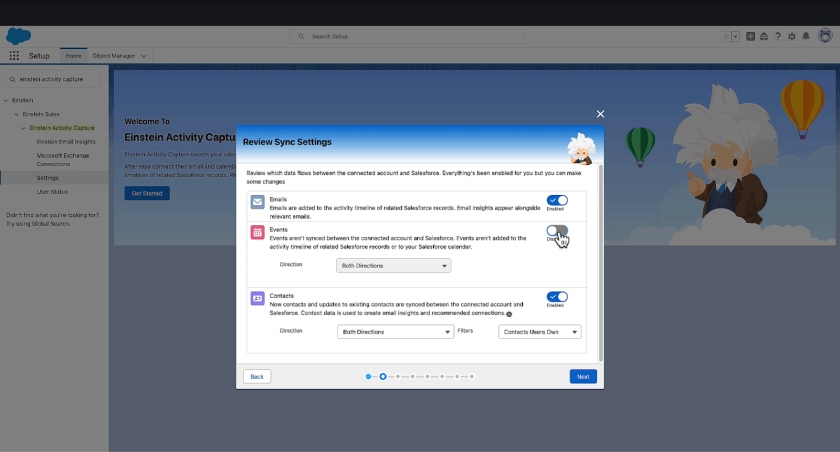
Sales reps can use Salesforce’s Einstein Activity Capture feature to gather email and event calendar data to update records automatically and keep track of a buyer’s journey via an activity timeline. (Source: Salesforce on YouTube)
My Expert Opinion
Salesforce is notable for its affordable set of email productivity tools, which includes email tracking for monitoring engagement metrics like open and click-through rates. If you usually launch email marketing campaigns or prefer to reach clients via email, then Salesforce is an excellent choice.
Plus, Einstein Activity Capture further boosts your email campaign efforts by automatically syncing email data into pipelines for a higher likelihood of conversion.
Visit Salesforce
What Makes Avid CRM the Best CRM With Outlook Built-in for Automatic Data Syncing?

Pros
- Unique CRM embedded—not just integrated—in Outlook enables automatic data sync between the two apps.
- It automatically tracks all Outlook-based emails, tasks, and calendars.
- It offers easy installation and has a fast learning curve because of simple commands and familiar Outlook layout.
Cons
- It’s not suitable for Google Workspace users
- It has no free plan or free trial, only free demo.
- Instant email notifications and sales pipeline automations are locked in the Enterprise plan ($50 per user monthly).
- Your team uses Microsoft apps: Avid CRM (formerly Prophet CRM) is a dedicated platform designed specifically for Microsoft users. While most Outlook CRMs integrate with this email client, Avid CRM is embedded directly into Outlook, automatically syncing data between the two apps. Unlike other CRMs, there’s no need for manual integration, saving you time and effort in data entry and updates.
- You want to automatically track all Outlook-based emails and tasks: Avid CRM automatically tracks all Outlook-based emails, tasks, and calendar events on desktop and mobile devices. It also helps your team cut time spent on data entry by automatically linking those emails and tasks to their corresponding sales deals.
- Your team uses Google Workspace for productivity and collaboration: Since Avid CRM is designed to work with Microsoft products, Google Workspace apps like Gmail and Drive will have a hard time adjusting to its interface.
- Alternatives: Pipedrive, Capsule CRM, and Salesforce are three of the best Google CRMs. Pipedrive offers the broadest Google app integrations, while Capsule CRM is great for task and calendar management. Salesforce provides the best Google Analytics integration to track performance.
- You want free or low-cost Outlook CRM software: While Avid CRM offers a free demo, the provider doesn’t offer free tools. Its most basic plan (Standard at $20 per user) is more expensive than other providers on this list. Moreover, Avid CRM doesn’t offer a monthly payment scheme, only annual billing.
- Alternative: Zoho CRM offers a free plan for three users and a startup plan (Standard) for only $14 per user monthly. On the other hand, Capsule CRM has a freemium option for two users with paid plans (Starter) starting at $18 per user monthly. Apptivo offers an affordable basic plan, Lite, at $15 per user monthly.
Avid CRM Pricing Plans*
Avid CRM Add-ons:
- Campaign manager
Starting up to 500 emails per month; highest plan up to 15,000 emails per month
: Starting at $95 per user billed annually
*Pricing is based on annual billing on a per-user, per-month breakdown. Avid CRM does not offer a monthly payment plan. While we update pricing information regularly, we encourage our readers to check current pricing.
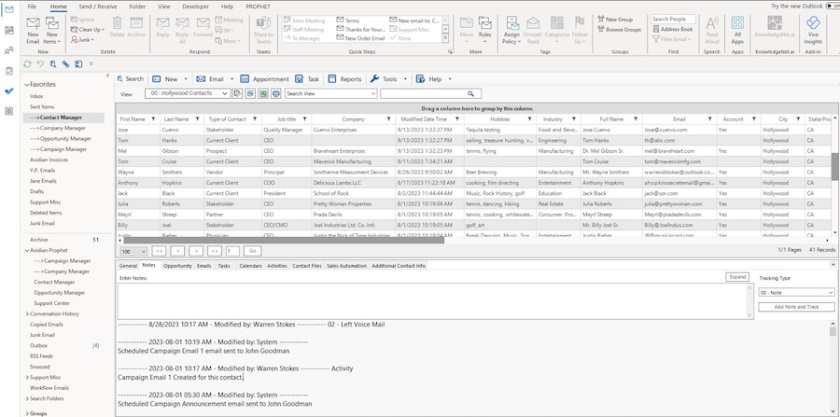
Avid CRM is embedded in Outlook, allowing automatic data sync and consistent data entry for new contacts without duplicates. (Source: Avid CRM)
My Expert Opinion
If your team uses Microsoft apps for productivity and collaboration, Avid CRM is my best CRM recommendation. It is specifically designed to work with Microsoft Outlook and is embedded into the email client instead of just integrating with it.
This means that your CRM and email client’s contacts, calendars, and functions are automatically synced, eliminating the need to tailor integrations and log CRM data into a new system.
Visit Avid CRM
What Makes Dynamics 365 the Best for Microsoft 365 Integrations?

Pros
- Its native Microsoft product integrates with Outlook and other Microsoft 365 productivity tools.
- Its highly advanced CRM has intelligent tools for lead scoring, pipeline analysis, and forecasting.
- It offers robust integration with LinkedIn Sales Navigator for accessing LinkedIn tools.
Cons
- It has no free plan (only a 30-day free trial) and is relatively expensive (starting at $65 per user monthly).
- Advanced features make it difficult to operate, especially for new CRM users.
- It only includes sales features, marketing, service, and project management tools and requires separate Microsoft products for an additional cost (starting at $6 per user monthly).
Our Expert Dynamics 365 Review
- You are a full Microsoft software user: Dynamics 365 Sales is Microsoft’s native CRM system with expanded synchronization. It offers excellent integration with Outlook for email, calendar, and contact data sync capabilities. Other Microsoft 365 products you can access include Exchange, Excel, Teams, OneDrive, SharePoint, OneNote, PowerBI, and Power Apps.
- You want advanced sales insights: As a sophisticated CRM system, Dynamics 365 has robust analytics tools that offer insights other CRMs lack. It has predictive lead scoring, relationship analytics to find connections with leads, and detailed forecasting. There’s also pipeline analysis in this best CRM for Outlook for analyzing sales process efficiency and customer sentiments, as well as conducting brand and competitor analysis.
- You need broader use cases outside of sales: Dynamics 365 Sales is one of many business software products offered by Microsoft. If you need tools for customer service, marketing, and project management, you’ll need another product, like Marketing or Project Operations, which warrant separate purchases.
- Alternatives: HubSpot CRM is a great option for those who need all-in-one sales, marketing, and service capabilities in one subscription. You can also look at Pipedrive as a combined sales and project management solution. Finally, Apptivo has customizable modules to support all business management needs.
- You need a more affordable CRM solution: Unfortunately, Dynamics 365 Sales is an expensive CRM option that starts at $65 per user, per month and has no freemium plan.
- Alternatives: Zoho CRM is a scalable alternative with a free option and low-cost paid plans. You can also look at HubSpot CRM and Capsule CRM if you need a specialty Outlook CRM with free and affordable subscriptions.
Dynamic 365 Pricing Plans*
*Pricing is based on a monthly breakdown of sales-specific products per user. Microsoft Dynamics 365 also offers unique software modules for finance, marketing, supply chain, service, project management, and human resources for additional costs. While we update pricing information regularly, we encourage our readers to check current pricing.
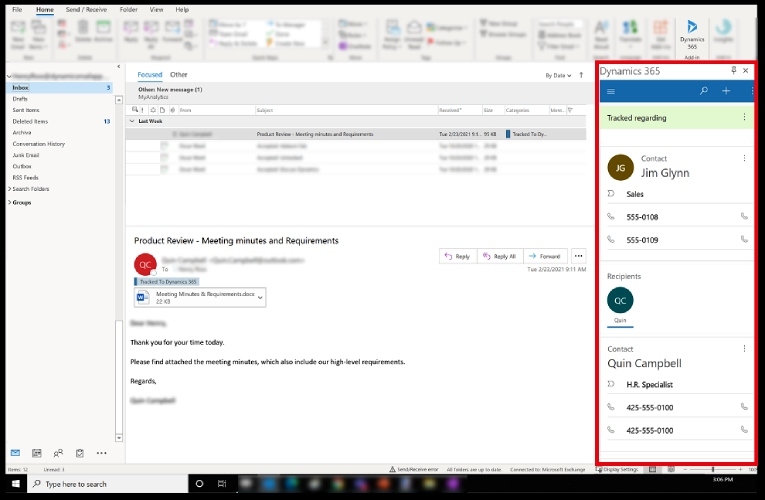
Sales reps can track customer interactions for lead nurturing with Dynamics 365 and Sales Outlook integration. (Source: Microsoft)
My Expert Opinion
Dynamics 365 is the top choice for teams that are deeply invested in Microsoft products and equipped with a budget for advanced sales tools. This CRM can be seamlessly integrated with Outlook, allowing users to perform crucial CRM functions such as lead and deal management directly within Outlook.
Moreover, sales managers can leverage the insights tools to gain valuable insights into their brand, pipeline, customers, and competitors.
Visit Dynamics 365
How did I evaluate the best Outlook-integrated CRMs?
When choosing a CRM, it’s crucial to set objective parameters. I wanted to find the best Outlook CRM system, so I checked its capabilities when connected to Outlook. I assessed every CRM’s ability to access emails from the CRM, sync calendar events, and import contacts between Outlook and the CRM.
I also considered the price, how easy it is to use, and how good the customer support is for each product.
10%
Advanced or Niche Feature
25% of Overall Score
As most CRM products have standardized Outlook integration capabilities, I focused on evaluating fundamental features essential to any CRM system, irrespective of its primary application or industry.
These include contact and lead management features, reporting and dashboards, pipeline customization, workflow automation, email management, and data import/export features. We also assessed its mobile capabilities and third-party integrations.
10% of Overall Score
I studied the niche features or specific capabilities associated with the best CRM Outlook integration. For example, a CRM integration for Outlook lets users access their CRM from the Outlook interface. We also examined other aspects, such as the availability of quoting or invoicing features and real-time notifications associated with data synchronization.
15% of Overall Score
I took pricing and affordability into account, which involved examining subscription costs, flexibility in billing, and expenses related to accessing Outlook features. My goal was to ensure that each provider offered a free plan and a range of scalable pricing choices suitable for growing businesses. Additionally, I assessed the availability of both monthly and annual subscriptions.
20% of Overall Score
To assess the ease of use of the best CRM software for Outlook, I checked if the provider has built-in templates or automations. I also searched reputable review sites to gauge general user sentiment regarding its learning curve and ease of setup, and considered its plan options to see if it is easily scalable.
15% of Overall Score
Comprehensive support is vital in preventing negative user experiences and addressing potential issues when using these Outlook CRMs. I assessed this aspect by considering the availability of various support channels, such as phone, email, live chat, and self-service resources like knowledge bases or community forums. I also examined the operating hours of their support services and the access to 24/7 assistance.
15% of Overall Score
The expert score considered the collective feedback from other users regarding each Outlook CRM, as gathered from online reviews. I aimed to determine whether these users were satisfied with the features and if they believed the platform offered good value for their investment. Furthermore, I assessed user opinions regarding the ease of setting up the CRM, operating its tools, and navigating the interface to gauge overall user experience.
*Percentages of overall score
Frequently Asked Questions (FAQs)
Yes, some CRMs are specifically designed for Outlook. These are full-featured CRMs you can access directly from Outlook, allowing you to manage your sales processes without leaving your email client. These products include Avid CRM, monday CRM, Salesforce, and Salesflare.
Multiple CRM systems integrate with Microsoft Outlook, including Microsoft Dynamics 365, Zoho CRM, HubSpot CRM, Pipedrive, Capsule CRM, and Apptivo. These integrations enable a seamless email and calendar data syncing between CRM and Outlook, though features may vary.
Yes. Outlook has a basic email tracking feature called Read Receipts, which can tell if an email was opened. If you need advanced email tracking capabilities, you’ll need a more powerful tool like a CRM for Outlook with a built-in email tracker. For instance, HubSpot CRM lets you monitor email open and click rates to gauge engagement levels.
Yes, Microsoft offers its Dynamic 365 Sales product, which lets you handle CRM functions such as lead management, deal tracking, quote generation, and campaign deployment. While robust, it’s not necessarily a great CRM for small businesses because of its cost and steep learning curve. We recommend a CRM that integrates with Outlook, like HubSpot CRM or Pipedrive.
Bottom Line
Integrating your CRM with Outlook lets you manage your email and customer data without switching platforms. The best CRMs for Outlook have automation, AI, and document management tools, improving efficiency and productivity.
Depending on your budget and feature preferences, various Outlook CRMs could better suit your business. For instance, HubSpot CRM is best for free email tools, while Zoho CRM is best for its cost-scalable plans.
Visit HubSpot CRM