I’ve been testing a bunch of different websites for logo design for some time now, and almost every year, there are always a bunch of new players on the market. Which brings me to conclude that … in 2025, Canva just isn’t the best website for logo design anymore. At least, not in every situation.
About five years ago, Canva was the undisputed king, but since exploding in popularity, there’s been a tendency for its logo designs to look generic, and even almost exactly the same as those of other businesses.
With so many people using Canva’s templates, you run the risk of your brand not being memorable, which is the exact opposite of what a logo should do.
But that doesn’t mean Canva isn’t worth considering anymore. It’s still a very capable design platform and something I use pretty often for quick designs, but it’s not the only available platform, even if you have no design experience.
I tested and compiled the best websites for logo design in 2025, and the following are my top picks.
- Adobe Express: Overall best website for logo design
- VistaPrint: Best logo designer for branding materials
- Canva: Best for beginners
- CorelDRAW: Best for illustrating fully custom logo designs
- Turbologo: Best AI logo generator
- Looka: Best for generating full brand kits
The best websites for logo design: An overview
Adobe Express: Best for Designing Logos and Other Marketing Materials

Pros
- Layer-by-layer editing for better customization
- Thousands of logo design elements and templates, hundreds free
- All design elements and images are available for commercial use
- Access to the Adobe Stock image library
Cons
- No fully custom logo designs, as you’re limited to the available design elements
- Some of the better elements and templates are locked behind paid plans
Adobe Express has since overtaken Canva as my favorite online logo design platform. It has the same ease of use and pretty much identical design capabilities, but it offers a lot more design customization. This customization is mostly thanks to its layer-by-layer design capability, which mimics a similar feature on Adobe’s professional platforms, Illustrator and Photoshop.
It’s a small feature that counts for a lot in making logos (and other design projects) a lot more customized and less generic. And it just makes the design process easier.
As someone who’s used both Adobe Illustrator and Canva, I particularly appreciate how this platform is like the perfect midpoint of both — it combines Canva’s ease with Adobe’s design expertise. You can tell that it was designed by designers.
There are also lots of logo templates, featuring a wide variety of styles. Not all of them are free, as with Canva, but all of them are very well designed.
I recommend Adobe Express to anyone I know who’s a little frustrated with Canva and wants different templates or design elements, but still wants to design a logo in an hour at most — or even other design collateral, like social media content. All the logos made with Adobe Express are also available for commercial use, including the ones generated using AI.
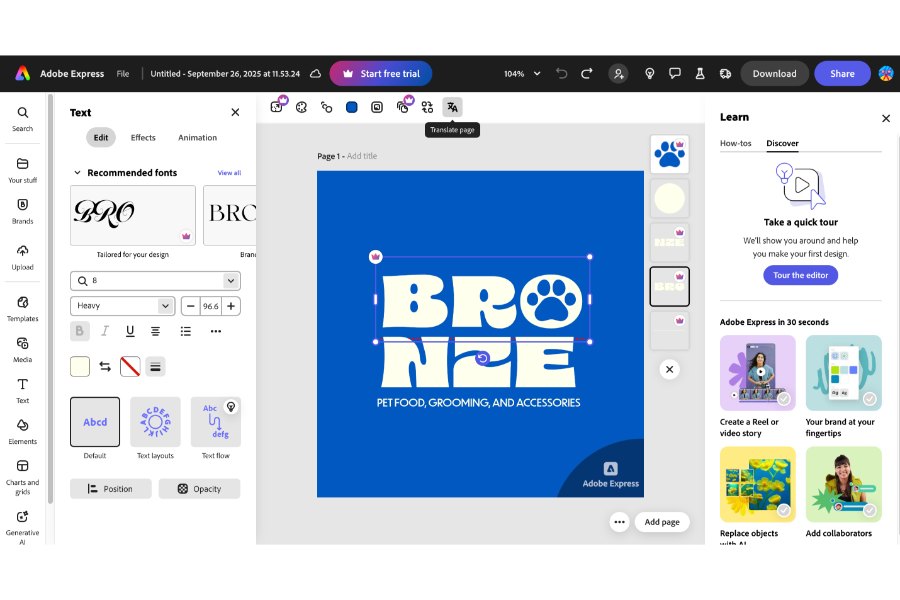
Adobe Express combines Canva’s ease of use with Adobe’s design sensibilities. (Source: Adobe Express)
Type of logo designer: Drag-and-drop
Canva: Best for beginners
Pros
- Super easy, beginner-friendly platform — build a logo in 20 minutes at no cost
- One of the biggest libraries of free design elements and templates
- Unlimited customization on your logo, even after downloading
- DIY a logo or use AI to generate one
Cons
- Designs can easily look generic — not great for branding
- Possibility of having a similar logo to another Canva user, especially when using a template
- Not all elements are available for commercial use
Of course, I couldn’t entirely leave Canva out of this list. Canva’s still one of the most capable websites for logo design, especially for beginners or anyone who wants the quickest and easiest way to build a logo.
If you’ve ever used Canva, you’re probably familiar with how intuitive the platform is, and how many design templates it has, although increasingly now, its best design elements and tools (looking at you, background remover) tend to be locked behind the paid plans (which have also gotten more expensive).
Also, because so many businesses and creators also use Canva, there’s a decent chance your logo might end up looking similar to another business’s. Making a truly unique logo is almost impossible because you’ll be sharing assets with thousands of other small business owners, creators, students, and everyone else on Canva’s massive user base.
So, from a branding perspective, it’s not the best platform I’d recommend for creating a long-term, custom logo, although I’ve seen many small business owners use it for temporary ones to get their business off the ground before transitioning to a more permanent one later on.
Canva also has an AI design tool that can generate logos from scratch. But honestly, they’re imperfect, and you can tell they were AI-generated, even if they are slightly more customized.
My verdict? Canva is perfectly fine for quick, simple logos — nothing that needs custom typography or advanced graphics. It’s not my best recommendation per se, but it’s still handy for quick designs. Convenience and usability are its biggest assets over design quality or customization.
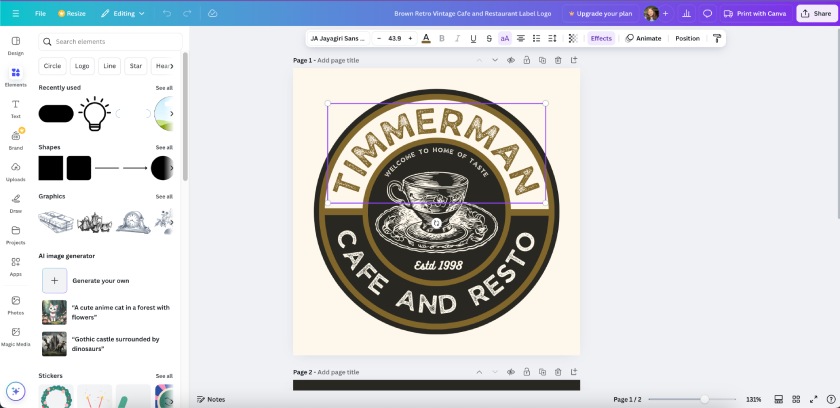
Canva is great for quick and simple logos, but not for fully unique or custom ones. Here’s a sample I made using its AI image generator. (Source: Canva)
Type of logo designer: Drag-and-drop and AI-generated
VistaPrint: Best logo designer for branding materials
Pros
- One-stop shop for designing logos and printing branded materials
- AI generates unique, commercial-ready logos based on descriptions
- Free to use for up to 60 logo generations
Cons
- No way to edit the AI logos, even if the text is misspelled
- Limited design freedom; not great if you have a specific logo design in mind
VistaPrint is first and foremost an online printing platform. But it also has a logo design tool, which is pretty useful for creating straight-to-print designs. However, I will caution that its design capabilities aren’t anywhere near Canva or Adobe Express’s standards.
They’re more basic and have more limited customization. Another big difference is that it uses an AI logo generator first before moving on to the customization platform, which is very limited, as it can only change colors and fonts.
In that regard, it’s a good option if you don’t have a clear idea of your logo yet. The AI can generate some initial designs that you can customize further. On the flip side, it means you get very little design freedom.
Furthermore, VistaPrint’s AI is prone to spelling some words wrong (which it did for me). And there is no way to change it, so I definitely don’t recommend it if you want a logo with text. There’s a good chance something will be misspelled.
And it’s not just that words are misspelled (“compaiy” vs “company”). But the way in which it chooses and places random nonsense words suggests that its AI model is pretty far behind on the comprehension scale.
Personally, I don’t use VistaPrint’s logo maker too often because I like to have more control over my designs. I imagine it’ll be more helpful if you’re not comfortable starting a design from scratch, or you’re using your logo primarily for printed materials and need it done quickly.
It’s also easy with VistaPrint to see mockups of your logo on posters, merch, business cards, and dozens of other marketing materials.
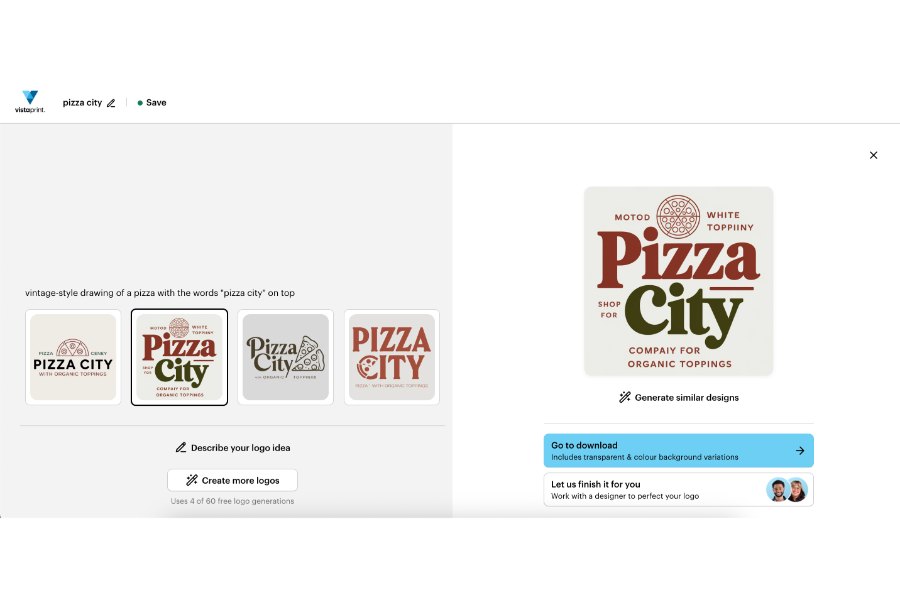
VistaPrint uses AI to generate logos — though not without flaws. Spot the misspellings in this one. (Source: VistaPrint)
Type of logo designer: AI-generated
VistaPrint LogoMaker is 100% free to generate 60 logos.
CorelDRAW: Best for illustrating fully custom logo designs
Pros
- Full creative freedom with freehand design tools
- Like Adobe Illustrator, but cheaper, easier, and fully online
- Library of vector graphics, fonts, and templates
- Custom logo sizes and resolutions
Cons
- Sometimes lags when designing
- No one-time logo purchase, only monthly or yearly platform subscriptions
- Not all design assets have a commercial license
- No brand kit
CorelDRAW is a new entry on this list and the one I’d recommend the most for full creative control over your logo designs. This is the platform for people who want something that allows full creative control and want more than what Canva allows, or if you already have a specific vision in mind for your logo and want to recreate it digitally.
It’s also the one graphic artists or anyone with a design background will appreciate most, as it’s the most similar online platform to Adobe Illustrator by far.
In fact, it’s my best alternative to it (yes, even more than Adobe Express). There are freehand drawing and painting tools, and even layer-by-layer editing. There are also vector and stock image libraries.
This being an online platform, though, the experience doesn’t quite feel as smooth as Illustrator, but it’s good enough and definitely the best website for logo design if you want a fully custom, unique logo. It’s not ideal for beginners, but rather for people with digital design experience.
There are also projects and templates for other designs, like social media graphics and presentations, and the 16-day free trial means you can design and download a 100% custom logo completely free if you’re new to the platform.
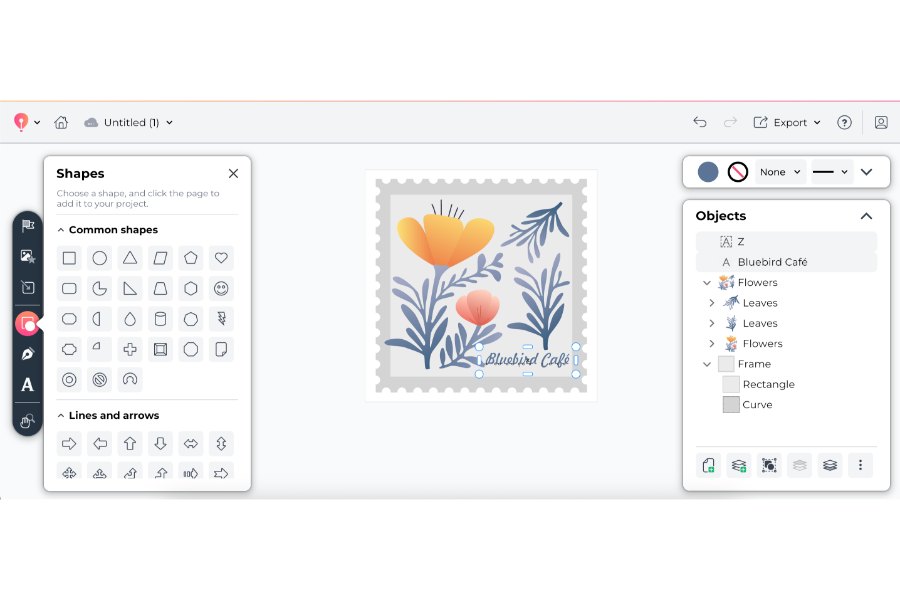
CorelDRAW offers full creative and design freedom — ideal for creating a completely unique logo. (Source: CorelDRAW)
Type of logo designer: Drag-and-drop
Turbologo: Best AI logo generator
Pros
- Option to customize AI-generated logos in the drag-and-drop editor
- Unlimited logo edits and full copyright ownership
- Generate a full brand kit with social media designs, business cards, and Zoom backgrounds
Cons
- Most generated logos are generic icon-and-text designs
- Costs are higher for similar designs that you can get on Canva or VistaPrint
Turbologo is a fully AI-powered logo design generator. But what I like about it is that it doesn’t just generate logos from text prompts. You can choose styles and colors beforehand, and it’ll generate a selection to choose from.
And there are options to customize your design in a drag-and-drop design platform as well, so it’s still possible to make changes before downloading and using your logo.
It combines the ease offered by AI design platforms with the customization capabilities of a drag-and-drop designer, all while being super easy to use.
That said, its logo designs aren’t what I’d call modern or particularly sophisticated. They tend to be a generic combination of text-plus-an-icon, though there are some gems in the mix. Plus, the ability to customize it further in the editor is a huge plus.
The only problem is that it’s not free to download, and downloading with full commercial rights costs $9.99 — higher than most other platforms that offer a similar logo quality.
Overall, it’s a decent platform that provides good value, and if its AI could only produce more complex designs (maybe in a few years?), I’d gladly put it higher on my list.
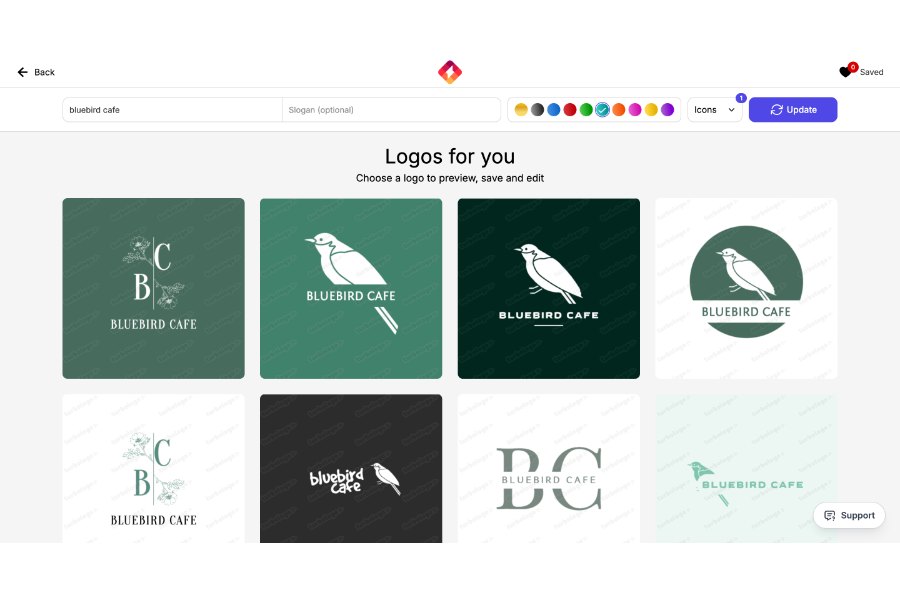
Turbologo uses AI to generate logo drafts that can be customized in a drag-and-drop editor, combining ease and customization. (Source: Turbologo)
Type of logo designer: AI-generated
Looka: Best for generating full brand kits

Pros
- Create a download-ready logo in 15 minutes or less, no design skill necessary
- Create a brand kit with a website and 300-plus branded templates
- Modern, industry-specific logo designs
Cons
- Limited logo customization — only fonts, colors, and icons are customizable
- Possibility of having a similar logo to another business
Looka’s primary benefit has always been its ease of use. It’s an AI-powered brand kit generator (before AI platforms were in the mainstream, so props to that), and it’s my top recommendation if you want AI to help generate a full brand kit.
It essentially acts as an AI-powered design agency, where you can choose specific logo icons, font styles, and colors, and it’ll generate some logo designs for you to choose from. It’s a very efficient process that takes about 15 minutes, tops.
The problem is that these logos aren’t exactly the most unique or sophisticated and are the sort of thing you could also create on Canva or Adobe Express at no cost. More than anything, it’s a platform I’d recommend to anyone who doesn’t have a clear vision of what they want their logo to look like but needs a full brand kit quickly and easily for business cards, websites, social profiles, and even marketing swag.
There’s also an editor for further customization, although, unfortunately, not a drag-and-drop one, which significantly limits design freedom. What I do like is that all the logos are nice and modern, and using the tool has no limits — you only pay once you’re 100% satisfied.
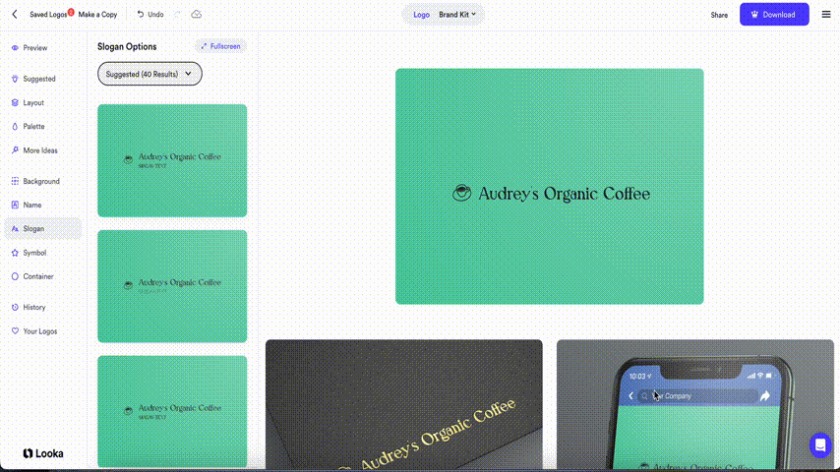
Looka acts as an AI-powered logo design agency, but without the same level of customization as other vendors. (Source: Looka)
Type of logo designer: AI-generated
Logo Only
Logo & Brand Kit
Some alternatives to consider
The platforms in this guide are some of the best websites for logo design I can personally attest to, but maybe you want something a little different. For example, if you want a completely custom logo design from a professional graphic designer, or you need a more complex type of tool.
I focused exclusively on online logo design platforms on this list that are good alternatives to Canva, but there are other places you can get good logo designs as well, like 99Designs, Fiverr Pro, or the OG design tool, Adobe Illustrator.
How I chose the best websites for logo design
30% of Overall Score
While each platform is built differently, some specific features I looked for were high-definition logo downloads, multiple logo formats, adequate design tools and services, color and font customization, and the ability to build other branding assets using your logo.
25% of Overall Score
I also gave extra credit for extra features. These include things like design tools for other marketing materials, brand kits, editable logos, logo printing services, and AI design tools.
15% of Overall Score
A logo that you create yourself shouldn’t have to make a significant dent in your marketing budget, which is why I specifically looked for design platforms with a starting price of $20 or less and design services with $100 or less. Most of the platforms above also have free plans or a money-back guarantee.
10% of Overall Score
The platforms above are also simple enough for beginners to navigate, but having human support nearby is invaluable to a good customer experience, which is why I gave higher scores to platforms with longer support hours and that can be contacted by phone, email, and online chat.
20% of Overall Score
Finally, I also took my experience in marketing and content creation into account when evaluating the platforms above and how they stack up against other logo design platforms. My expert score is based on each platform’s overall features, design tools, value for money, and ease of use.
*Percentages of overall score
How do you design a good logo?
A good logo is far more than random shapes and colors — it should communicate what your brand is about quickly and accurately.
Think of the iconic logos of Starbucks or Apple, or even newer ones like the Spotify logo. They’re unique, memorable, and give you a sense of what the brand signifies — aka, its brand identity.
The logo you design should accurately represent the thoughts and ideas behind your brand and differentiate you from your competitors, while being easy for audiences to understand and recognize. Doing that first means understanding your brand.
- Understand your brand to its core. No good brand logo exists without a fully formed brand identity behind it. Before designing your logo, know your brand’s mission, vision, values, personality traits, and even elements like colors and motifs. All of these will help shape your logo design.
- Research your market and competitors. The foremost functions of your logo are to help you stand out from the competition and to connect to your target audience. To do that, you’ll need to understand both. Research your audience’s preferences and values, and the design principles that speak to them. Research your competitors’ brands to see how you can stand out.
- Get inspired. One of the best things about logo design is that you can always take inspiration from the thousands of logos that already exist. Take a look at some of the best brand logos from successful businesses and note what design elements and creative interpretations might work for your own logo.
- Choose the right platform to support your vision. Even if you don’t have your full logo designed, it helps to have a general vision of what it should look and feel like, along with the design elements you want to include. This helps you choose the top logo maker to fulfill that vision, whether you want a complex logo that requires a custom design or just a simple wordmark.
- Think for the long term. A simple logo with your brand name might be enough for now, but as your brand grows, you might need something more unique that sets you apart from competitors. Doing a full rebrand is risky if your brand isn’t established enough, so design a logo that can support your brand until the next few stages of your business’s growth.
- Get feedback. No good logo came out of just one design session. Feedback is an important part of the creative process, especially for a public-facing asset like a logo. Before finalizing your logo, get feedback from people important to your business, like investors, team members, trusted friends and family, and even fellow business owners.
Frequently asked questions (FAQs)
To choose the best logo design website for your needs, first evaluate the type of logo you need. Do you already have a specific logo design in mind, or do you need to start with some design inspiration?
Some platforms have drag-and-drop editors that allow more creative control, like CorelDRAW and Adobe Express, while others use AI to generate logos based on your preferences, like Looka. Then, evaluate your budget, as well as other design needs. Some platforms have design tools for other brand and marketing assets, like social media posts and business cards.
It largely depends on your specific preferences, but an overall good option is Adobe Express — it’s easy to use with ample design customization, has a design library with thousands of elements, and its designs are all available for commercial use.
It’s an online drag-and-drop design platform like Canva, but often with better templates and customization capabilities. Other good logo design platforms are Turbologo for an AI-generated logo design and CorelDRAW for an online illustration and design platform that allows full creative control.
No, ChatGPT doesn’t create logos as it can only generate text. A good alternative for AI-generated logo designs is Turbologo, which generates logos based on your design preferences using AI, or Looka, which generates full brand kits.
DALL-E, which is also from OpenAI, can generate images, but requires very specific design directions and often takes multiple prompts to get a logo design right. And its results are hard to replicate. If you need to resize a previously generated logo, you run the risk of getting a design that’s close but not exactly the same. Even small design differences can chip away at your brand identity.
Bottom line
Canva’s still a reliable, easy option for designs, but it’s no longer the absolute best website for logo design, in my estimation.
There are dozens of new platforms that can help create a memorable, well-designed logo — whether through AI or using a drag-and-drop design platform — regardless of your design skills, like Adobe Express, VistaPrint, and CorelDRAW.