Consignment stores bridge owners and shoppers, taking items on intake, pricing and tagging them, selling in-store or online, then paying out commissions. That workflow demands a POS that’s both quick at checkout and built for consignment, centralizing intake, commission rules, consignor portals, payouts, store credit, and automated aging markdowns, so you’re not juggling add-ons or spreadsheets.
We evaluated nearly a dozen POS systems on consignment workflows, register speed, pricing, ease of setup, and real-world integrations (native tools and app add-ons). Based on our review, the seven best POS systems for consignment stores are:
Fit Small Business is able to offer our services for free because some vendors may pay us for web traffic or other sales opportunities. Our mission is to help technology buyers make better purchasing decisions, so we provide you with information for all vendors — even those that don’t pay us.
1
Toast
Employees per Company Size
Micro (0-49), Small (50-249), Medium (250-999), Large (1,000-4,999), Enterprise (5,000+)
Any Company Size
Any Company Size
Features
Barcode Scanning, Cash Management, Customer Management, and more
2
Square
Employees per Company Size
Micro (0-49), Small (50-249), Medium (250-999), Large (1,000-4,999), Enterprise (5,000+)
Any Company Size
Any Company Size
Features
Barcode Scanning, Cash Management, Customer Management, and more
3
Clover
Employees per Company Size
Micro (0-49), Small (50-249), Medium (250-999), Large (1,000-4,999), Enterprise (5,000+)
Any Company Size
Any Company Size
Features
Barcode Scanning, Cash Management, Employee Management, and more
Best POS systems for consignment stores compared
Ricochet: Best overall consignment store POS system

Pros
- Dedicated portal lets consignors see their accounts and inventory
- Seasonal and automated discount capability
- Webstore available as a paid add-on; built-in loyalty/rewards
- Booth rental capability
Cons
- Ecommerce costs extra
- Live customer support is limited (business hours only)
Ricochet overview
With a 4.38 out of 5 on our rubric, Ricochet is the best POS system for consignment stores. It is specialized consignment POS software with industry-specific features, including a consignor portal for account access, supplier tracking, payout management, and tools for managing consignor credit. It also includes inventory management.
Ricochet had the highest score for consignment-specific features, but lost points because ecommerce is a paid add-on (Ricochet Web) and because its store-return workflows and checkout-screen customizations are more limited than some competitors. The customer service hours are not 24/7, unlike those of others on our list. However, real-world customers give it 4.67 out of 5 stars, the highest approval on our list. Additionally, it integrates with Square, which means that you to combine the two for the best of both worlds.
Ricochet’s plan costs $159 per month or $1,599 for an annual subscription. This is average for POS for consignment stores, although ConsignCloud is cheaper. Ricochet offers a 14-day free trial, but does not have a free plan. You need to pay extra for ecommerce, and you’ll typically use Ricochet Pay (Fortis) or Ricochet’s Square integration for payment processing.
- 14-day free trial
- Consignment plan: $159 per month ($1,599 for an annual subscription)
- Ecommerce solution: $79 per month ($799 for an annual subscription)
- Payment processing through Ricochet Pay: $15 per month PCI and admin fee
- In person: starting at 2.6% + 10 cents
- Online: starting at 2.9% + 30 cents
Since Our Last Update: Ricochet has added QR code scanning, text receipts, and tax compliance via Avalara tax compliance software.
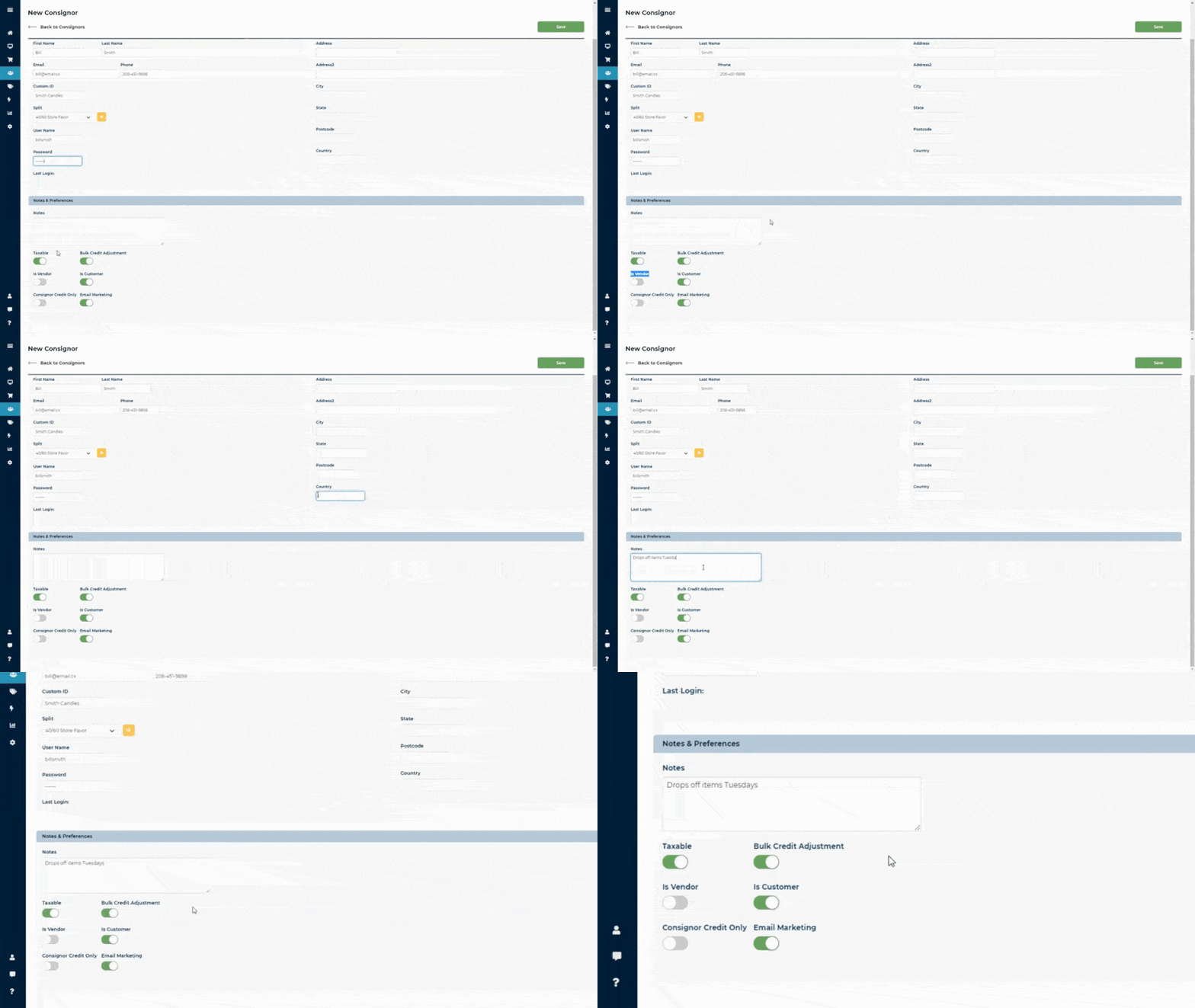
You can give consignors a username and password, and designate them as vendors to let them access their accounts through the portal as well as edit and add items. (Source: Ricochet)
- Consignment portal: Ricochet has a consignor/vendor portal, where consignors can log in to see their accounts, including items still unsold, pending payouts, and more. While the other POS for consignment stores also offer portals, Ricochet’s is widely considered more complete.
- Consignment tools: Ricochet, unlike Square and Shopify, is designed specifically for consignments. You can assign consignor credits and awards, automate commission splits, and even let consignors create their own inventory and print their own tags.
- Booth rentals: All of Ricochet’s plans include booth rental management, which allows you to automatically charge booth rentals in the consignor account.
- QR code scanning: Ricochet has added QR code generation, which lets customers scan a code on an item’s tag or signage to view available variants or related products.
Ricochet does not manufacture or ship its own dedicated hardware. Rather, it works on computers, Macs, or tablets (including Windows PCs, Macs, and iPads). It provides “Recommended Setups” through its partner POSGuys, with suggestions for label printers, cash drawers, barcode scanners, Ureceipt printers, and card readers. Ricochet also supports third-party hardware that meets its compatibility requirements.
Ricochet has strong user approval on review platforms: 4.7/5 on Capterra and 3.9/5 on G2. Users consistently praised its inventory management and reporting tools.
Recent reviews, however, point to some drawbacks. Users report that the booth-rent feature isn’t enabled by default and requires extra setup, and a few mention the app can feel glitchy, noting login issues, inconsistent workflows, or occasional reporting limitations. While overall sentiment remains positive, these concerns suggest Ricochet may need refinement in usability and configuration.
Shopify: Best for omnichannel retail

Pros
- Versatile system for online or in-person sales
- Best-in-class ecommerce platform
- Shipping discounts available
- Sell in 133 currencies with Shopify Payments
Cons
- Needs third-party apps or custom integrations for consignment-specific features
- Shopify Payments is the only integrated payment processor for Shopify POS
Read our full Shopify POS review
Shopify POS overview
Shopify is primarily an ecommerce platform with a powerful retail and thrift store point-of-sale system. Although not designed specifically to be a POS system for consignment stores, Shopify tops our list for the best consignment POS system because of its excellent tools and ability to integrate with consignment store software. Shopify offers social selling tools and discounts on shipping.
Shopify earned 4.11 out of 5 in our evaluation. It has good tools for checkout, marketing, and ecommerce but lost points for needing an add-on for consignment tools and because some features require a higher-tier plan. Shopify requires an app for loyalty programs (unlike other providers such as Ricochet and SimpleConsign, which have native tools for this), but free apps are available.
Its pricing is competitive, and you can purchase or rent the POS hardware or use the mobile app.
To use the POS system, you need a Shopify plan. Plans run from $39 to $399 per month for the Basic, Shopify, and Advanced plans. These offer better discounts on shipping and lower transaction fees with higher-tier plans.
If you subscribe to an ecommerce Shopify plan, you get POS Lite included for free. Or, you can sign up for Shopify POS Pro for $89 per month per location (added on top of your Shopify plan).
You can count consignors as vendors, but if you want specialized consignment tools (consignor-specific payouts, vendor portals, etc.), then you’ll need to purchase an app to handle those. Shopify POS itself does not include full consignment-management tools.
Shopify has a 3-day free trial for its plans and the monthly fee for the first 3 months for any plan is $1.
* Shopify collects sales taxes in certain states where it is required by law. The prices stated here do not reflect such taxes.
Shopify integrates with several consignment systems. We recommend ConsignCloud. It offers a simple POS system, but excellent consignment tools, including split payment, a mobile-friendly consignor portal, and automatic inventory control and bulk payouts.
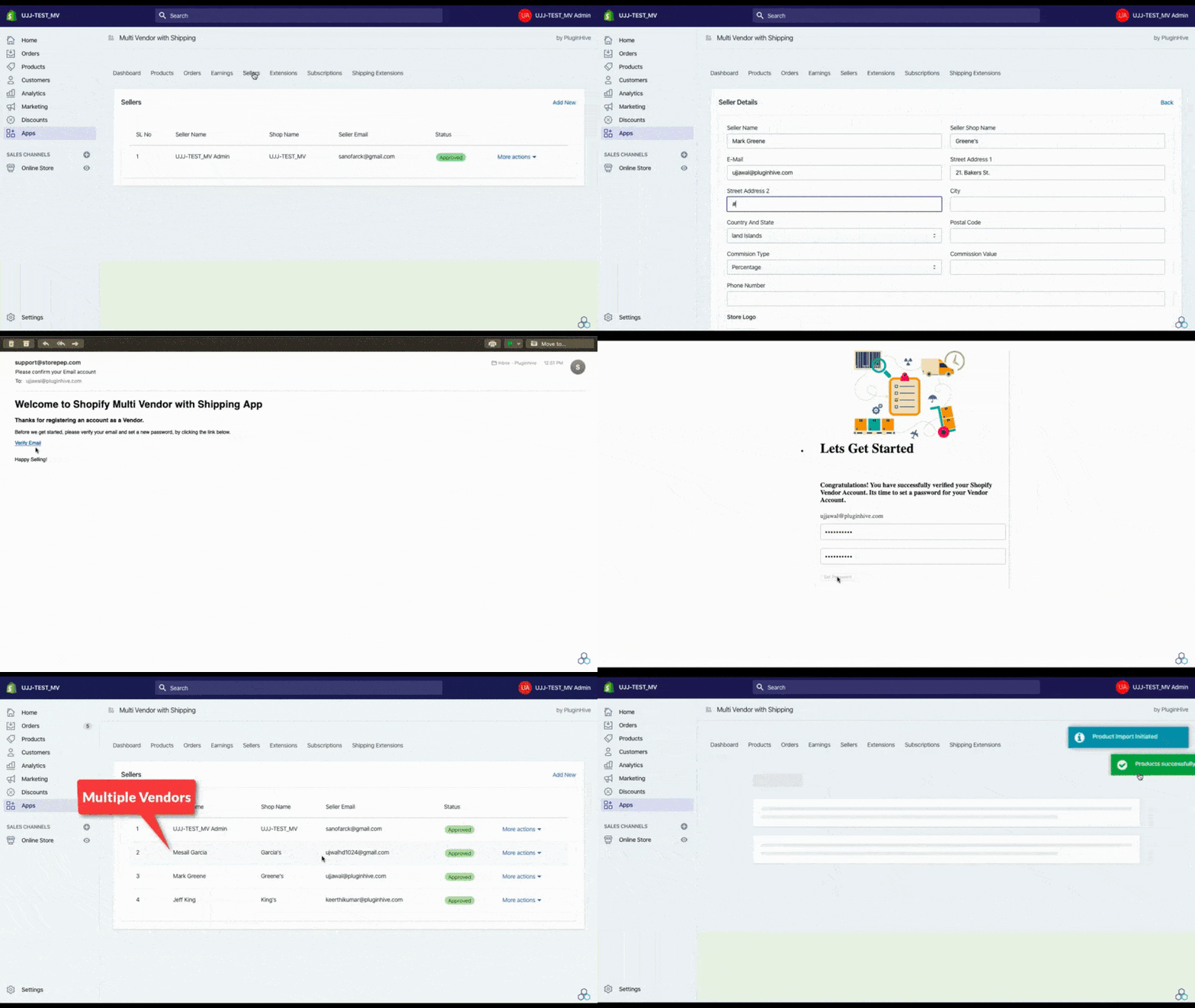
You can integrate a consignment app or input consignors as vendors. (Source: Shopify)
- Integrated POS: Shopify’s POS system integrates fully with the online store; whether you sell an item in person or online, it’ll be accounted for in inventory and sales reports. The POS is customizable, with shortcuts and saved carts as well. Shopify makes our list of the best POS system software along with Square.
- Online sales: In addition to being able to create an online store easily, you can make sales online and have customers pick up items in person. This POS system also lets you sell on social media sites via solid integrations with Facebook, Instagram, and TikTok. Shopify is our No. 1 recommendation for ecommerce platforms.
- Inventory management: Shopify has excellent inventory features, including low stock alerts and variants, purchase orders (POs), and even the ability to forecast product demands.
- Integrations: Shopify is by far the best for variety of integrations, from Quickbooks to consignment hardware to customer relationship management and more. Square is a close second, while the other consignment store POS software on our list generally only offer a handful of integration options.
Although it focuses on online sales, Shopify offers hardware for an in-store POS system for resale shops or consignment stores. The hardware systems include stands, cash drawers, card readers, and more. You can even rent individual devices or hardware bundles for a few days, such as for a fair or community event. Hardware rentals start at $22 per day, and Shopify alone offers this capability.
Shopify real-world users rate it 4.46 out of 5 stars averaged over multiple websites. People love the ease of use and excellent website design elements. They also noted the excellent range of features. Although users appreciate the shipping discounts, their most common complaint is Shopify’s expense.
The phone app scores 4.2 out of 5 on Android and 4.7 out of 5 on iOS.
Square for Retail: Best for quick setup and low upfront cost

Pros
- Basic POS is free
- Free native ecommerce tools
- Easy-to-use system
- Integrated banking/payroll/team tools
- Works great on iPads or tablets, or purchase POS hardware
Cons
- Consignment functions need third-party add-ons
- Can only use Square payment processing
- Limited or inconsistent phone support
Read our full Square for Retail review
Square for Retail overview
Square for Retail is one of the top retail POS systems for small businesses, though in our rubric, it places below Shopify and Ricochet. It’s a terrific choice for a small consignment shop that doesn’t need full consignor-management tools. The Square for Retail app is fully supported on iPad/iOS; Android devices are limited to the basic Square POS app. While Square offers its own POS hardware, it’s best optimized for tablet use.
As with Shopify, you can register consignors as vendors or integrate Square with third-party consignment apps (such as ConsignCloud, Rose, or Circle-Hand) to get consignor payout and portal features. Square offers competitive, flat-rate payment processing through Square Payments only — it does not integrate with outside processors—along with a free POS plan and a wide variety of Square-branded services you can add as your business grows.
It earned 4.24 out of 5 on our rubric and scored highest on pricing and checkout experience, but lost points on consignment features, since commission splits, consignor portals, and payouts require add-ons. Even so, the free Square plan includes an easy-to-use POS, strong inventory management, customer tools, and a free online storefront.
While Square offers a free plan, you need the Plus plan for vendor management and certain advanced features. Its payment processing is competitive, and it includes a free basic ecommerce (online store) option.
- Square for Retail (baseline plan): Free
- Square for Retail Plus: Starting at $89 per month, per location ― adds vendor management, automatic inventory tracking, inventory counting, and purchase orders
- Ecommerce: $0-$79 per month
Square POS / Processing Fees:
- In person (card present): 2.6% + 15 cents (Free plan) · 2.5% + 10 cents (Plus plan)
- Online (via Square Online / eCommerce): 2.9% + 30 cents on all plans
- Manually entered (keyed-in, or invoice): 3.5% + 15 cents
Additional Services:
- Marketing: Starts at $15 per month for up to 500 customer contacts
- Loyalty program: Starts at $45 per month, per location, for up to 500 loyal visits
- Payroll: $35/month + $5-$6/employee depending on package
- Team management: $0-$35 per month, per location
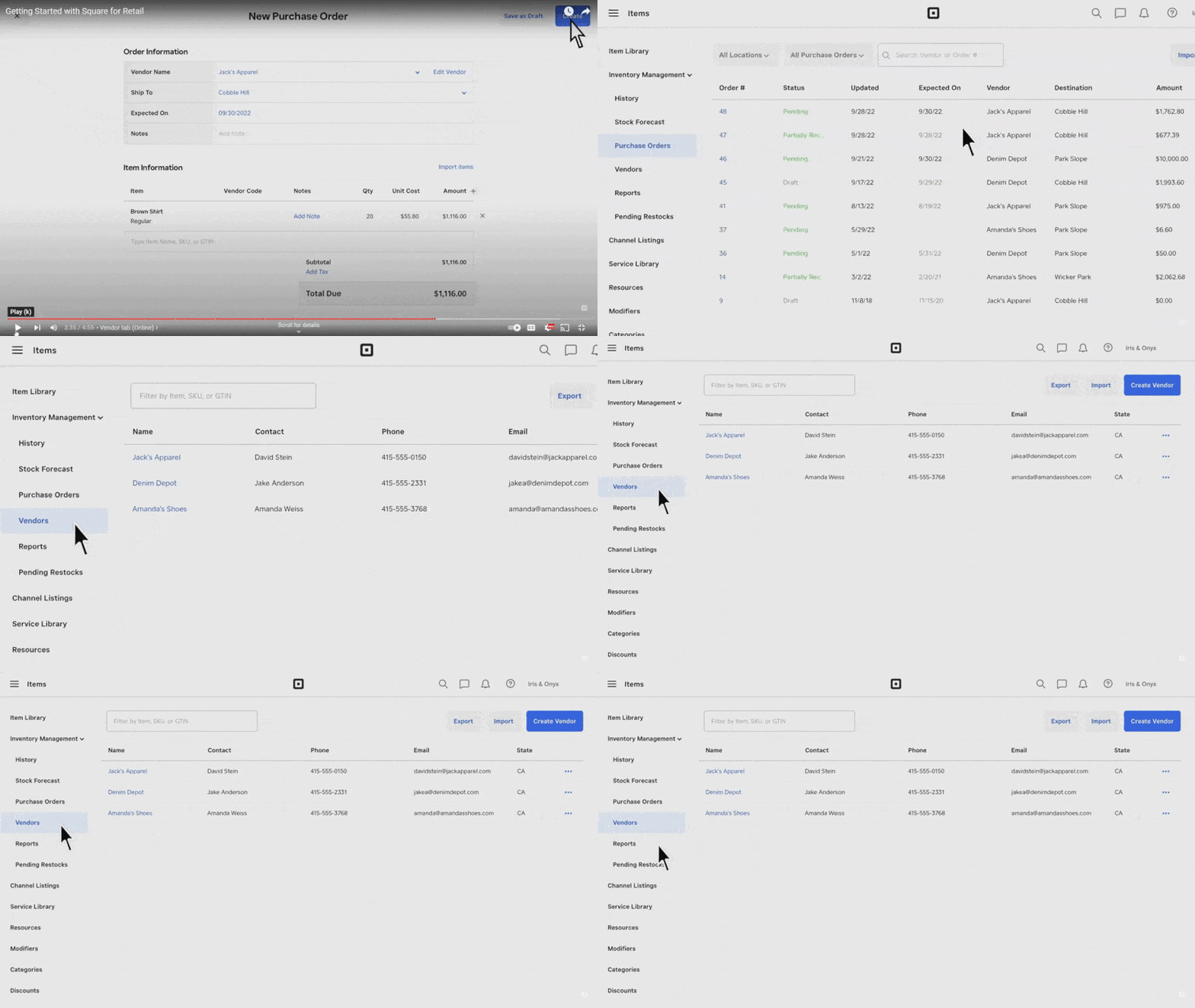
You can either integrate a consignment app or designate consignors as vendors. (Source: Square)
- POS system: Square’s POS system is very easy to use and, unlike many POS systems, lets you take credit card payments even if offline. It processes them once you have a connection again. It also has customizable hotkeys for quicker checkout. With a free plan, it’s a great POS system for thrift stores as well as consignments. Note: vendor management, purchase orders, and advanced inventory tools require the paid Plus plan.
- Omnichannel sales: Like Shopify, Square has an online store component, but Square’s offers a free basic online store builder with all plans. This includes a store, the ability to order online and pick up in-store, and to sell via Facebook, Instagram, or Pinterest. Advanced ecommerce tools (like abandoned cart recovery) may require a paid Square Online tier.
- Customer management: Square can recognize customers by their payment methods, and customers can save their payment preferences for future sales. You can ask customers for feedback right after the sale via text or email receipt. One drawback is that email campaigns and loyalty programs cost extra. Square’s built-in loyalty and marketing tools start at $45/month and $15/month, respectively.
- Grows with you: Of all the consignment POS systems on our list, Square is the best for businesses looking to grow. You can use it for multiple locations and add services like payroll or team scheduling. Square also has banking services, including loans and checking accounts. However, consignment-specific tools, such as commission splits, consignor portals, or payout automation, are only available through third-party apps.
Square has great flexibility for hardware. You can use your phone, iPad, or Android tablet, or you can purchase its dedicated counter or handheld POS systems. This makes it a great POS system for resale shops, thrift stores, or consignment stores.
Square has strong user satisfaction across major review sites. Real-world users give high praise for its ease of use and the ability to take payments on the go. Complaints included some glitches and that the payment processor can freeze your payments (a typical complaint for payment processing).
The app scores differ by platform: 4.6 out of 5 on Android and 4.8 out of 5 on iOS. Users praise its adaptability and how easy it is to use.
ConsignCloud: Best lightweight consignment platform

Pros
- Free trial (full capabilities, no credit card needed)
- Choose your own payment processor
- Multi-store capabilities
- Consignor portal and automated email notifications
Cons
- Ecommerce requires an integration
- No offline mode for accepting payments
- Chat support with delays
ConsignCloud overview
ConsignCloud is a consignment and reseller software that does not include a free permanent plan (only trial); while its features are robust, many are part of paid add-ons. It tracks inventory and consignors, manages consignor balances, and allows payments via Checkbook.io for direct deposit, with a payout fee of $1.79 per payout when using direct-deposit/Checkbook.
It scored 4 out of 5 in our evaluation, with strong marks for pricing flexibility and consignor tools. Its lowest subscores came in ease of use and integrations, due to basic plan restrictions, such as chat support, no offline mode, and limited base integrations. However, it has strong consignor-facing tools, including a portal and the ability to pay consignors right from the software.
ConsignCloud uses a tiered pricing structure based on the number of add-ons enabled.
- Basic: $119/month, includes 2 add-ons
- Professional: $149/month, includes 5 add-ons
- Enterprise: $179/month, includes unlimited add-ons
Add-ons include: POS register features, email notifications, consignor portal, Shopify / Square / Near.st integrations, advanced reporting, API/webhooks, etc.
- Multiple payout options: With a Checkbook.io account, you can pay your consignors in multiple ways, including check, Zelle, Venmo, PayPal, and even Bitcoin. If you pay consignors via electronic check or direct deposit, the cost is $1.79 each, regardless of the payout amount. ConsignCloud tracks payments as sent, pending, and paid.
- Consignor portal: Like Ricochet, ConsignCloud has a consignor portal (but not with the free plan). Consignors can log in to check account balances, item status, and account history.
- Multiple-store / multi-location: If you have more than one store, ConsignCloud has multi-store tools to help track sales and inventory. Of particular note is restricting inventory access by location, so that employees can’t see inventory from other stores. This can prevent confusion when searching for items for a customer or ring-up.
- Customizations: While it lacks register customizations like Square, it does offer many customizations in the backend. You can customize receipts, control how much information you share with consignors, create custom item fields, discount schedules, and item tags, and more. You can also create your own custom reports, a feature often not found in POS software.
Like Ricochet, ConsignCloud works on a computer or tablet with internet access. You can find a list of recommended peripherals, such as scanners, printers, and cash drawers, on its help site. They are standard for the industry.
We only found reviews for ConsignCloud on Capterra, where real-world users gave it 4.6 out of 5 stars. One user called the inventory management “rewarding and breezy.” People also gave high praise to customer support. There were some complaints about the label maker for jewelry, and that the report maker is the least user-friendly part of the software.
Lightspeed Retail (R-Series): Best for multi-location retail consignment

Pros
- Detailed supplier & customer management
- Excellent inventory tracking
- Ample register fields and tags for tracking
- 50+ preset reports with customizations
Cons
- Expensive
- Not designed specifically for consignment
Lightspeed Retail overview
Lightspeed is a popular retail POS system with incredibly robust inventory and register tools. While it’s not designed specifically for consignment shops, it can easily be used to track consignment items and vendors because the system is so detailed and customizable.
Lightspeed earned a 3.99 out of 5 in our evaluation. It earned high marks for register and checkout functionality, ease of use, and expert score. However, it lost points for not having some consignment features built in, like crediting and payouts. Lightspeed is also relatively expensive, with monthly fees starting at $69 for a single register.
However, Lightspeed’s breadth and depth of tools earned it a good score overall.
Additional registers are $59 each. The monthly fees apply per location, so if you have two locations, for example, you will pay double.
Lightspeed comes with Lightspeed Payments built in. In-person processing fees are 2.6% + 10 cents. It is possible to use a third-party processor with Lightspeed; however, this may incur additional fees.
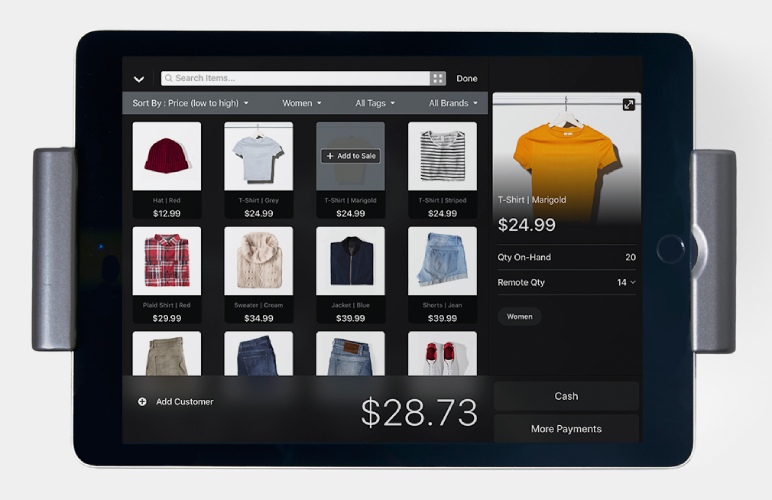
Lightspeed has a sleek yet powerful iPad checkout. (Source: Lightspeed)
- Register tools: Lightspeed checkout can be accessed from either a desktop browser or the Lightspeed mobile app. Lightspeed prompts associates through the checkout process with options for leaving customer and transaction notes, attaching a customer or vendor to the sale, and a variety of payment options, including layaway, on-hold, store credit, and more.
- Analytics platform: Lightspeed also has an excellent reporting platform, with over 50 preset reports, tools to filter and segment data, and visualizations to accompany them. These tools come in every Lightspeed plan. The Advanced analytics in the Advanced plan allow for custom reports, automatic data analysis and suggestions, guides for how to use the reports, the ability to set and measure progress against company and individual goals, and more.
- Ecommerce: Lightspeed has a decent native ecommerce solution that comes included with Standard and Advanced plans, allowing you to create a full-blown online store that syncs with your POS data for no extra cost.
- Customer management: Every Lightspeed plan comes with a customer database. Higher plans include SMS and email marketing, blogging, customer behavior tracking, promotions and coupons, and an omnichannel loyalty program.
Lightspeed operates on iPads and desktop computers via browser. Lightspeed sells desktop and iPad hardware kits, as well as accessories like receipt printers, cash drawers, barcode scanners, and more. All of Lightspeed’s hardware pricing is quote-based.
Lightspeed averages a 4 rating across user review sites like GetApp, G2, and SoftwareAdvice. Overall, users like the system; they say it is easy to use and has decent reporting. Most of the complaints are around billing practices and the inability to get in touch with customer support or account representatives.
Though Lightspeed is not BBB-accredited, there are several complaints around billing, particularly additional transaction fees for using third-party payment processors. Overall, these cons don’t dissuade us from recommending Lightspeed — it’s a great platform. Just be sure to read the fine print before signing up.
Clover: Best turnkey hardware with app-market flexibility

Pros
- Turnkey hardware options
- Large app marketplace for added features
- Integrated payments and basic inventory tools
Cons
- Consignment tools require third-party apps
- Contract terms and processing rates vary by reseller
- Quote-based pricing, not transparent
Read our full Clover POS review
Clover overview
Clover is a turnkey POS system that combines ready-to-use hardware with built-in payment processing through Fiserv. While it’s not designed specifically for consignment, its App Market makes it possible to add tools for consignor management, portals, and payouts.
Clover earned a 3.82 out of 5 in our rubric, with its strongest marks in pricing, register/checkout, and ease of use. It lost points in management tools since consignment features aren’t native and require third-party apps. Small business owners who want a fast setup and integrated hardware will find Clover appealing, but you should expect to budget for add-ons if consignment workflows are essential.
Clover’s pricing can be trickier to pin down than other POS systems because it’s offered both directly from Clover and through a wide network of Fiserv resellers, such as banks and merchant service providers.
If you purchase directly from Clover:
- Software fees: Some plans start at $0; retail packages bundled with hardware begin around $16/month.
- Card-present transactions: Typically 2.3%-2.6% + 10¢ per swipe, dip, or tap.
- Online/keyed-in transactions: Around 3.5% + 10 cents.
Unlike most other POS providers here, Clover separates its hardware/software from payment processing. This means you can buy Clover hardware and still shop for processing through an authorized reseller, giving you flexibility in choosing rates and contract terms.
Because Clover is sold through third-party partners as well as directly, the total costs, fees, and support levels can vary a lot. Always review the contract terms and compare different offers before you commit.
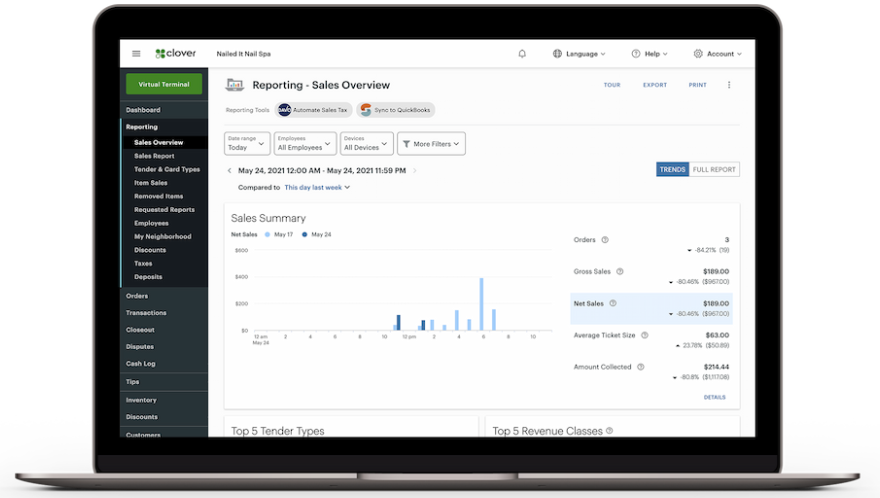
Clover’s reporting dashboard helps shop owners track sales performance, consignor activity, and payout details in one place. (Source: Clover)
- Register and checkout: Clover’s touch-screen checkout makes it easy to ring up sales, apply discounts, accept multiple payment types, and issue refunds. It supports tap, chip, swipe, gift cards, and digital wallets. Staff can also create saved orders, split payments, and manage tips, making it flexible for both retail and service-oriented consignment shops.
- Inventory tools: You can build item catalogs with variants, modifiers, and tags. Clover also supports barcode scanning and label printing for easy stock management. Inventory counts update in real time, and you can set alerts for low stock, though advanced analytics and reporting may require paid add-ons.
- Customer management: Clover includes a customer database where you can store purchase history and preferences. Through the App Market, you can layer on loyalty programs, promotions, and digital gift cards to encourage repeat visits.
- App integrations: Consignment workflows, like consignor portals, vendor tracking, and payout management, are not built into Clover by default. However, you can add them through apps in the Clover Marketplace, which also offers integrations for accounting, ecommerce, and marketing tools.
Clover offers its own line of POS devices. Options range from compact handhelds to full countertop stations, and you can expand with accessories like barcode scanners, receipt printers, and cash drawers. Because Clover requires proprietary hardware, pricing depends on the device bundle and reseller contract.
Clover averages around 3.8 out of 5 stars across review sites. Users like its sleek hardware, intuitive interface, and flexibility through the App Market.
However, many point to higher costs from add-ons and payment processing, along with inconsistent customer support. Overall, Clover is seen as a dependable POS that works well for retail and can handle consignment with the right apps.
KORONA POS: Best for processor choice and high-risk retail

Pros
- Processor-agnostic (lets users choose a processor)
- Powerful, customizable inventory, reporting, and multi-location tools
- Strong customer support with 24/7 availability
Cons
- No built-in consignment payout or vendor portal workflows (those features must be worked around or added via integrations)
- Steeper learning curve with advanced/custom settings and less modern UI
- Features like invoicing or some niche industry addons cost extra or require a separate setup
Read our full Korona POS review
KORONA POS overview
KORONA POS is a cloud-based retail system that stands out for its processor-agnostic model, letting businesses choose from multiple merchant service providers instead of being locked into one. This flexibility appeals to both retailers seeking to negotiate lower processing fees and to high-risk businesses, such as vape shops, liquor stores, and cannabis retailers, that may be declined by mainstream processors.
The platform delivers strong retail tools, including advanced inventory management, detailed reporting, and multi-location support. While it lacks native consignment features such as consignor portals or automated payouts, these workflows can be set up through customizations or integrations. KORONA also offers modules for ecommerce, loyalty, and ticketing, making it versatile for stores with mixed retail and consignment models.
Starting at around $59/month with no long-term contracts, KORONA includes unlimited users, cloud syncing, and 24/7 support, making it best for retailers who value processor choice and enterprise-grade retail tools over built-in consignment workflows.
All KORONA POS plans include no hidden fees, no long-term contract, and 24/7 support:
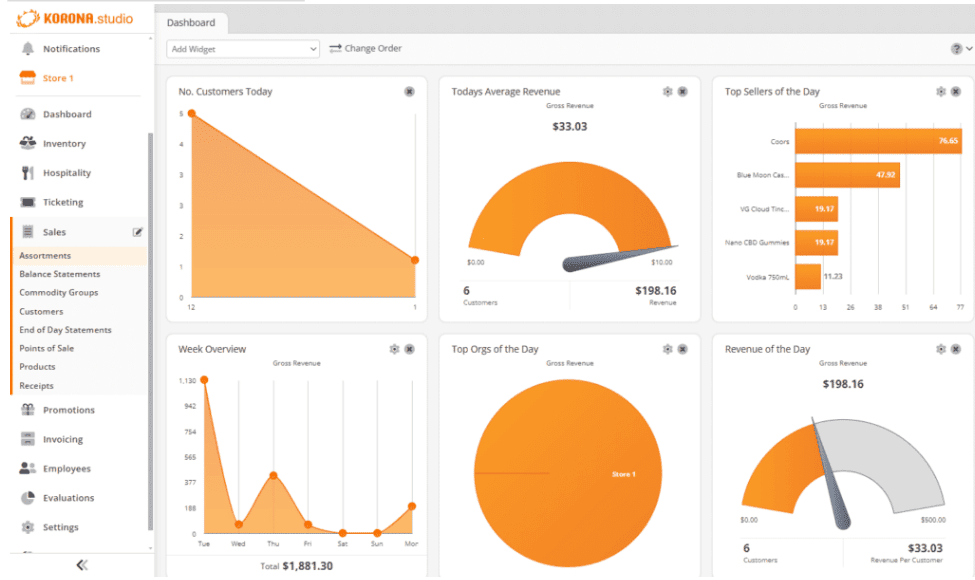
KORONA POS dashboard showing sales, customers, and revenue trends that consignment shops can use to track both retail and vendor activity. (Source: Korona)
- Inventory management: KORONA excels at real-time inventory tracking, allowing you to manage thousands of SKUs across multiple locations. You can build item catalogs with categories, tags, and variants, and set up automated promotions, discounts, and reorders. Advanced features include vendor management and customizable stock alerts, which help retailers streamline purchasing and reduce shrink.
- Reporting and analytics: The platform includes detailed sales, product, and employee performance reports that can be customized and exported. Multi-location businesses can view consolidated reports or drill down by store. Many users highlight the reporting tools as a standout feature compared to other retail POS systems.
- Checkout flexibility: The POS interface is designed for speed, with customizable buttons and workflows. Cashiers can split tenders, process returns and exchanges, apply discounts, and create order notes directly at checkout. User permissions ensure that only authorized staff can access sensitive functions.
- Integrations and add-ons: KORONA supports ecommerce integrations, ticketing modules, franchise tools, and loyalty programs. Because it’s processor-agnostic, you can integrate with a variety of merchant services. While consignment-specific functions aren’t native, KORONA’s open architecture allows stores to add or configure workflows to handle consignor tracking or payouts.
KORONA POS offers a wide selection of hardware options designed to give you flexibility at checkout. You’ll find bundles featuring checkout terminals, receipt and label printers, and barcode scanners, along with mobile/tablet and customer-facing display options. These devices are built to integrate seamlessly with KORONA’s software, giving retailers scalable setups from a single register to multi-lane operations.
KORONA POS holds about 4.7 out of 5 stars on sites like Capterra and G2. Users praise its deep reporting tools, flexibility with payment processors, reliability, and strong customer support, especially useful for retail businesses with complex inventory and multiple locations.
On the downside, some reviews call out a steeper learning curve because advanced features and customizations can feel overwhelming at first. Others mention the UI looks a bit dated, and that integrations with e-commerce or invoicing tools aren’t always seamless.
How to choose a consignment store POS system
Picking the right POS system for your consignment shop isn’t just about price. It’s about finding the features that actually make your day-to-day easier. Here are the big things to look for:
- Consignment tools: At a minimum, your POS should track consignors, manage commission splits, and handle payouts. A built-in consignor portal is a huge plus because it cuts down on phone calls and gives sellers transparency.
- Checkout experience: Speed matters. Look for a POS that supports barcode scanning, quick product lookups, and flexible payments, including consignor credit, store credit, and split tenders.
- Inventory management: Since consignment means items often come in one at a time, you’ll want bulk upload tools, customizable item fields, and low-stock alerts. Advanced reporting helps you see what’s selling and what isn’t.
- Ecommerce integration: If you sell online, make sure your POS syncs inventory across your store and website. Some platforms include built-in webstores, while others require a paid add-on or integration.
- Ease of use and support: Even the best system won’t help if your staff can’t figure it out. Look for intuitive software, 24/7 support (if possible), and onboarding assistance, such as import tools or guided setup.
- Pricing and contracts: Watch for monthly fees, add-on costs, and payment processing rates. If you’re a high-risk business (like vape or CBD shops), a processor-agnostic system can save you headaches.
Frequently asked questions (FAQs)
Click through the sections below to read answers to common questions about consignment store POS systems:
Some of the best consignment store software that work with Square include Ricochet, Rose, Nextgenresale, and Best Consignment Shop. You can find them in the Square app store or go to the consignment store app website.
In general, inventory management is fairly similar between consignment shops and regular retail stores. In both cases, you’ll benefit from features like low-stock alerts, variant management, and multilocation tools. One difference is that consignment stores will need to track inventory and sales by specific consignors; this is another reason that it’s beneficial to use a POS system with a consignor portal, as it makes it easier to do this.
Consignor portals, like Ricochet’s, allow consignors to log in and see the status of item sales, payouts, and inventory. Some even let them edit information. This can save you time-consuming phone calls from consignors wondering if their items have sold yet.
It depends on the POS system you get. In general, a good consignment store POS software costs around $130 per month, although some providers have limited free plans or cheaper versions. You may opt for a cheaper POS system and get an add-on for the consignment tracking.
Bottom line
The best POS systems for consignment stores should be inexpensive, easy to use, and take into account the unique needs of consignment sales. Sometimes, you can’t get all three, but with the best consignment POS systems above, you can come close.
We chose Ricochet as the best consignment store software because it’s designed specifically for consignment store needs, with consignment sales tracking, reports, and consignor credit. It’s also a feature-rich software that would make it a great thrift store point-of-sale system. Sign up for a free trial today.