Artificial intelligence is no longer something I see as a future trend; it’s already transforming the way businesses operate. Every day, I use and review AI tools for business that help with content creation, task management, data analysis, and team collaboration.
Adoption is moving fast, with 78% of organizations reporting they used AI in 2024, up from 55% the year before. In this guide, I’ll share the best AI tools, including top picks like ChatGPT, Gemini, and Writesonic, and explain how you can choose the right platform for different needs.
Top AI tools compared
Drawing on over three years of experience evaluating AI and automation solutions, I’ve identified industry-leading AI business tools, particularly some of the popular choices among business professionals, thoroughly assessing each through in-depth reviews.
Review my full methodology to learn more about my evaluation process and criteria.

Office Technology Staff Writer at Fit Small Business
ChatGPT: Best all-around AI assistant

Pros
- Accepts text, image, and video inputs
- Daily usage credits available for free users
- AI model options tailored to various tasks
Cons
- Constant updates disrupt workflows
- Occassinal bugs after an update
- Overly relies on user input
My expert opinion
Managing multiple AI tools in a single tech stack can quickly become expensive and overwhelming, especially if you need apps for different business tasks. ChatGPT addresses this by serving as an all-in-one AI platform that handles everything from deep research and content generation to data analysis, programming, and even image or video production.
What sets ChatGPT apart is its versatility and advanced capabilities, making it a reliable solution for businesses that need to execute complex, dynamic tasks. With frequent updates that improve accuracy and problem-solving, it consistently adapts to new user demands. Plus, its high level of customization lets you fine-tune outputs based on your preferred references, integrate resources, and even create dedicated workspaces tailored to different business needs.
What actual users say:
Users say ChatGPT is useful for everyday tasks like drafting emails, creating LinkedIn posts, and building search strings. Some users mention that outputs can feel overly AI-generated, pointing to issues like formatting quirks that persist despite customization attempts. Others note that its performance has recently improved compared to competitors, making it a valuable tool for research and workplace content planning.
“It helps me in my day-to-day tasks like creating emails, writing LinkedIn posts etc. It also helps in making a search string. It helps me to write a reply to emails.” – G2 review
“I often need to edit the information to make it look less AI-generated. This does improve regularly but the long dash is a huge giveaway, and when I tried to customize my options and ask it not to use any more, it still does.” – SoftwareAdvice review
“I used to prefer Google Gemini, but recently ChatGPT is so much better. For work, I use it to find benchmarking data and plan out wellbeing newsletters on a variety of topics.” – SoftwareAdvice review
ChatGPT has a free plan, while paid tiers range from $20 to $200 per month, depending on the AI model and business features included
- AI agent Codex handles parallel coding tasks in a secure sandbox.
- Assign projects to synthesize data and generate reports and spreadsheets.
- Turn spreadsheets into insights with patterns and charts.
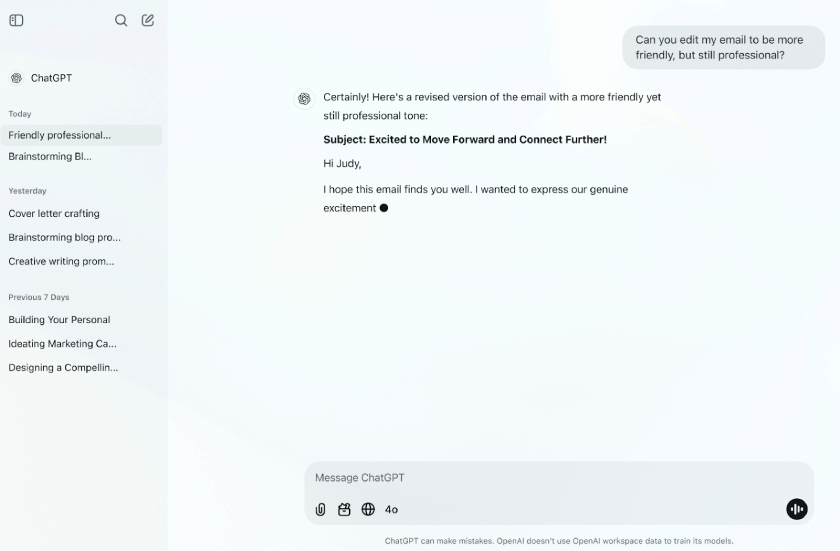
Improve productivity by using AI to draft, edit, and refine professional communication in seconds. (Source: OpenAI)
Gemini: Best for Google Workspace productivity

Pros
- Strong integration across Google Workspace apps
- Dedicated to advancing safe and ethical AI practices
- Multimodal understanding for text, image, and video
Cons
- Supports only eight languages
- Can struggle with complex prompts
- Limited customizability
My expert opinion
While Gemini competes closely with ChatGPT in handling a wide range of tasks, it stands out as a more capable AI assistant for Google Workspace users. It integrates across all Google productivity apps, supporting you during video meetings, while drafting documents, checking emails, or building slide presentations.
Gemini is included with your Google Workspace subscription and works seamlessly across Gmail, Docs, Sheets, and Slides. By toggling the Gemini icon in the side panel, you can ask it to handle a variety of tasks such as summarizing emails, creating report outlines, analyzing customer data, and building interactive slides, all within the apps you use every day.
What actual users say:
Users appreciate Google Gemini’s multimodal capabilities, as well as its strength in delivering real-time answers. Some reviewers caution that it can miss context with more complex questions, which leads to incomplete responses. Others highlight how easy it is to use by voice, making it faster than traditional search engines for finding information.
“The most thing I like about Google Gemini is that it has a lot of multimodule capabilities that seem to be more powerful in terms of helping to get real-time answers” – SoftwareAdvice
“…sometimes it misses context in more complex or nice questions which can lead to slightly off or incomplete answers.” – G2 review
“Can easily navigate to it with just asking. I can find answers quicker and better than if I were to type it in on a search engine. – SoftwareAdvice
Gemini comes included with most Google Workspace Business and Enterprise subscriptions at no additional cost.
- Takes meeting notes and lets you catch up through summaries if you join late.
- Use prompts to craft slide decks complete with images and designs.
- Drafts, replies, and summarizes emails to save time.
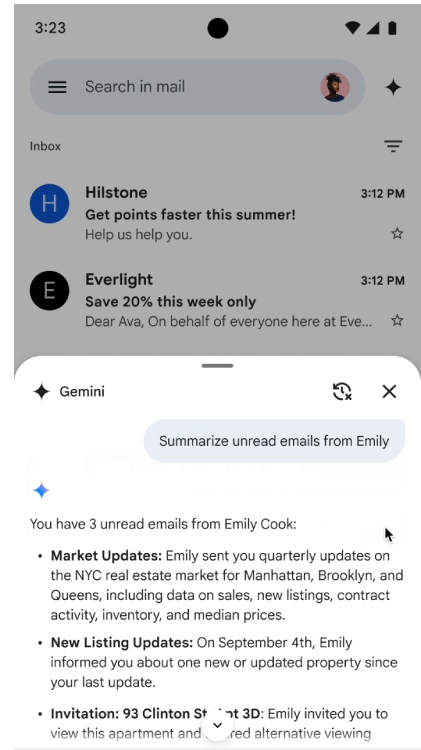
Save time with AI that summarizes emails and streamlines daily tasks. (Source: Google)
Writesonic: Best for SEO & branded content

Pros
- Generates copy in seconds
- Combines AI models: ChatGPT, Claude, and Gemini
- Also functions as an SEO automation platform
Cons
- Steep learning curve during initial use
- Lacks a free-forever plan
- No team workspace tools
My expert opinion
Writesonic serves as an all-in-one assistant for marketers when it comes to writing content, tracking brand visibility, and developing search engine optimization (SEO) strategies. Instead of juggling multiple apps, you can publish content backed by competitor analysis, automated internal linking, and built-in SEO optimization all in one place.
At its core is an AI marketing agent that blends top language models like ChatGPT and Gemini with trusted marketing tools, such as Ahrefs and WordPress. This combination simplifies campaign optimization and streamlines daily workflows. On top of that, Writesonic offers brand voice customization, so you can define and maintain a consistent tone across all your content.
What actual users say:
Reviewers highlight that the platform is useful for SEO audits, content corrections, and producing more natural, human-like writing. While some mention slight delays in site audit results, they generally don’t see this as a major drawback. Many also praise the tool’s fast content generation and seamless integrations that boost overall productivity.
“Starting from SEO audit, correcting the article and making the content more human-written, it’s worth all the penny. Me and my team are using this platform for so long and it’s really helpful.” – G2 review
“Sometimes the site audit takes a little time to show the results but other than that there is nothing bad to say” – G2 review
“The speed of content generation is impressive, and the integration with other tools adds real value for productivity.” – G2 review
Writesonic pricing runs from $49 to $499 monthly, with 20% off for annual billing. You can also try a free trial with limited feature credits.
- Track brand mentions, rankings, sentiment, and citations across AI tools in real time.
- Use the keyword planner and Ahrefs data to build SEO strategies and fix issues with AI.
- Create well-researched articles with internal links, trust signals, and a consistent voice.
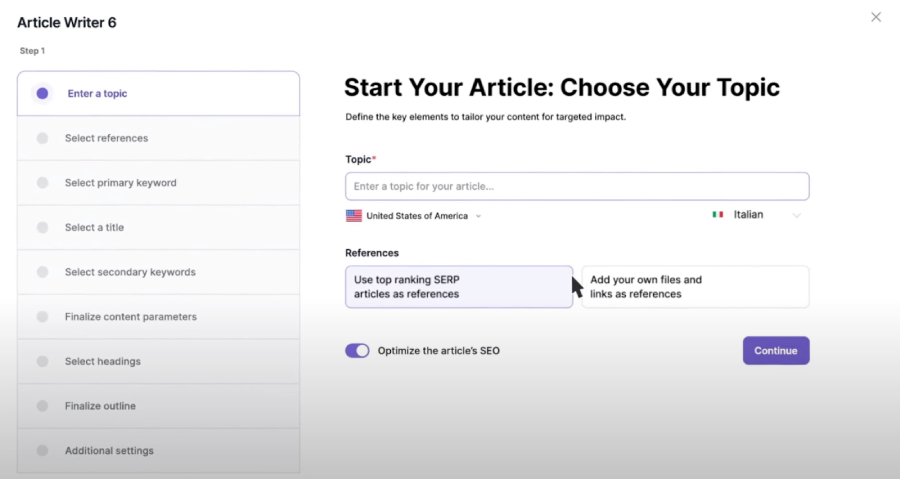
Generate SEO-optimized articles with AI that streamlines content research and writing. (Source: Writesonic)
ElevenLabs: Best realistic AI voiceovers

Pros
- Generates a range of voice outputs
- Converts expressive text to human-like speech
- Fast audio generation
Cons
- Inconsistent tonal quality
- Lacks real-time customer support
- Extended audio recordings require a premium plan
My expert opinion
ElevenLabs offers an affordable alternative for businesses that don’t have the resources to hire professional voice actors or live agents. Its text-to-speech software transforms written text into natural, human-like voices with emotional nuance and expressive delivery. This makes it a strong option for creating professional-quality voiceovers, podcasts, and videos.
What really sets ElevenLabs apart is its conversational AI agents, which allow companies to interact with customers through personal, human-sounding voices. Beyond text-to-speech, it also offers advanced tools like AI dubbing, voice cloning, sound effects, and even studio-quality music tracks, giving businesses a wide range of branding possibilities.
What actual users say:
Users say ElevenLabs is easier to use than competing tools and helps them save time when generating voice content. However, some reviewers note issues with incorrect pronunciation and limited controls for adjusting tone, speed, and pauses. Others mention they would like the ElevenReader app to be available in a browser version.
“I’ve found that I have to spend a lot of time redoing generations to try and get something usable, but I have had way better success working with ElevenLabs. It’s much easier to use than the competitive tools, and saves me a lot of time.” – G2 review
“Sometimes gives incorrect pronunciation – Limited editing controls around tone, speed and pauses in the voice statements” – SoftwareAdvice review
“One thing that I wish was available was if the ElevenReader app was available to use in browser.” – G2 review
ElevenLabs has a free plan, while paid tiers range from $5 to $82 per month. Annual subscriptions offer around 17% savings compared to monthly billing.
- Localize content in 29 languages with AI-powered dubbing.
- Engage customers with natural, human-like voice AI assistants.
- Automate inbound scheduling as voice agents handle bookings.
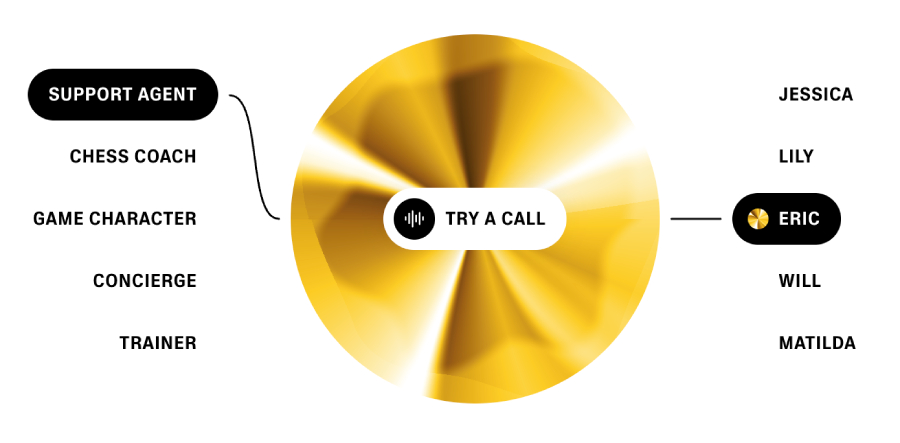
Bring conversations to life with realistic AI-generated voices tailored to different use cases. (Source: ElevenLabs)
Otter.ai: Best full-featured meeting assistant
Pros
- Generous free plan
- Share a custom vocabulary with AI
- Available on mobile devices
Cons
- Transcribes in English, Spanish, and French only
- Support requests can only be made via ticket
- Limit transcription to a maximum of 4 hours per meeting
My expert opinion
While most video conferencing platforms now include AI-generated transcripts, many users still find them unreliable because of frequent inaccuracies. If you want a dedicated meeting assistant, Otter.ai goes further by capturing meeting notes, summarizing meetings when you’re absent, and highlighting action items.
What makes Otter.ai stand out is its role as a collaborative workspace, letting you chat with teammates and assign tasks directly from meeting discussions. It’s also ideal for busy professionals since it can join up to three meetings at once, take notes if you cannot attend, and even generate follow-up content like emails or status updates.
What actual users say:
Users praise Otter for its seamless meeting integration, accurate transcripts, and helpful features like annotations and automated summaries. However, some point out that the free version is restrictive, offering only 30 minutes of recording before cutting off without notice. Many also value how quickly and reliably the tool converts recordings into accurate transcripts.
“Otter is great for meeting integration and note taking, transcripts, and especially for annotation and automated summaries.” – SoftwareAdvice review
“In terms of limitations, the free version only has 30 minutes, which is very limited to try, and it cuts out without warning.” – G2 review
“I like how easily Otter takes a recording of a meeting, podcast, etc., and is able to quickly produce a transcript that is very accurate and correct.” – Software Advice review
Otter.ai offers a free plan, while paid options range from $16.99 to $30 per month. You can save up to 51% with an annual prepayment.
- Use Otter AI Chat to get answers and draft content like emails or status updates from your meetings.
- Blend live conversations with async updates and chat with teammates.
- Receive automated notes, summaries, and action items after every meeting.
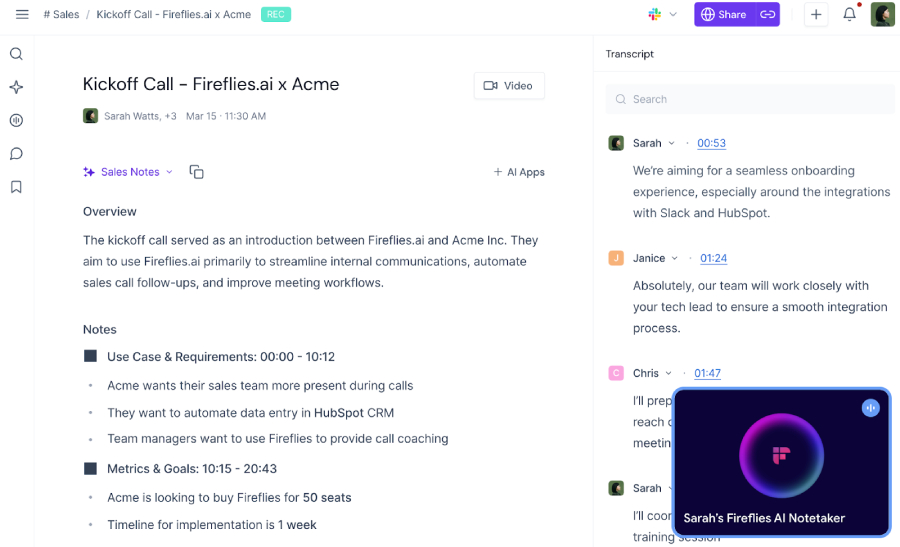
Capture and organize meeting notes automatically with AI that transcribes and highlights key points. (Source: Otter.ai)
GitHub Copilot: Best AI coding support

Pros
- Free-forever plan available
- Suggested syntax accelerates coding process
- Works with boilerplate and repetitive code fragments
Cons
- May generate code that doesn’t accurately reflect the developer’s intent
- May not be able to identify larger design or architectural issues.
- May suggest code that isn’t relevant to the context
My expert opinion
GitHub Copilot acts as an AI pair programmer that helps developers with repetitive coding tasks and boilerplate so they can focus more on solving problems and collaborating. You can offload work by letting AI analyze code, suggest edits, run tests, and validate results across multiple files. With Model Context Protocol server integration, Copilot codes like an insider by drawing from your repositories and external resources.
As you write, Copilot offers next-edit suggestions that highlight the ripple effects of your changes throughout the project. Its chat function is powered by large language models (LLMs) from OpenAI, Claude, and Gemini, so you can ask questions, get coding help within your workspace, and pull from publicly available source code.
What actual users say:
Reviewers praise GitHub Copilot for offering access to high-quality AI models under one subscription and for its ability to generate and adapt complex code with ease. Some users describe the tool as powerful and transformative for development workflows. At the same time, others report frustrations with VPN compatibility, which often leads to errors and timeouts.
“The support for multiple high-quality AI models. All in a single subscription.” – G2 review
“I can’t even tell you how amazing Copilot is; it’s unbelievable what she can do. I still can’t believe it. She is able to generate really complex things and modify the code up/down how you ask her.” – Reddit
“Another major pain point is VPN compatibility. Copilot struggles significantly when running behind a VPN, leading to more frequent errors and timeouts.” – Reddit
GitHub Copilot provides a free plan for individual users, while paid options start at $10 or $39 per month. The business plan is available at $19 or $39 monthly.
- Agent mode validates results across multiple files and proposes edits.
- Coding tasks support AI models like OpenAI GPT-5, Claude Opus 4.1, and Gemini 2.0 Flash.
- Upcoming edit suggestions show the ripple effects of your changes across the entire project.
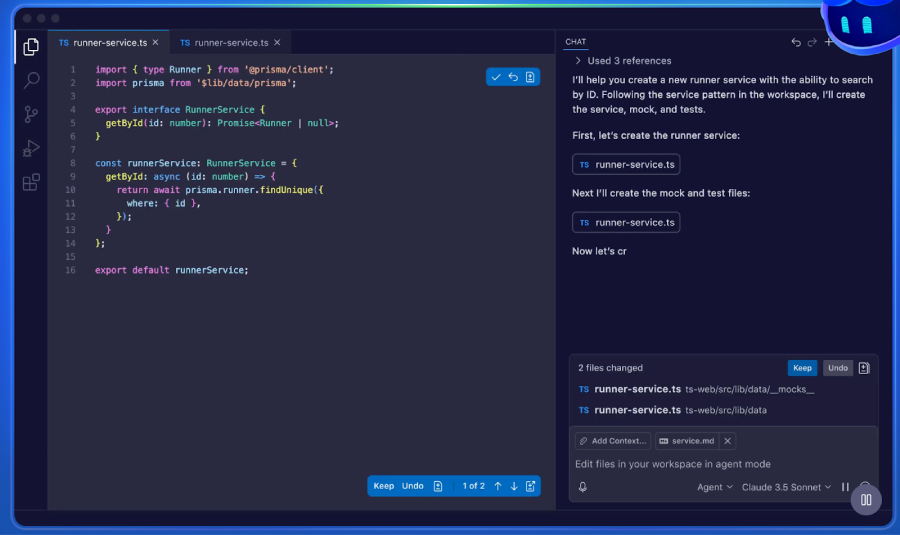
Accelerate coding projects with AI that generates functions, tests, and complete services in your editor. (Source: GitHub)
Chatbase: Best for building AI support agents

Pros
- Embed AI agents on your website without code
- Quick AI chatbot deployment
- Customize the AI agent based on your data
Cons
- Has strict character limits
- Use of ChatGPT consumes more message credits
- Support could be more responsive
My expert opinion
Chatbase lets businesses build a full-scale support team by creating AI-powered agents in minutes. It leverages LLMs from platforms like ChatGPT and Gemini to deliver accurate, context-aware responses to complex queries. This ensures customers can easily find answers, resolve issues, and take actions through AI-driven conversations.
You don’t need coding or technical skills to create an agent with Chatbase because its user-friendly interface makes deployment simple even for new users. You can also route inquiries to human agents and analyze past AI interactions. Over time, you can optimize and customize your agent to become the ideal support assistant for your business.
What actual users say:
Reviewers highlight that Chatbase makes it simple to build and deploy chatbots across social media apps like WhatsApp, Instagram, and Facebook. At the same time, some users feel the tool lacks depth in customization and struggles with handling complex queries. Others note that while it’s a strong option for getting started, its capabilities are best suited for basic use cases.
“Effortlessly develop a customized chatbot with multiple input methods, seamlessly integrating it with platforms such as WhatsApp, Instagram, and Facebook.” – G2 review
“Limited customization – You can’t fine-tune responses deeply. Struggles with complex queries – Works well for simple use cases but can feel rigid.” – Reddit
“I’ve tried a few AI chatbot builders recently, including Chatbase, and it definitely makes getting started easy…” – Reddit
Chatbase has a free plan, while paid monthly options range from $40 to $500. You can save 20% by choosing an annual subscription.
- Connect your agent with systems like AI CRMs and order management tools for seamless data access.
- Set up actions your agent can perform, such as updating subscriptions or changing customer addresses.
- Use natural language to guide your agent on when to escalate queries to a human.
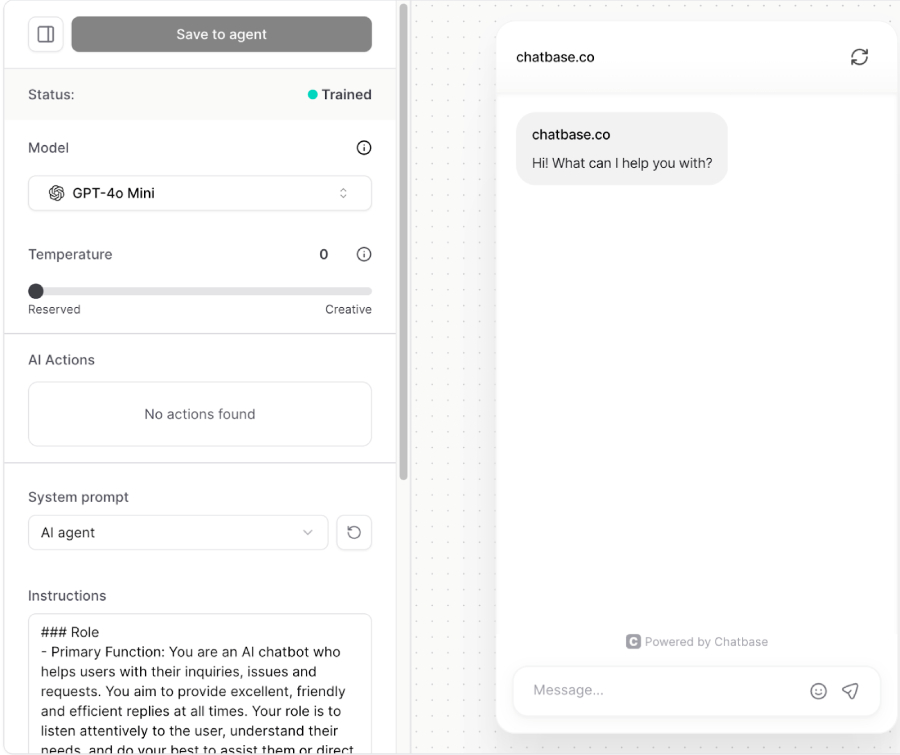
Build and customize AI chatbots that deliver automated support for your business. (Source: Chatbase)
Beautiful.ai: Best for slideshow presentations

Pros
- Play your presentations offline
- Collaborative workspace for teams
- Integrates with MS PowerPoint
Cons
- No free plan
- Limited customization
- Can be complex to use when moving things around
My expert opinion
Creating compelling slideshow presentations has become an essential skill, and Beautiful.ai makes it easier for professionals to impress and engage their audiences. This AI-powered presentation maker provides hundreds of templates and visual elements so teams can quickly design stunning presentations under one account.
If design isn’t your strength, Beautiful.ai does the heavy lifting for you. Just add your content, and the platform automatically formats text and images based on your branding guidelines. For more control, you can use prompts to design slides and take advantage of built-in visualization tools like charts, diagrams, and graphs.
What actual users say:
Users say the platform makes it easy to create sleek and impressive slide decks with user-friendly design templates. However, several reviewers note that customization options are limited and customer support is lacking. Others add that the AI features work well enough to speed up PowerPoint creation
“The slides can be made to look quite impressive. Very sleek! The design templates were fairly user-friendly.” – SoftwareAdvice review
“The options to customize it are limited and the support is non-existent.” – SoftwareAdvice review
“…quick and easy creation of [PowerPoint]. Some use of AI is pretty good.” – SoftwareAdvice review
Beautiful.ai offers a 14-day free trial. Paid plans start at $12 for individuals and go up to $50 for teams of up to 20 users, with custom pricing available for larger groups.
- Includes a vast library of images and icons designed to fit your brand
- Templates include layout variations to preview content in different angles.
- Smart Slides and template galleries make it easy to kick off pitches, reports, or training decks.
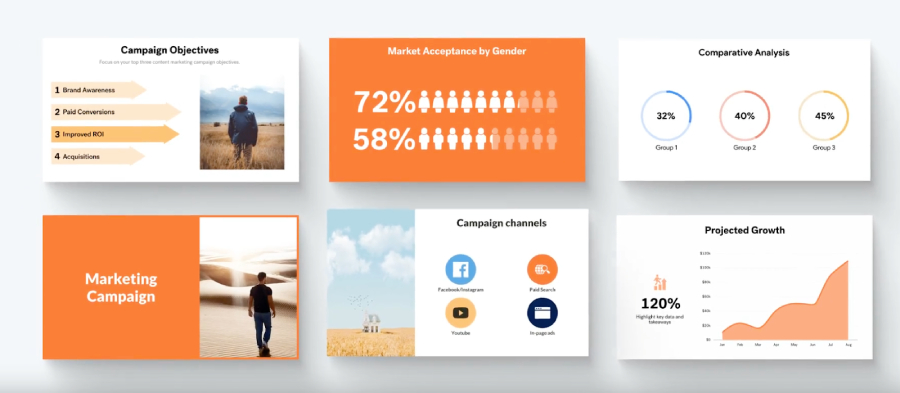
Create engaging marketing presentations with AI-designed templates that showcase data and charts. (Source: Beautiful.ai)
Luma AI: Best creative video generation

Pros
- Produces 1080-pixel images and videos
- High-quality 3D videos and pictures
- Accepts image, text, and video inputs
Cons
- Base plan include watermarks
- Some image prompts fail to produce changes beyond zooming or panning
- Maximum video duration is restricted to 10 seconds
My expert opinion
Luma AI makes video creation simple for anyone without the time or budget to hire a professional designer. With Dream Machine, Luma’s AI model, you can generate images and videos by just asking, making it easy to create in your unique style. For example, you can request “colorful visuals for interior design” and instantly produce professional-grade visuals.
You can also fine-tune video shots with commands like “loop” or “zoom,” and even upload reference visuals for more tailored results. Its video generation service goes a step further by letting you upload an existing video and transform its environment, lighting, or characters, giving you full creative control without advanced editing skills.
What actual users say:
Some users experimenting with the free version report mixed results, ranging from interesting to bizarre, with long wait times being the biggest drawback. Others point out that while quality has improved over older models, Luma AI still lacks useful features like camera controls. A few reviewers note that although it isn’t perfect, it works well for animating simple graphics created with image generators.
“I’ve tried the free version a few times, just messing around, using an image as a prompt. Results vary, interesting to bizarre, but my biggest problem is wait time.” – Reddit
“It’s not bad at all compared to some of the older models. but it needs some camera controls and [stuff] but the quality is [definitely] improving for AI videos.” – Reddit
“It’s not great but sometimes it creates fun stuff. I’ve found its best use is animating simple graphics made with an image gen model” – Reddit
Luma provides a free plan limited to image generation, while paid plans range from $9.99 to $94.99 per month. You can save 30% with an annual prepayment.
- Extract motion from any video to animate characters, props, or camera paths in sync.
- Change a scene’s look while preserving motion and framing.
- Uses pose, expressions, and scene structure to decide what to keep or reimagine.

Transform simple footage into cinematic or 3D-stylized videos. (Source: Luma AI)
My methodology
To evaluate the best AI tools for business, I reviewed each platform against a weighted rubric covering the most important criteria for small business owners. I considered both functionality and practical value to make sure the recommendations will help you boost efficiency on your daily operations.
15%
Scalability & performance
10%
Security & compliance
15% of Overall Score
20% of Overall Score
Automation features were assessed based on how well they reduce manual effort and streamline workflows. Platforms that offered AI-driven efficiency across multiple tasks ranked stronger.
15% of Overall Score
I evaluated how easily each tool connects with existing software like CRMs, productivity apps, or communication platforms. Seamless integrations add real value by reducing setup time and avoiding workflow disruptions.
15% of Overall Score
The ability to scale with business growth was another key factor. I prioritized tools that perform well under higher workloads and support multiple users without sacrificing speed.
10% of Overall Score
Data security and compliance with industry standards were carefully considered. Providers that clearly outlined their security practices and offered compliance certifications scored higher.
15% of Overall Score
I tested the overall user experience, focusing on how intuitive the interface was and how quickly teams can adopt the tool. Solutions with simple navigation and minimal learning curves ranked best.
10% of Overall Score
Finally, I reviewed the availability and responsiveness of customer support. The best AI tools offering live chat, knowledge bases, and reliable response times were rated higher than those limited to ticket-only systems.
*Percentages of overall score
Which AI tool fits your business needs?
AI adoption continues to grow, and 63% of organizations say they are already using generative AI to create text outputs. For some companies, this means exploring new AI business ideas that fit their industry, while others may focus on specialized tools for HR, finance, or marketing.
Beyond text, companies are experimenting with other modalities, from voice to video, as they explore how top AI tools can drive growth and efficiency. Choosing the right AI tool comes down to matching its strengths with your specific business needs.
Recent AI marketing statistics show that AI is becoming a trusted partner in content creation, helping teams scale articles, blog posts, ads, and social media campaigns faster than ever. Organizations are also eager to adopt AI agents, with 82% planning to integrate them within the next one to three years. For marketers, this means now is the time to explore tools that streamline workflows and maintain brand consistency.
Businesses are finding real advantages by adding AI to their support systems. Early adopters report improved efficiency and stronger customer experiences, with customer engagement and satisfaction rising 6.7% over the past year. Chatbots from Chatbase help companies handle routine queries instantly while freeing human agents to focus on complex issues.
AI plays a major role in data-driven decision-making, especially in predictive analytics, where 52% of companies already use AI agents. These tools make it easier to identify trends, forecast outcomes, and uncover insights from large data sets.
Platforms with strong BI capabilities give small businesses the same level of strategic advantage that large enterprises rely on. These insights also extend into HR platforms, where generative AI in HR is being used to forecast workforce needs.
AI tools for business are transforming sales by automating repetitive tasks like lead tracking, outreach, and scoring. Instead of manually qualifying leads, sales teams can prioritize prospects most likely to convert and spend more time building relationships. This shortens sales cycles and ensures better use of time and resources.
Engineering teams are also turning to AI for faster prototyping and more accurate development cycles. Tools like GitHub Copilot or Gemini assist with coding, testing, and debugging, making it easier to deliver high-quality products in less time. For product managers, AI can streamline collaboration between teams and accelerate go-to-market strategies.
What makes a great AI tool for business?
Artificial intelligence tools for business vary widely in quality, and the right choice comes down to finding a platform that delivers both advanced features and practical value. Here are the factors I looked at when evaluating AI tools:
- Choose multimodal capabilities: AI tools that support text, voice, image, and video inputs give your team flexibility across different workflows. A multimodal approach ensures you can handle diverse tasks without switching between multiple platforms.
- Ensure data readiness: The effectiveness of AI depends on how well it integrates with your business data. Tools that connect smoothly with CRMs, analytics systems, or productivity apps unlock more actionable insights.
- Prioritize ethics, governance, and security: A reliable AI platform must prioritize data security, compliance, and responsible usage. Transparent governance and strong security safeguards build trust for both your team and your customers.
- Adopt a strong LLM integration strategy: Tools that leverage leading large language models, such as GPT or Gemini, can handle more complex queries and reasoning. An effective integration strategy ensures your AI stays current as models evolve.
- Evaluate cost structures carefully: Pricing needs to match your business size and budget without forcing you into rigid plans. Look for business AI software that offers transparent pricing and scalable options so you only pay for what you need.
AI automation tools are no longer optional as they’re becoming essential for productivity, efficiency, and growth. By focusing on key factors like multimodality, data integration, and cost, you can choose a solution that fits both your current needs and future goals. With the right AI tool in place, your business is positioned to save time, reduce costs, and stay ahead of competitors.
Frequently asked questions (FAQs)
The best AI software for a small business depends on your specific needs, whether that’s marketing, customer support, or data analysis. However, if you’re looking for an all-in-one AI partner that can handle almost any business task, I recommend ChatGPT, thanks to its versatility, advanced reasoning, and ability to integrate into a wide range of workflows.
Artificial intelligence tools help marketing teams streamline content creation by generating ideas, drafting copy, and optimizing campaigns. It can also analyze audience behavior, track performance data, and personalize the customer journey by delivering targeted messaging that resonates with specific segments.
The best AI assistant for sales is Chatbase, which lets businesses build chatbots tailored to sales workflows. These bots can generate leads, qualify prospects, and guide customers through the buying process, automating repetitive tasks so sales reps can focus on closing high-value opportunities.
Safety depends on the platform you choose, so it’s important to review how each tool manages data privacy and compliance. Gemini is a strong choice, as it emphasizes ethical AI practices, data security, and alignment with Google’s enterprise-level compliance standards.
The ROI of AI varies depending on how it’s applied, but most businesses see gains through time savings, reduced costs, and increased efficiency. With the right tool, AI can also create new revenue opportunities by improving customer experiences and driving better decision-making.