The best free payroll software for small business owners can calculate pay for hourly and salary workers, handle tax calculations and deductions, and print checks and pay stubs. Some of the systems even file taxes and offer direct deposits.
In this guide, I evaluated six free payroll software and narrowed them down to my top three recommendations.
The Fit Small Business editorial process follows strict standards to ensure that our best answers are founded on the basis of accuracy, clarity, authority, objectivity, and accessibility.
With over eight years of experience evaluating payroll and HR software and 10 years of experience in human resources and handling HR systems, I am deeply familiar with business owners’ pay processing needs and the HR solutions available on the market.
To evaluate the best free payroll software for small businesses, I compared six software providers across 20 data points, prioritizing functionality, ease of use, and customer support. See my full methodology below.

Payroll & HR Software Expert at Fit Small Business
Featured Partner
Fit Small Business is able to offer our services for free because some vendors may pay us for web traffic or other sales opportunities. Our mission is to help technology buyers make better purchasing decisions, so we provide you with information for all vendors — even those that don’t pay us.
1
Deel
Employees per Company Size
Micro (0-49), Small (50-249), Medium (250-999), Large (1,000-4,999), Enterprise (5,000+)
Any Company Size
Any Company Size
Features
24/7 Customer Support, API, Document Management / Sharing, and more
2
OnPay
Employees per Company Size
Micro (0-49), Small (50-249), Medium (250-999), Large (1,000-4,999), Enterprise (5,000+)
Small (50-249 Employees)
Small
Features
Check Printing, Document Management / Sharing, Employee Self Service, and more
Top Free Payroll Software Compared
HR.my: Best Overall Free Payroll Software

Pros
- Free HR solution includes payroll, basic HR, expense claim management, and online time clock tools
- Multilingual platform supports up to 66 languages
- Additional paid features are only $5 per month
- Mobile app includes manager tools and employee portal
- Expense management has a receipt upload feature
Cons
- No payroll tax filing and payment services
- User guide isn’t robust and is confusing to follow
- Lacks phone support; you can only post questions on the community forum if you need help
- Sponsorship ads appear on the dashboard and other features
Overview
Who should use it:
HR.my is a feature-rich free platform that lets you pay employees, generate payslips, track staff attendance and PTO, and digitally store worker information. This makes it a good option for small businesses looking for a budget-friendly way to calculate payroll and manage employees.
Why I like it:
HR.my provides more than just HR tools. It can help you process expense claims and manage incident reports to monitor workplace safety and employee misconduct issues. You can also share company updates through its announcement and notice board, while its online forum and discussion board allow you and your workers to collaborate with team members.
Further, it offers a flexible payroll module, enabling you to set up pay and deduction items like recurring allowances, bonuses, and statutory benefits deductions. You can even create pay-related alerts to remind you when an employee’s salary should be reviewed.
These functionalities contributed to HR.my’s overall score of 3.57 out of 5. I would have given it a higher rating if it offered customizable reports, phone support, and payroll tax filing services. Plus, I don’t like seeing ads on its dashboard and in some of its online tools. However, if you sign up for its sponsorship package, you get an ad-free platform and additional online storage.
I was also unimpressed with the initial system setup, as it doesn’t have an online wizard that walks you through the process. If you plan to get HR.my as your free software for payroll, I suggest opening its user guide in another tab on your computer so you know what to do.
HR.my doesn’t charge monthly fees but offers a crowdfunding or sponsorship package to help support its operations and software development projects. For $5 monthly, you get ads-free web accounts for you and your employees, early access to new features, an additional 7,000 MB of online storage, and one extra “HR Role” user seat per unit of sponsorship.
You can pay the sponsorship fee each month or for one full year. Cancelling this option is also easy. Simply sign into your employer account, click the Crowdfund HR.my link on the menu, and cancel the sponsorship.
- Cloud-based and mobile-accessible: HR.my offers payroll software free both on the cloud and on mobile. With Payroll4Free and ExcelPayroll, you don’t get mobile apps, which would have allowed you to access payroll tools while on the go.
- Multilingual platform: While HR.my’s default language is English, you can change it to any of its 66 language options, like Chinese, Korean, French, Spanish, Japanese, and Vietnamese. This is great if you employ a lot of Spanish speakers in your small businesses or contract with workers internationally.
- Employee portal: Payroll4Free may have an employee portal, but I liked HR.my’s much better because it lets your workers upload expense claim receipts via mobile devices. Your employees can also manage documents and forms, view past and planned PTO, and see pay information.
- Flexible pay runs: You can start a new pay cycle several days or weeks before the actual deadline and start reviewing each employee’s pay details. Even if you don’t finish, HR.my will save your previously edited items and you can easily pick up where you left off. It also lets you create a draft pay run, which is helpful if you want to check expected payroll expenses for that pay period.
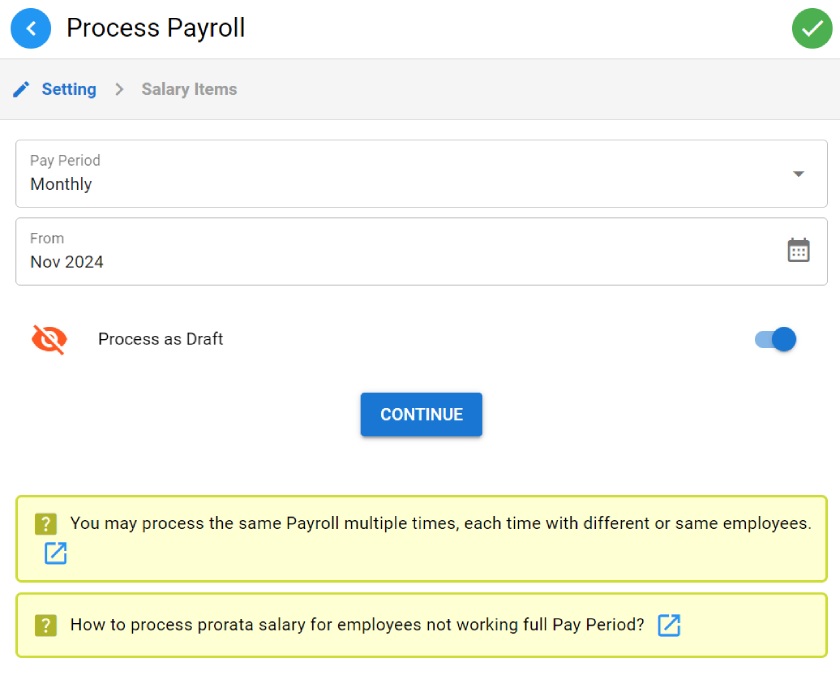
With HR.my, you can process a draft payroll or rerun a pay cycle. (Source: HR.my)
There are no up-to-date HR.my reviews on popular review sites like G2 and Capterra. The most recent ones I found were posted in 2023, and many reviewers described its platform as generally easy to use with free time tracking, payroll, and employee communication tools. However, several users dislike not having access to technical support and features to help with onboarding and payroll tax filings.
Payroll4Free: Best for Businesses With Fewer Than 9 Employees

Pros
- Free-forever payroll services with PTO tracking tools and an employee portal
- Email and phone support with access to payroll and tax experts
- Tax filings and direct deposits (not using own bank) are affordable add-ons
- Can import information from time clocks
- Integrates with QuickBooks & other accounting software
Cons
- Limited system compatibility (Windows only)
- Interface looks outdated
- New user sign-up process isn’t straightforward; requires several forms and documents to create an account
Read our Payroll4Free review
Overview
Who should use it:
Payroll4Free is an excellent payroll software free for small businesses with 10 or fewer employees. It doesn’t charge any fees if you only have up to 10 workers—although, paid add-ons are available if you want payroll tax filings and direct deposit services.
Why I like it:
While its platform can handle payroll for 25 and more workers, it’s best for managing simple pay runs for very small teams. It calculates wages and taxes, tracks PTO accruals, and lets you print paychecks for free if you have 10 or fewer employees (it charges add-on fees if your employee count exceeds 10).
If you prefer to pay workers via direct deposits, Payroll4Free can handle this for you at no cost if you use your own bank or with an add-on monthly fee if you want to use Payroll4Free’s bank account. The software can also generate year-end tax reports (W-2s and 1099s), providing you with pre-formatted forms to send to the government. However, you have to pay Payroll4Free to file tax forms for you—an optional paid service that neither HR.my nor ExcelPayroll offers.
In my evaluation, Payroll4Free earned an overall rating of 3.44 out of 5. Its online tools are sufficient to handle simple pay runs. What I appreciate most is the access to payroll and tax professionals, making it easy to get expert payroll advice. It scored the lowest in platform and interface features because, while it has an employee portal, it doesn’t have a mobile app. The software also looks outdated and some of its features aren’t as intuitive as modern-looking platforms, which only require one or two clicks to get things rolling.
You can use its platform at no cost, provided you only pay 9 or fewer unique individuals (not number of employees) per calendar month. Payroll4Free charges a fee of $10 per payroll batch if you pay 10 up to 25 workers per month. If the employees you pay in a calendar month exceed 25 unique individuals, Payroll4Free will bill you a processing fee of $35 per payroll batch for that month.
It also offers several add-on services to help streamline your payroll processes. You can check the full fee schedule on its website, but the most important add-ons are below:
- Payroll tax payments and filings: $35 monthly
- Direct deposit transfers using Payroll4Free’s bank account: $35 monthly
- Bundle payroll tax and direct deposit services: $40 monthly
- Live system training: $100 per hour
- Employee data setup or setup reprocessing: $100 per hour
- Multiple payment options: Unlike the other free software for payroll on my list, Payroll4Free supports paycheck and direct deposit payouts. It charges a monthly fee if you want to use their bank account for direct deposit. If you don’t want to pay extra, it provides a free ACH file so you can use your own bank instead.
- Access to payroll and tax experts: Payroll4Free offers unlimited customer support and has a team of experienced payroll and tax specialists you can contact if you need payroll advice. However, it doesn’t have the community forum that HR.my offers, which allows you to get input from other business owners and HR professionals.
- Check printing setup assistance: Payroll4Free.com can help set up its software to add any data you want to appear on the check. You won’t get a similar service with ExcelPayroll, while HR.my doesn’t have paycheck printing capabilities.
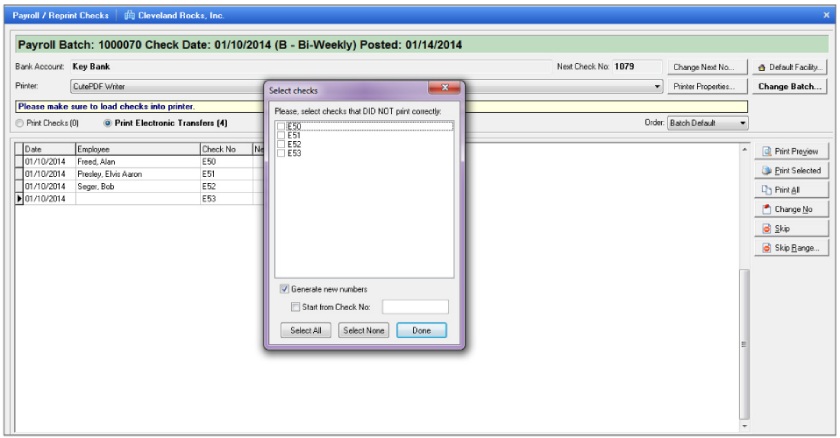
Payroll4Free allows you to print, void, and reprint employee paychecks if needed. (Source: Payroll4Free)
There are very few up-to-date Payroll4Free reviews on G2 and Capterra. Those that I found commended Payroll4Free for providing a platform that makes it easy for them to complete weekly payroll and a direct deposit service that pays employees on time. Some reviewers also said that while its support team is generally helpful, its setup team isn’t always responsive. They added that its interface looks dated and doesn’t allow any customization.
ExcelPayroll: Best for Excel Users
Pros
- Payroll calculations are pre-formulated using Excel functions
- Offers basic PTO accrual tracking tools
- Prints checks, W-2 forms, and other payroll tax documents
- Generates accounting entries
Cons
- Up to 50 active employees only
- Software looks dated; only works on older Excel versions (2007, 2010, and 2013)
- No tax filing services; must pay for state tax table updates
- Sets default limits to some entries (ex. maximum hourly rate is $48.07 per employee)
Read our ExcelPayroll review
Overview
Who should use it:
If your pay processing needs are basic and you’re comfortable using Excel, then ExcelPayroll may be the best free payroll software for you. It is especially useful for employers that want an offline spreadsheet-based payroll tool and don’t need payroll tax filing services.
Why I like it:
ExcelPayroll is a downloadable free payroll system that lets you input salary, hourly, and other compensation information to pay workers. It computes payroll taxes and prints paychecks, pay stubs, and tax documents.
If you’re an Excel expert, editing the applicable data fields for deductible items, such as benefits premiums, will be easy for you. It even comes with a timecard tool where you can add and track employee work hours.
ExcelPayroll only earned 3.05 out of 5 in my evaluation because while it can accurately compute payroll, you need to input a lot of information manually. It also does not have the HR tools, tax filing services, and the additional support options that HR.my and Payroll4Free offer.
Further, the software only runs on PC Excel, which may limit businesses that use Macs or cloud-based spreadsheet tools. Older versions of ExcelPayroll had macro-related compatibility issues with newer Excel and Microsoft 365 settings, but its 2026 version now uses open code with no embedded macros.
ExcelPayroll is completely free to use and also updates federal tax schedules, as needed, for accurate tax calculations. However, for state tax table updates, you have to pay $50 per state except for Alabama (which costs $100).
- Time card: While ExcelPayroll does not integrate with time clocks, it does have a timecard feature where you can input hours, and it will do the calculations accordingly.
- Paycheck printing: Unlike HR.my, ExcelPayroll can print paychecks. However, it is not tied to a particular period, so you can print a check whenever you need to. It can also collate payment information for direct deposit payouts like Payroll4Free does.
- Batch pay processing: It can handle payroll on a per-employee basis but can do it in batches, as well as reprocess previous payrolls—something Payroll4Free may charge you for.
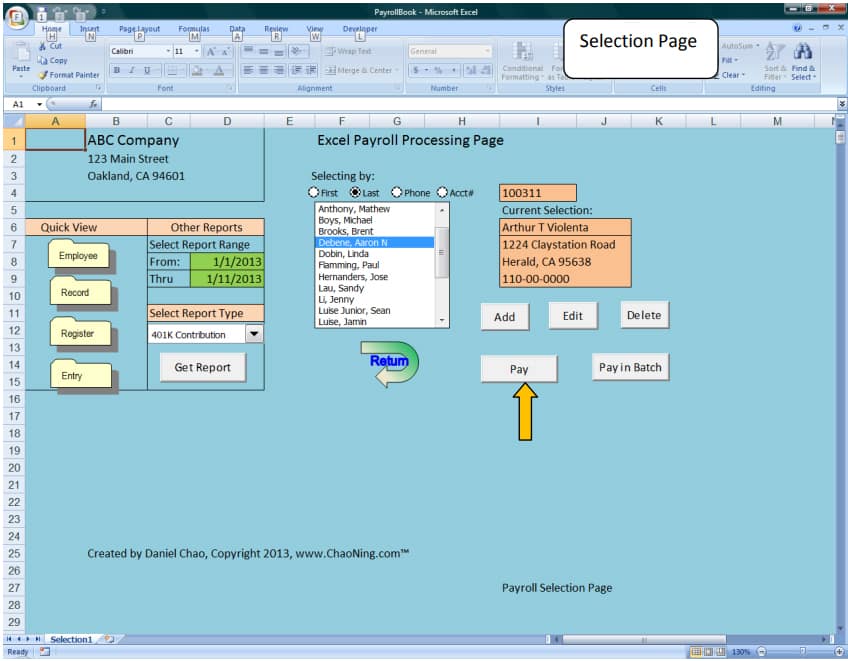
ExcelPayroll has a dated design, but Excel users should find it easy to use. (Source: ExcelPayroll)
As of this writing, there aren’t any ExcelPayroll reviews available on G2 and Capterra and other popular review sites (such as Trust Radius). While it has a Feedback page on its website, it doesn’t contain user reviews—only instructions on how to leave one.
How to Choose a Free Payroll Software
Even if the software is free, you shouldn’t just settle for any program. When looking for a free payroll system for your business, use the following steps;
- Consider your payroll needs: Identify the essential features you need to compliantly and accurately pay employees. For example, the free software should be able to meet your payday schedules and calculate employee payments, deductions, and taxes. Downloadable reports should also be available so you can use those to comply with payroll compliances and track payroll data.
- Compare your options: Create a list of your options, add the features you like and don’t like, and remove those that don’t meet your requirements. Also, check for exceptions where providers may charge you. Some free payroll systems charge extra fees if you exceed a specific number of employees, while others may require you to upgrade to paid plans for advanced pay processing tools and automatic tax filings.
- Check tax update responsibility: Free payroll software can reduce calculation work, but it usually doesn’t remove your responsibility for tax accuracy. In my experience, this is where small businesses should be the most careful. If the tool doesn’t file taxes or automatically maintain tax tables, build a review step into your payroll process.
- Check user reviews: Browse online software review sites to find out whether customers are happy with the software provider’s service and the system in general. User reviews also provide helpful insights about the software’s ease of use, customer support quality, and if there are features that don’t work well or are glitchy.
When to Consider Paid Payroll Software
Free payroll tools may be a good option for budget-constrained small businesses, but many of them have basic features. Paid payroll software comes with a wider range of tools and services.
Consider paid payroll software if you’re hiring in multiple states, paying contractors and employees, handling tips or overtime, or spending too much time checking tax tables and payroll reports manually. Free tools can work well for simple payroll, but once payroll starts requiring more judgment, more filings, or more employee support, a paid provider can become the safer choice.
Some even provide free trial offers, like those on our best payroll software and top payroll services guides—so you can try its features before purchasing a subscription.
If you need help selecting the best option for your business, follow our step-by-step guide on choosing payroll services.
Methodology: How I Evaluated the Top Free Payroll Software
Evaluation Criteria
To evaluate the best free small business payroll software, a collaborative assessment was made using a new rubric containing several criteria that looked at the software’s features, pricing, ease of use, customer support options, and reporting tools. Irene Casucian, one of Fit Small Business’s expert research analysts, objectively scored the rubric. From there, I cadded my expert rating to each criterion, where I considered the effectiveness of that area or feature.
We evaluated six solutions:
- TimeTrex
- Payroll4Free
- HR.my
- ExcelPayroll
- Paycheck Manager
- eSmart Paycheck
Then, I compared each software—and while I wasn’t able to test all of these, I looked for features to help streamline basic payroll processes. I also checked video tutorials if available and user reviews for feedback about the system’s overall ease of use and functionality. Of the six solutions on our list, I narrowed it down to the three best free software for payroll.
To view the full evaluation criteria, click through the tabs in the box below.
- Pricing 25%: In this criterion, we looked for free forever plans, unlimited employee seats, and each platform’s “value for money,” which determines whether the number of features in the free plan is competitive with other vendors in the space.
- Support 15%: We looked at the support options available, such as the support hours and if customer representatives can be reached via phone, email, or chat. We also checked the types of help resources offered, such as how-to guides and a community forum.
- Platform/Interface Features 20%: In this criterion, we considered the platform’s mobile app functionality, including its time tracking and paid time off management features.
- Reporting & Analytics 15%: We gave the most points to software that offers basic payroll report templates, such as tax withholding, deductions, and payroll register reports. We also looked for report customizations and data export options.
- Payroll Tools 25%: We looked for key features, such as payroll tax calculations, year-end tax reports and filings, and pay processing in all US states and Washington, D.C. We also checked if the software supports multiple employee payment types and contractor payroll.
Frequently Asked Questions (FAQs) About Free Payroll Software
Yes, you can manually calculate payroll with a calculator or use Excel to compute all earnings and deductions. There are also online payroll calculators you can use for free, but you have to input the salary information one employee at a time to get each worker’s net pay. While these options can save you money since you don’t have to pay a software provider or a payroll accountant to handle it—I only recommend these if you have a small team of five to 10 employees.
First, check federal and state laws, as some states may have payday schedules for specific types of employees. Next, take a look at the payroll frequencies that best fit your business and workers—the options are biweekly, weekly, semimonthly, and monthly.
Yes, but “free” usually means free payroll calculations, pay stub creation, check printing, or basic employee records. Some providers charge extra for payroll tax filings, direct deposit, state tax table updates, or support. Before choosing a free payroll tool, check the employee limit, add-on fees, and whether you’re responsible for filing taxes yourself.
The biggest risks are outdated tax tables, manual data entry errors, limited support, and missing tax filing services. Free payroll software can work well for simple pay runs, but it may not be enough if you have employees in multiple states, complex deductions, tipped workers, frequent payroll changes, or limited payroll experience.