One of the best developments in social media marketing, since I started doing it in 2018, has been in the number of tools that now make it easier and more efficient. Back then, I was making do with the native scheduling tools on Facebook and Instagram (they hadn’t merged into Meta yet). It worked, but wasn’t exactly convenient. These days, there are tools that make all that a breeze.
In fact, there are so many tools that claim to be the “best free social media scheduler” that I went on a hunt to find the actual best ones — the ones that let you plan, schedule, and measure your social media posts and keep everything organized. I especially looked at ones that were easy to set up and wouldn’t take a huge chunk of time to navigate.
- Buffer: Overall best free social media scheduler
- Metricool: Best for social media scheduling with analytics
- CoSchedule: Best for promoting blog content
- Meta Business Suite: Best for posting on Facebook and Instagram
- GoDaddy: Best scheduler with an AI content assistant
- Planable: Best for short-term social media campaigns
- MailChimp: Best for an all-in-one social media and email marketing platform
Featured Partners
Fit Small Business is able to offer our services for free because some vendors may pay us for web traffic or other sales opportunities. Our mission is to help technology buyers make better purchasing decisions, so we provide you with information for all vendors — even those that don’t pay us.
2
Customer.io
Employees per Company Size
Micro (0-49), Small (50-249), Medium (250-999), Large (1,000-4,999), Enterprise (5,000+)
Any Company Size
Any Company Size
Features
Analytics / Reports, Email / Drip Marketing, Marketing Programs / Lead Generation, and more
3
emfluence Marketing Platform
Employees per Company Size
Micro (0-49), Small (50-249), Medium (250-999), Large (1,000-4,999), Enterprise (5,000+)
Small (50-249 Employees), Medium (250-999 Employees), Large (1,000-4,999 Employees)
Small, Medium, Large
Features
A/B Testing, Automated Workflows, Email Campaign Builder
Overview of the best free social media scheduler tools
What does a social media scheduler do?
Honestly, it just makes your job as a social media manager easier. At the very least, a social media scheduling platform can schedule your posts in advance across various social media platforms.
A good one can also help plan content on a calendar, and a really good one can even help you with content creation, for instance, through a content creation platform or an AI caption draft generator. Some platforms can also measure your posts’ analytics and measure their progress over time — important when you remember that 55% of customers discover new businesses on social media.
A social media scheduler is like your second-in-command, running your social media campaigns. A fair warning, though: All the tools in this list are free social media scheduling tools, so expect them to have certain limitations, at least on their free plans, like a limited number of scheduled posts or social media accounts you can connect to. However, I’ve tested and verified them all to be genuinely capable and free social media schedulers.
I recommended Later Social in a previous version of this article. However, unfortunately, Later Social doesn’t seem to offer its free version to new users anymore. If you signed up for its free plan before 2025, you’ll still have access to your account, as I still have access to mine. However, it seems Later Social quietly shut down its free version sometime in 2024.
Buffer: Overall best free social media scheduler

Pros
- Free to schedule up to 10 posts a month on three platforms
- Super beginner-friendly platform with an intuitive social calendar
- Content ideas board, first comment tool, and AI caption assistant for content planning
- Integrates with Canva, Google Drive, and Dropbox for easy file sharing
Cons
- No post analytics or comments management on the free plan
- No tools for social media ads
- Only recommends best posting times for Instagram (even on paid plans)
- Approval workflows are only on the highest plan
My expert opinion on Buffer
Buffer is honestly still my favorite free social media post scheduler and the one I personally use most. It’s easy, free for up to 10 scheduled posts on three social media platforms, and has all the essentials for social media marketing. It even has a link-in-bio site builder and an AI assistant that helps repurpose content. Not many can say the same.
What I particularly like about Buffer is its content calendar-style planner and content ideas tool. The calendar makes it easy to plan and see your content weeks ahead of time. And the content ideas tool is just a really great board to throw content ideas around, save them for later, or turn them into posts.
The ideas tool is something I particularly like and find helpful as a social media marketer. It’s a lot more convenient than ideating on paper, and there are even tags to keep everything neat and organized.
Unfortunately, the one big drawback with Buffer’s free plan is analytics. They’re only available on the paid plans, along with the comments monitoring tool. The free version is squarely a social media scheduling platform, but a really good one at that.
Given that the paid plan costs just $5 a month, though (a lot cheaper than most), it’s one of my overall best social media marketing tools as well.
- Free scheduled posts: 10 every month
- Free connected social media accounts: Three
- Supported social media platforms: Facebook, Instagram, X, LinkedIn, TikTok, Pinterest, YouTube, Google Business Profile, Threads, Bluesky, Mastodon
Metricool: Best for social media scheduling with analytics

Pros
- Track your social media engagement rates, audience demographics, and growth over time
- Schedule 50 posts a month and analyze five competitors for free
- Shows previews of your posts before scheduling
- Manage inboxes and set up social media ads
Cons
- X and LinkedIn are only available on the paid plans
- Manage only one account for free
- Canva and Google Drive integration only on paid plans
My expert opinion on Metricool
Metricool is my second-best free social media scheduler after Buffer. Something particularly noteworthy about it is that it displays social media analytics for up to three months on the free plan, which is really why it ranks so high on my list. It also shows the analytics of your top five competitors (and more on the paid plan).
This makes it easier to see your best-performing content at a glance and which areas you’re lacking against your competitors, and conversely, any content gaps your competitors may have missed.
You’ll see your profile’s growth over time, as well as your engagement rates and audience demographics. Everything is also presented in easy-to-understand graphs, so there’s no need for any extra analysis.
And yes, Metricool also has a social media scheduling tool with a similar calendar format to Buffer. Although it’s not as intuitive, it also has an AI caption assistant that lets you adjust caption tones. And Metricool also recommends optimal posting times, depending on your social platform (though, of course, I recommend doing your own analysis).
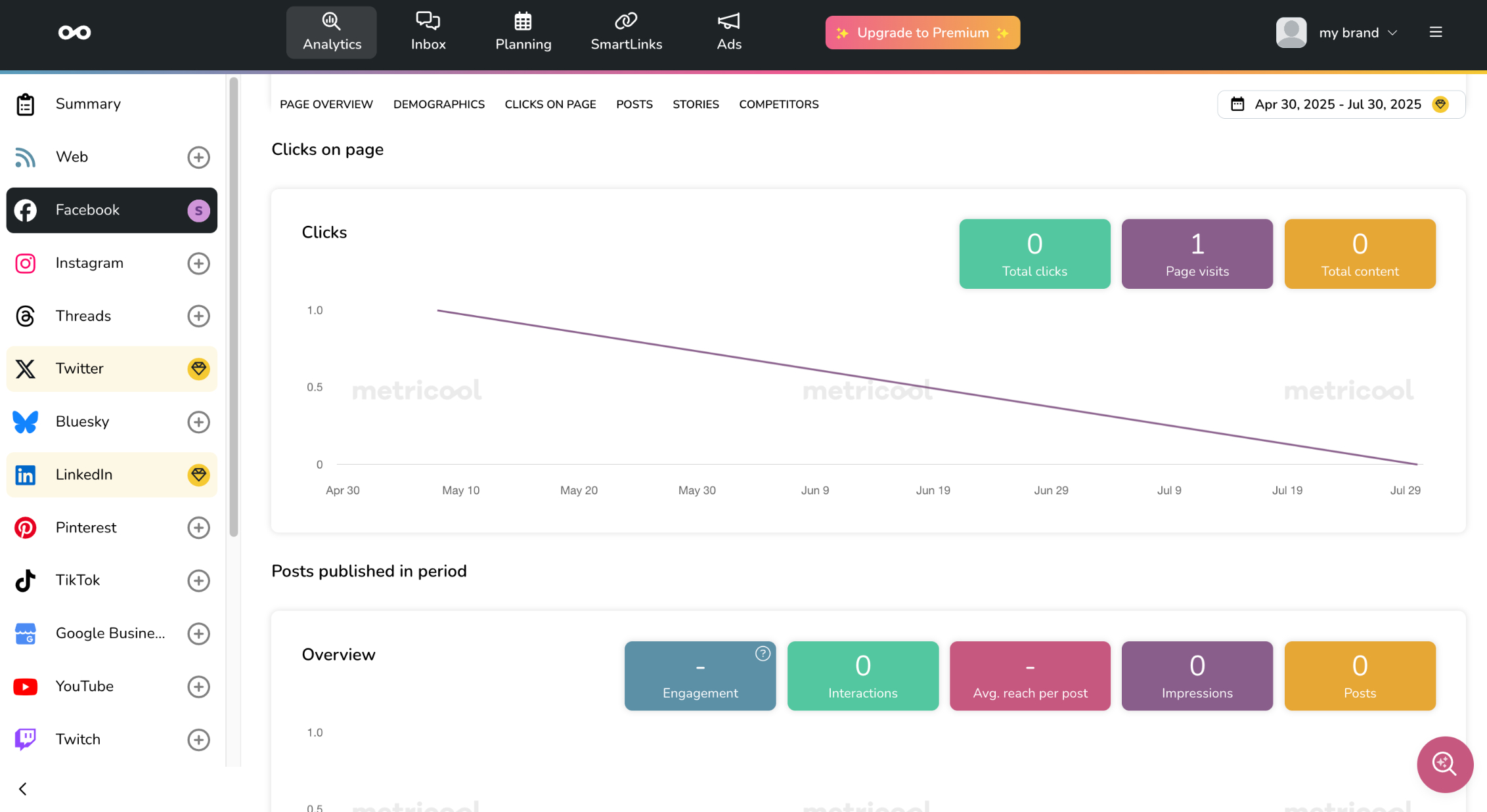
Metricool’s standout feature: social analytics, even on the free plan. (Source: Metricool)
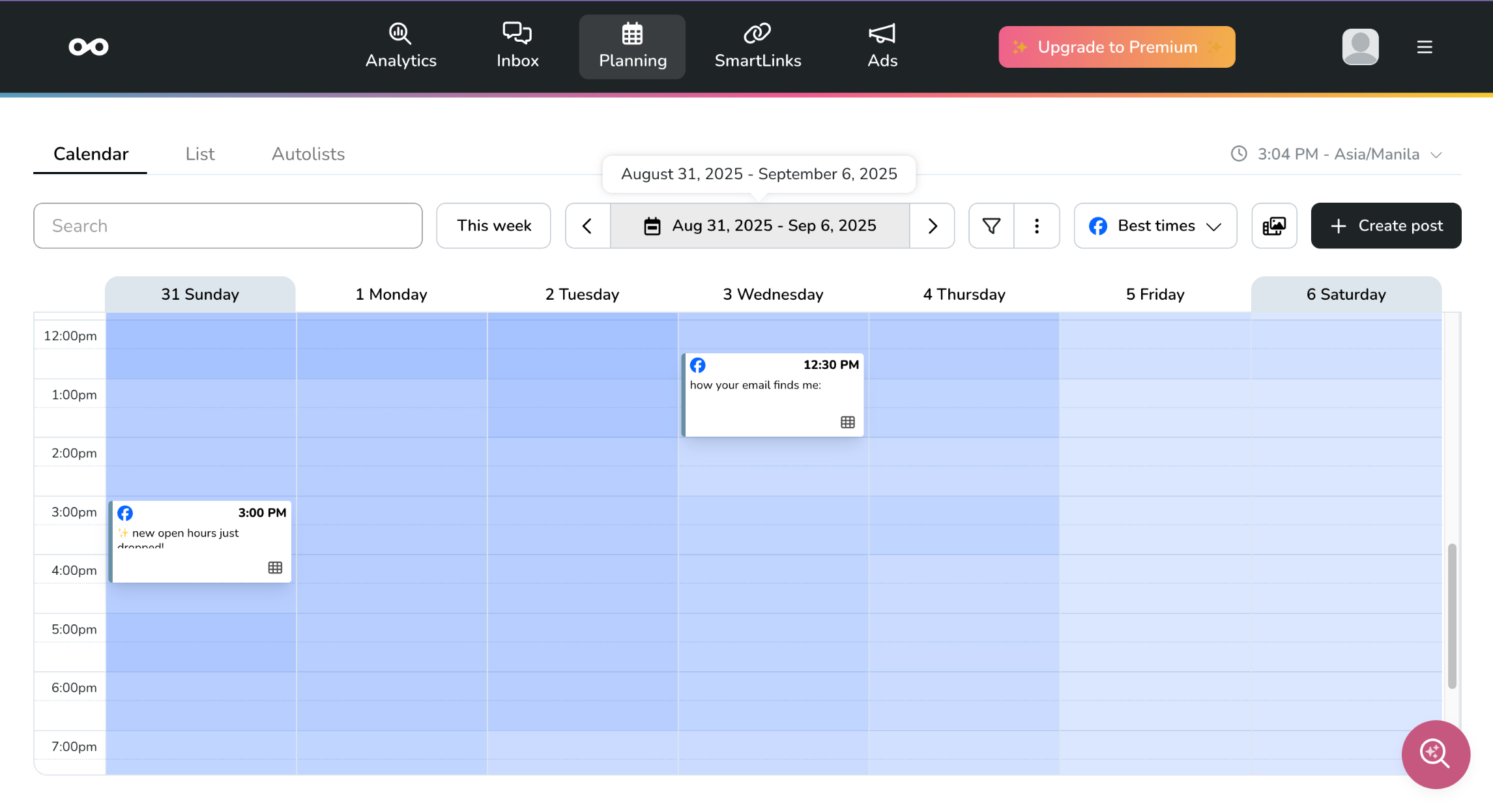
There’s also a social media content calendar. (Source: Metricool)
- Free scheduled posts: 50/month
- Free connected social media accounts: One
- Supported social media platforms: Facebook, Instagram, Google Business Profile, X, Bluesky, TikTok, Threads, YouTube, Linkedin, Twitch, Pinterest
CoSchedule: Best for promoting blog content

Pros
- Plan full social media campaigns, not just individual posts
- Built-in blogging tools: keyword assistant and blog outline generator
- Automatically publishes posts at optimal times based on past performance
- First comment scheduling
Cons
- Not beginner-friendly
- No inbox or comments management tools
My expert opinion on CoSchedule
CoSchedule is pretty different from the other social media schedulers on this list in that it’s specifically geared for creating and promoting blogs. For instance, it has a blog post assistant that can generate keywords and blog post outlines. It’s also not exclusively for social media, but for multiple marketing campaigns — kind of like a digital marketing campaign planner.
That said, it’s not the most intuitive tool around, so it’s not exactly my top recommendation, unless you specifically need the content writing assistants.
What I do find helpful is the marketing campaign planner, which lets you create long-term campaigns with multiple tasks, for example, to promote an upcoming event or a limited-time seasonal sale. That’s where I find CoSchedule’s task lists particularly helpful. Another highlight is the first comment scheduling, which is helpful in the current social media climate where comment threads are everything.
Otherwise, as strictly a social media tool, there are a tad too many buttons and menus to navigate around, and its social media tools aren’t anything I won’t also find with other more intuitive platforms. But if you do post blogs regularly, CoSchedule is worth looking into.
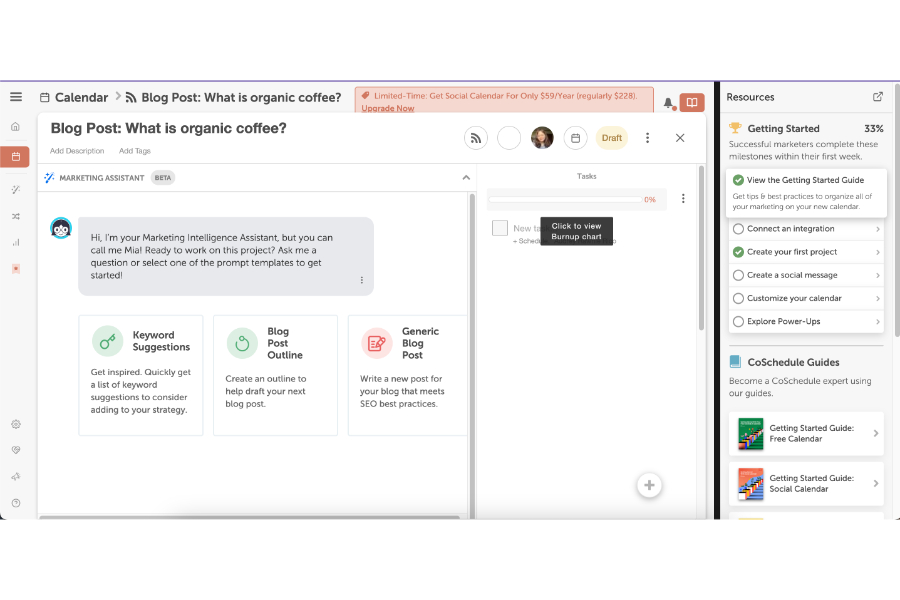
CoSchedule’s AI content assistant helps draft blog posts. (Source: CoSchedule)
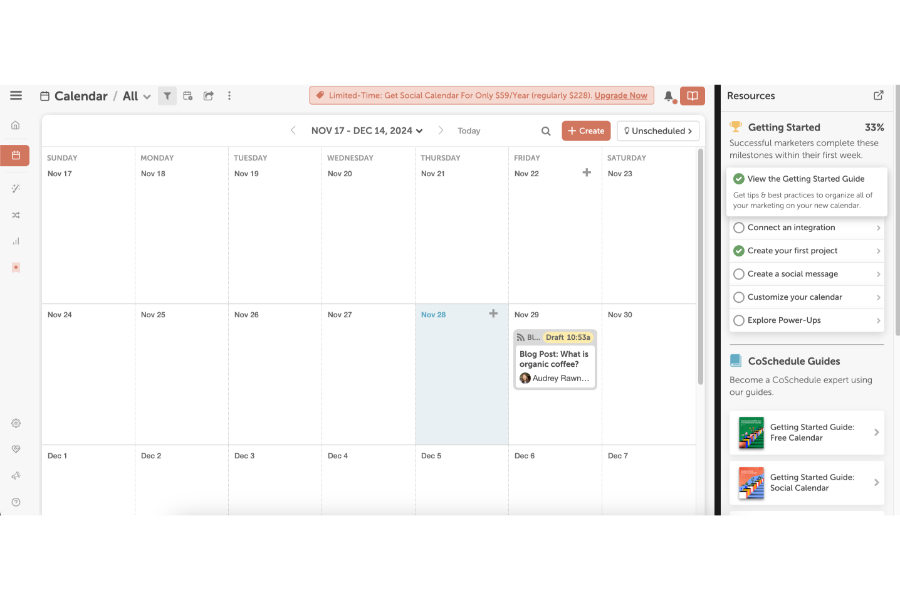
There’s also a marketing campaign calendar-slash-planner. (Source: CoSchedule)
- Free scheduled posts: 15 at a time
- Free connected social media accounts: One
- Supported social media platforms: Facebook, Instagram, Google Business Profile, X, Bluesky, TikTok, Threads, Mastodon, YouTube, Linkedin

Pros
- Free forever to schedule unlimited posts on Facebook and Instagram
- Super detailed post and audience analytics
- Automatically accessible with a Facebook account and can be handled by multiple users
Cons
- Not an intuitive platform, and the interface changes constantly
- Only schedules for Facebook and Instagram
- No integrations with Google Drive, Canva, or other apps outside Meta
My expert opinion on Meta Business Suite
I have a love-hate relationship with Meta Business Suite. On one hand, it offers unlimited post scheduling on Facebook and Instagram and the most detailed analytics you’ll ever need for your posts, as well as tools for setting up ads.
On the other hand, it is a frustratingly, stubbornly difficult-to-navigate platform. And I say that, having known the platform since about 2018, when I first started doing social media marketing.
So unfortunately, that puts Meta Business Suite further down my list, even if it’s a free-forever platform. It also doesn’t help that the interface seemingly changes every few months, and I suddenly find tools are in an entirely different menu.
That’s also why I now primarily use Meta Business Suite to check my Facebook and Instagram analytics, or if I don’t have too many posts to schedule. It’s always free, and there’s simply no comparison to the level of detail of Meta’s native analytics: organic and paid reach, page and post interactions, and even the interests and behaviors of my audience.
I get a bigger value out of Meta Business Suite as a research tool, but it’s also my backup scheduling platform for Facebook and Instagram.
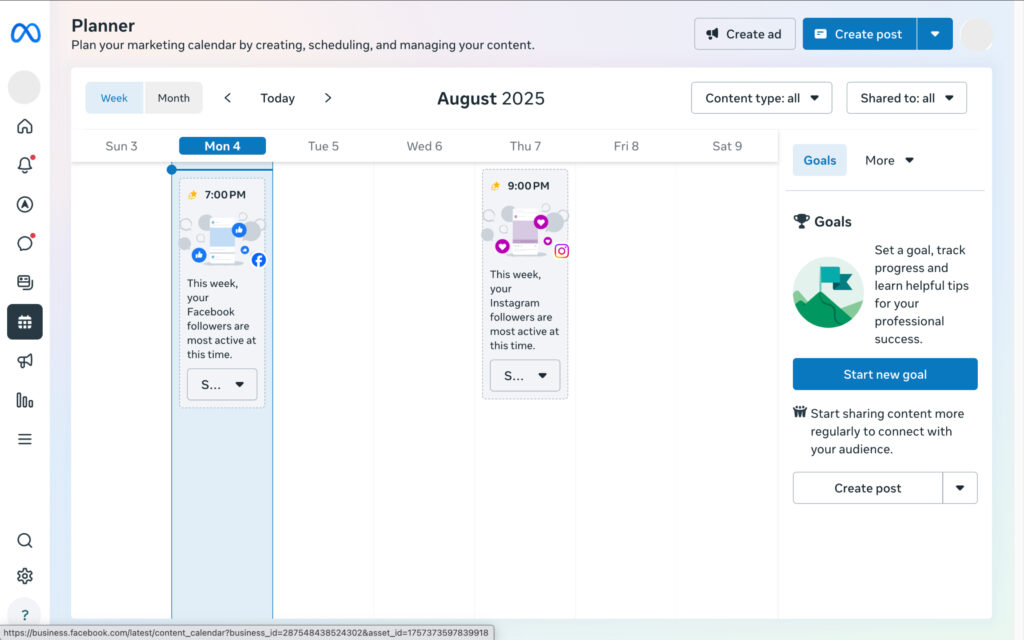
Meta Business Suite is Facebook and Instagram’s native, forever-free scheduling platform.
- Free scheduled posts: Unlimited
- Free connected social media accounts: Unlimited Facebook and Instagram Business Pages
- Supported social media platforms: Facebook and Instagram
Meta Business Suite is 100% free and accessible to anyone who handles a Facebook page.
GoDaddy: Best scheduler with an AI content assistant

Pros
- Above-average AI caption assistant that can change tones and direction depending on your post
- Built-in content editor with templates in the calendar
- Unlimited post scheduling for free
Cons
- Only supports Facebook, Instagram, and Google Business Profile
- Need to create a GoDaddy website first before using its social media tools
- No social media analytics
My expert opinion on GoDaddy
You might know GoDaddy best as a website host and builder. But over the past few years, it’s been trying to rebrand itself as a more comprehensive digital marketing platform, and its free social media automation tools are some of its better offerings.
They’re surprisingly easy to use for a software that’s better-known for its website hosting services, with a content calendar for scheduling posts that’s not unlike Buffer’s.
But my favorite feature so far is GoDaddy’s AI content assistant that’s built into the content calendar. In a way, it’s like a content creation and scheduling tool in one with some pretty decent post templates, which makes content creation more efficient, especially if you’re a one-person marketing team.
The AI caption assistant can even change tone and direction depending on what type of content you’re posting, and it’s surprisingly not very robotic (although it will still need some editing, as with all AI-generated content).
But it’s still one of the best instances of AI in social media I’ve seen. I’m overall pleasantly surprised with GoDaddy’s social media tools and would have ranked it higher had it supported more platforms and allowed more connected accounts.
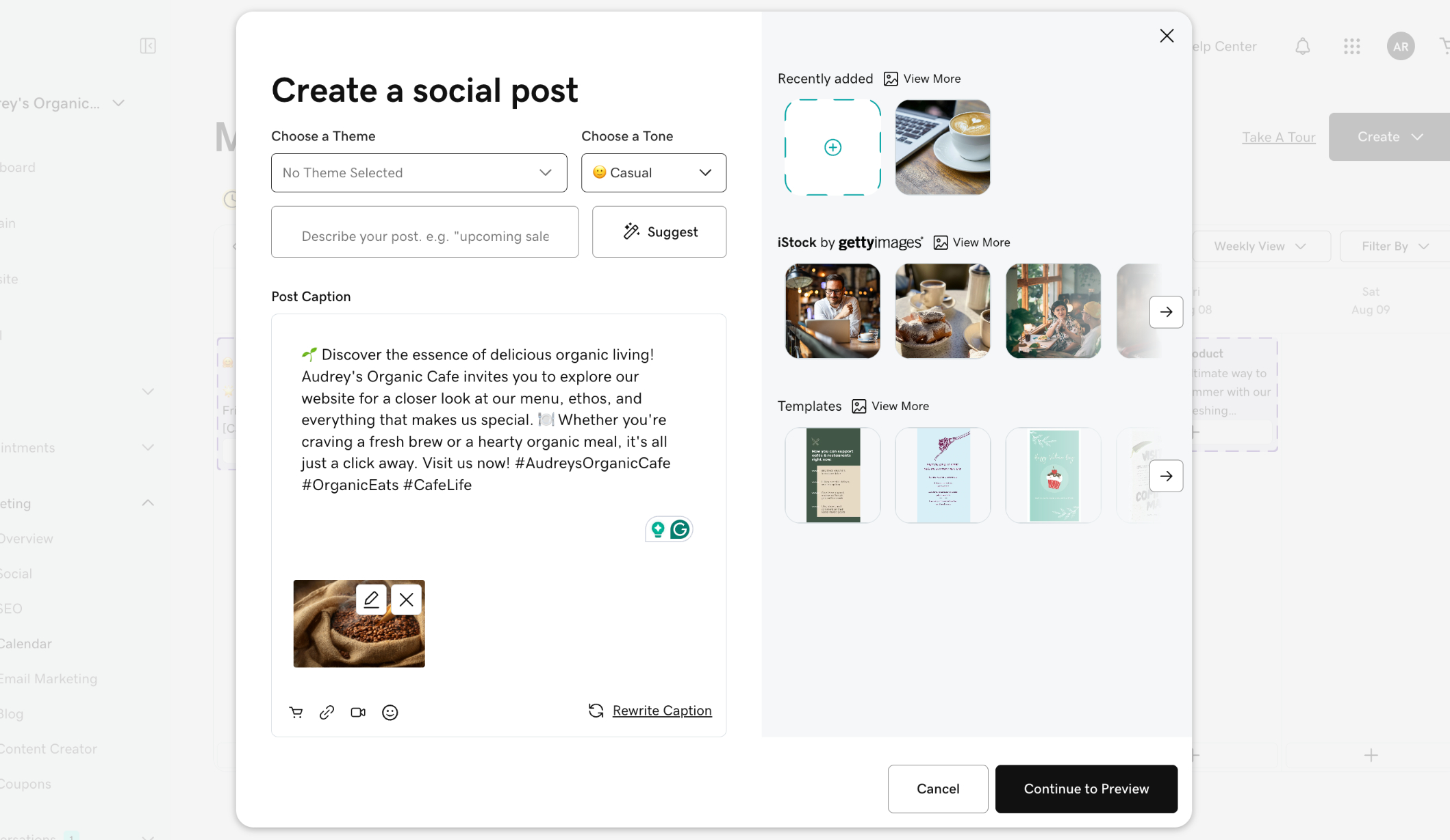
GoDaddy’s best social media feature by far is its built-in AI content assistant. (Source: GoDaddy)
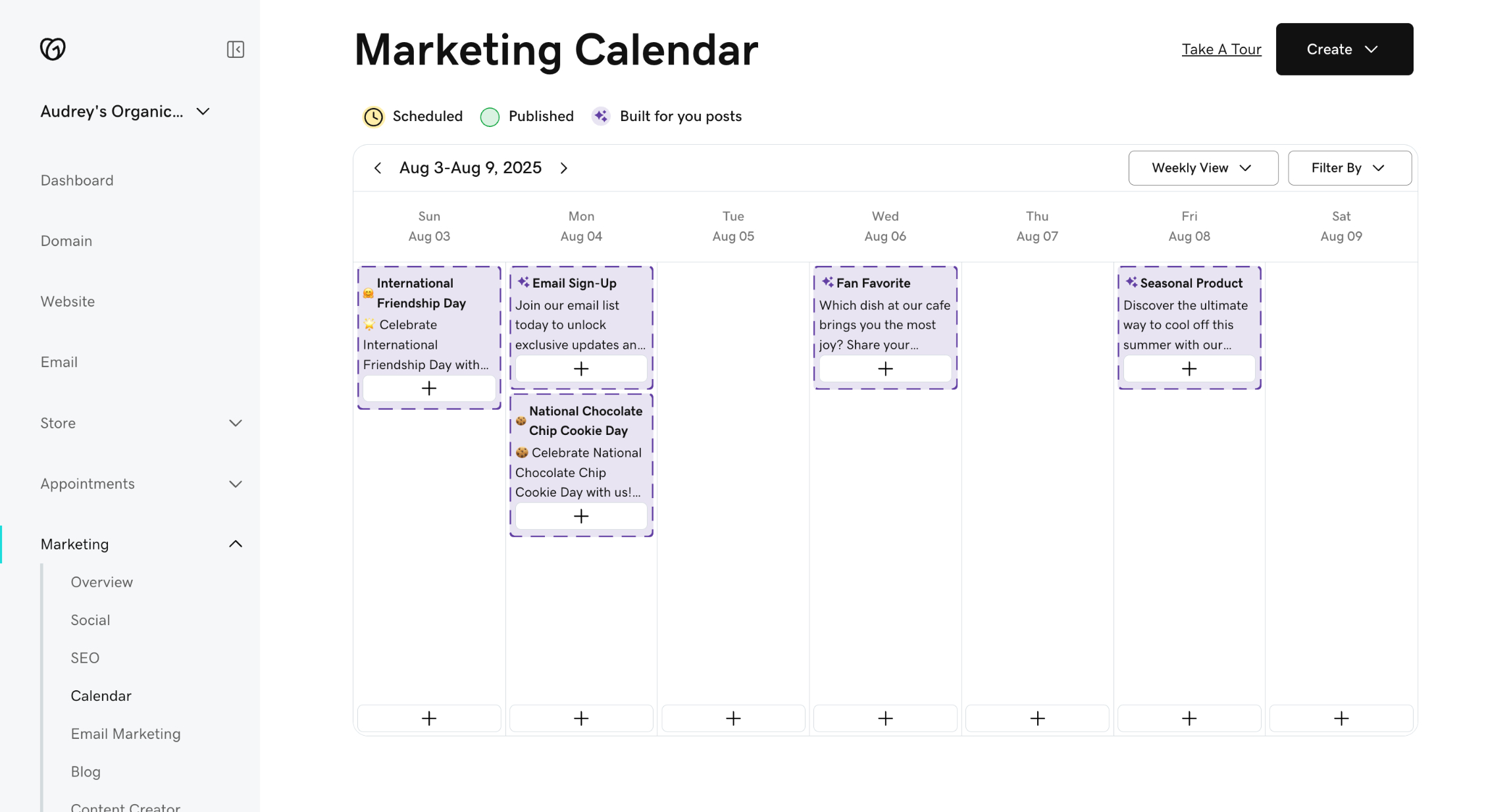
The content calendar is also easy to navigate and helpful. (Source: GoDaddy)
- Free scheduled posts: Unlimited
- Free connected social media accounts: One
- Supported social media platforms: Facebook, Instagram, Google Business Profile
Planable: Best for short-term social media campaigns

Pros
- Shows mockups of your posts before they go live
- Intuitive, beginner-friendly content calendar
- Post to multiple accounts and platforms for free
Cons
- Only up to 50 posts in total on the free plan
- Free plan doesn’t post to X
- Generic AI-generated captions — no way to change tones
My expert opinion on Planable
Planable has all the essentials you need from a free social media scheduling app: a content calendar with post scheduling and a managed inbox across multiple social media platforms and accounts. Here’s the catch: You can only schedule up to 50 posts total.
Once your 50 posts are up, you’ll lose access to its tools, so it’s really more like a free trial than anything else, which is why my best use case for it is one-time, seasonal campaigns and not regular social media content.
The feature I like from Planable is its live post mockups, which show you how your post looks before it goes live. It’s not something I see from most other platforms. The content calendar is also intuitive and easy to navigate, and it covers all the major social media platforms (although, notably, no Bluesky yet). It’s a great, handy tool. If it just had a more generous free plan, I would have scored it much higher.
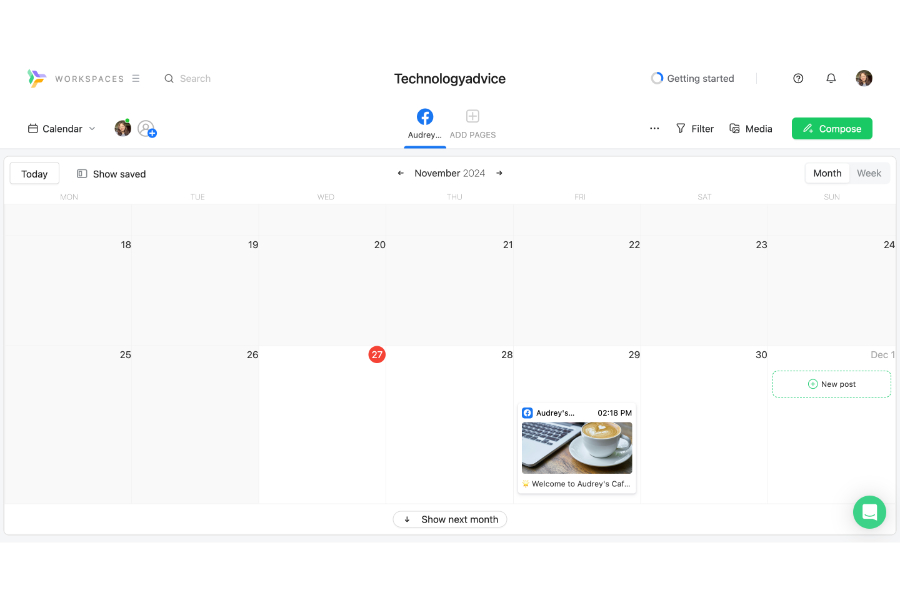
Planable’s content calendar is simple and efficient, but only supports 50 total posts. (Source: Planable)
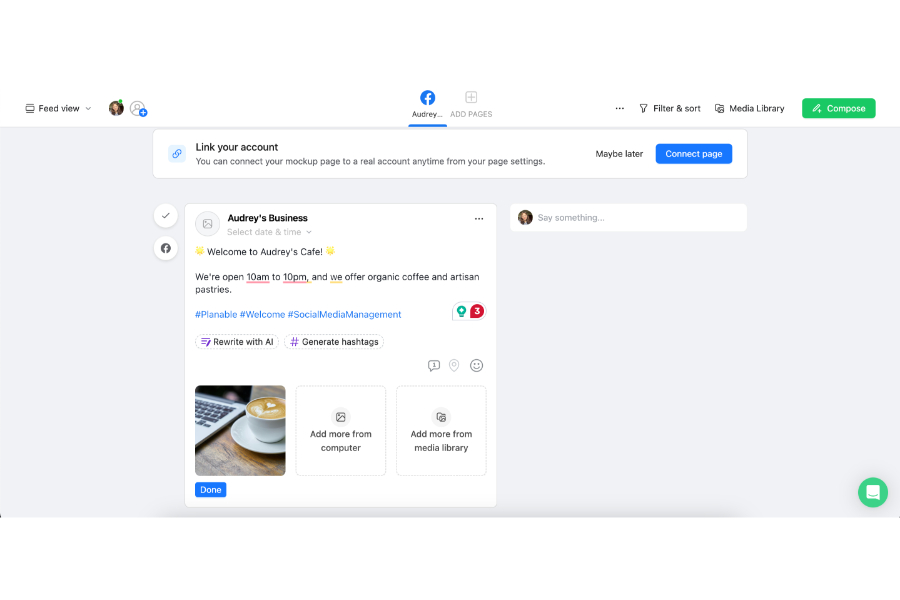
Its best feature by far is the live post mockup. (Source: Planable)
- Free scheduled posts: 50 total
- Free connected social media accounts: Up to four
- Supported social media platforms: Facebook, Instagram, Google Business Profile, X, TikTok, Threads, YouTube, Linkedin, Pinterest
MailChimp: Best for an all-in-one social media and email marketing platform

Pros
- Free email and social media marketing platform
- Unlimited posts on Facebook, Instagram, and X
- Integrates with Canva, Shutterstock, Google Drive, Giphy
- AI social media content generator
Cons
- No advanced post scheduling for free, just cross-posting across multiple platforms
- Only supports Facebook, X, and Instagram
- No analytics or comments management
My expert opinion on MailChimp
MailChimp’s always been one of my favorite email platforms. While it’s still primarily for email marketing, every year it adds new features to its toolset, including for social media marketing. Like everything else with MailChimp, it’s easy to use and does the job well enough.
The one big drawback is that it doesn’t actually let you schedule posts in advance on the free plan — just publish them instantly in one go. And it only publishes on Facebook, Instagram, and X so far, so it’s really only useful if you have the same content strategy across all those platforms.
Unfortunately, MailChimp doesn’t have a content calendar either. It’s a very simple posting tool, though I will give it points for having integrations with Canva, Shutterstock, and Giphy.
As solely a social media marketing tool, it’s not as robust as the others on this list, but if you’re looking for an all-in-one email and social media platform that won’t give you a hard time to navigate, MailChimp is one of my top recommendations.
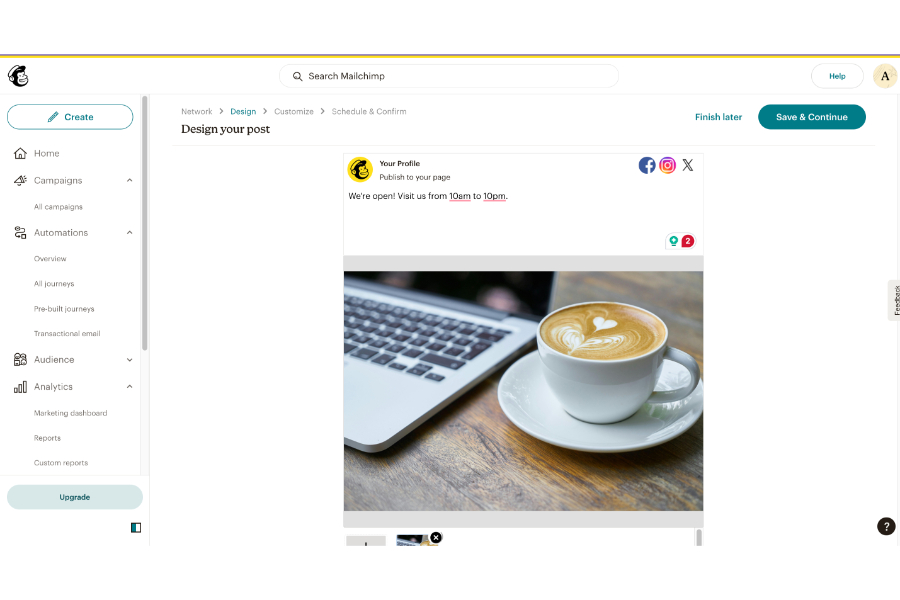
MailChimp’s social media tools let you post simultaneously to Facebook, Instagram, and X. (Source: MailChimp)
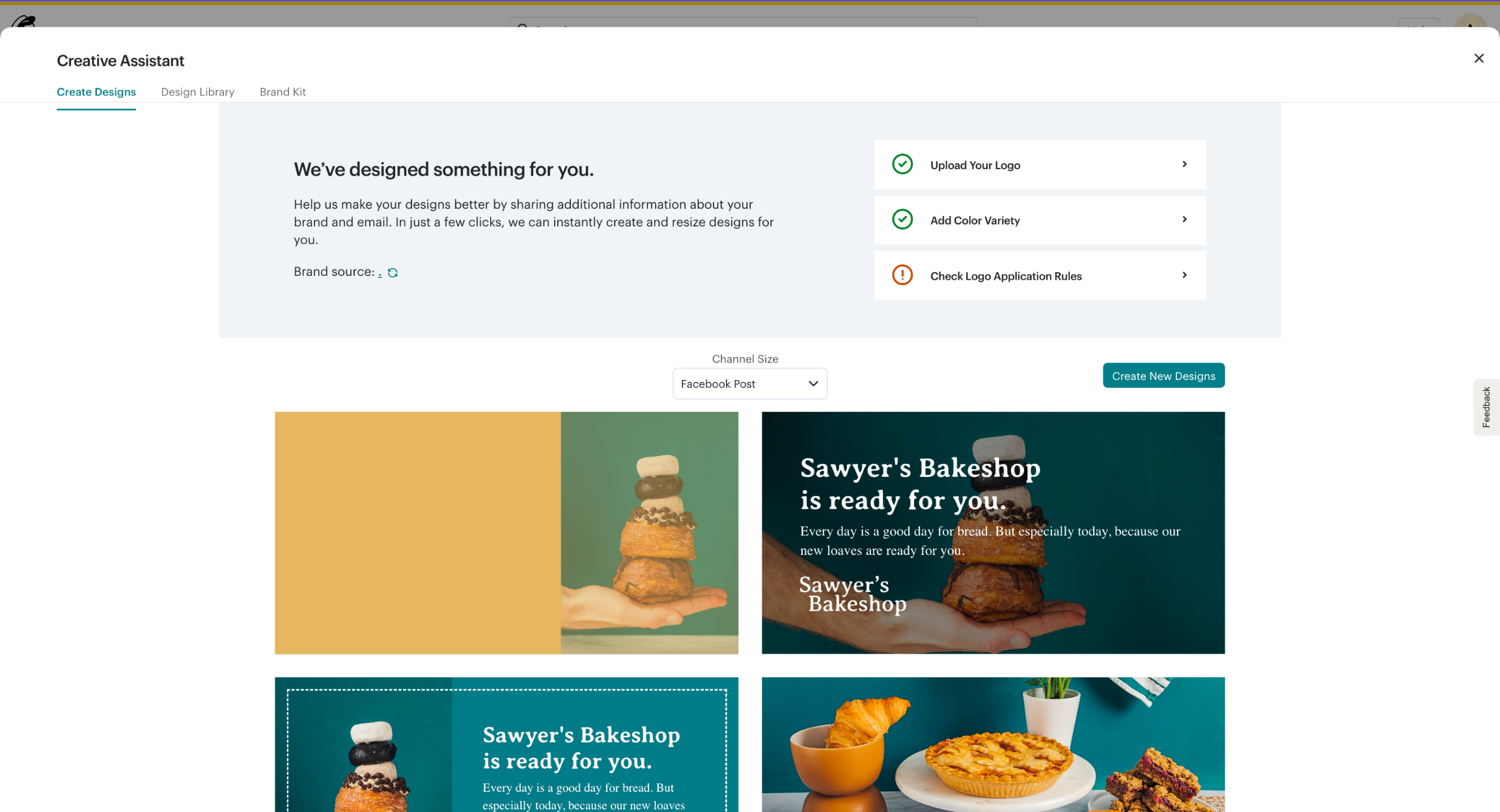
It also has an AI content generator, though imperfect. (Source: MailChimp)
- Free scheduled posts: No scheduled posts, but unlimited cross-posting to Facebook, Instagram, and X
- Free connected social media accounts: One of each platform
- Supported social media platforms: Facebook, Instagram, and X
A few honorable mentions that didn’t make the cut
I looked at a good many platforms, old and new, to compile the list above. A few that I looked at that, unfortunately, didn’t make the cut, for various reasons, are SocialOomph, Zoho Social, and Outfy. While these all allow social media scheduling, they fall short in other areas, like other social media tools or interface navigation.
- SocialOomph: A free tool that allows unlimited social media scheduling (even bulk post scheduling), but requires significant coding before you can connect your social media accounts and start posting. It’s also a very unintuitive, difficult-to-navigate platform overall.
- Outfy: A new platform that uses AI to generate video promotional posts for social media. Unfortunately, it’s exclusively for ecommerce brands and can only accommodate up to four scheduled posts at a time. It also doesn’t have any extra social media tools beyond creating and posting AI-generated content.
- Zoho Social: This would have otherwise been another great tool for Zoho’s suite, but its free plan is, ultimately, just too limited. It doesn’t allow scheduling posts in advance or access to the content calendar, and it only allows one account.
How I chose and evaluated the best free social media scheduling tools
All free social media schedulers do the same core function: help you plan and schedule social media posts. That was the base evaluation criterion for the platforms above. However, some go beyond the basics and provide helpful tools like analytics, social listening, and AI assistants to make managing social media easier, all of which I also took into consideration in my scoring criteria.
20% of Overall Score
All the platforms above have 100% free plans, and most are free forever. However, I also evaluated how many scheduled posts and platforms were supported on the free plan, and whether you could connect to multiple accounts.
30% of Overall Score
Aside from letting you schedule posts on social media, general features include a social media calendar, content creation studio, video support, AI caption assistants, and the number of total social media platforms it could accommodate.
25% of Overall Score
As mentioned, some platforms go above and beyond, which is why I gave extra credit for more features like social media analytics, social listening, comments management, link-in-bio site builders, and recommendations for the best times to post.
15% of Overall Score
Social media management platforms can sometimes take a learning curve to navigate, which is why platforms with longer support hours and more avenues (phone, email, and live chat) were graded higher.
10% of Overall Score
Finally, I took my experience as a social media marketer into account when grading the platforms on this list. I graded each platform based on its ease of use, features, and overall value for money.
*Percentages of overall score
6 things to consider when choosing a free social media scheduler
The tools above are my personal best picks, but the right one for your business will ultimately come down to your specific needs, comfort level, and social media resources. All the tools above have the basic ability to schedule and publish posts on social media.
Where they differ is in the smaller details, like their integrations or analytics, which is why it’s important to keep those in mind when choosing the best free social media scheduler.
- What other social media tools you might need? Some platforms also offer extra tools in their plans, like competitor analysis or inbox management. See if these features are helpful to your wider social media strategy. For example, if your focus is generating and nurturing leads, inbox management tools will likely be helpful.
- What are your long-term social media goals? Social media as a marketing strategy isn’t going away anytime soon, which means you’ll also need to think about your social media presence for the road ahead. Think about your goals a year or five years down the line so you can choose a platform that can also support those goals.
- Which social media platforms are you focusing on? You might have noticed that not all the social media schedulers above support all social media platforms. Keep in mind the platforms where you want to build your social media presence before finalizing your decision.
- How comfortable are you with social media marketing tools? Not all scheduling platforms are entirely beginner-friendly. Some will take a learning curve, or might have more advanced tools you may not even need. Evaluate your comfort level with different management platforms so you can choose one that works with you.
- What integrations do you need? What tools are currently in your marketing tech stack? You’ll ideally want a platform that can easily integrate with the tools you currently have. For instance, if you use Google Drive to store files, platforms like Buffer and MailChimp already integrate with it.
- How do you track and measure results? Not all platforms offer social media post analytics. In fact, most only offer them on paid plans, and only offer the basics like engagement rates and impressions. Not all of them integrate with Google Looker Studio for creating reports. Consider how you plan to (or already) track your social media growth.
Frequently asked questions (FAQs)
Yes. There’s Instagram’s native scheduling platform, Meta Business Suite, which is entirely free and accessible to anyone with a Facebook account (it can also schedule posts to Facebook). It lets you schedule as many posts as you like, whether static images, videos, or Reels.
Other free Instagram schedulers are Buffer, CoSchedule, and Metricool, although they only allow a limited number of scheduled posts.
Yes, Canva does have a social media scheduler, though it’s only available on the paid plans (Canva Pro, Teams, or Enterprise), from $15 a month. The scheduler lets users schedule and post designs to social media platforms from within the Canva platform.
Bottom line
Looking for the best free social media scheduling tools means looking at the little details and specifics you need most — the platforms you want to focus on, the integrations you need, the analytics you want to measure, and such. As a former social media marketer myself, I’ve tested and verified all the platforms above and find them all capable of helping grow your social media presence through content.