Website banners are digital image and video ads you see around news sites, ecommerce sites, and other websites. You’ve probably already encountered a few of them. They appear on websites related to the brand they’re advertising. For example, you might see a web banner ad for a home furnishing store on a blog about home interiors, or one for a makeup brand on a beauty website.
Most website banners are also remarketing ads, meaning they’re targeted to people who’ve previously visited a brand’s website or online store in efforts to bring them back and re-engage them. This is made possible through ad tracking pixels (aka the advertising cookies of a website).
The cost per click (CPC) of web banners is often lower than Google or Facebook Ads, but click-through rates also tend to be lower. These factors are why most digital marketers (myself included) typically use web banners for brand awareness or remarketing campaigns more than for engagement or direct sales.
How web banner ads work
A web banner (aka a web banner ad) is a form of online advertising delivered by an ad platform, like Google Ads or Microsoft Ads. Its purpose is to direct traffic to a specific page on the advertiser’s website that is designed to convert leads. In most cases, the format of a web banner will be a static image, GIF, or short video displaying a company’s logo, tagline, or call-to-action message.
However, banner ads can also include more extensive text, images, flash animation, or other rich media to better capture visitors’ attention. The banner ad is then embedded, typically near the top of a web page, where it can be seen by the majority of site visitors for easy interaction.
Types of website banner ads
There are several different types of web banners you can use to promote your website or online product, including static, animated, and interactive.
- Static: This basic banner contains a static image and some text. Usually, you will see these types of banner ads on websites that don’t get a lot of traffic or aren’t updated very often.
- Animated: These banners are more complex, containing multiple images and/or videos that play in succession. They are often used on high-traffic websites or for ads that need to convey a lot of information in a short period.
- Interactive: Interactive banner ads allow users to interact with them in some way, such as by clicking on a button or playing a game. They are often used on websites that want to increase user engagement.
- Expandable: These banners start small but can be expanded to reveal more information when users click on them. They are often used to advertise products that require more information to persuade or explain to get a conversion.
- Rich media web banners: These banners are the most complex and can contain various interactive features, such as games, videos, or 360-degree images. Providing a more immersive experience can increase engagement and conversions.
- Transitional: These are banner ads that appear during a transition, such as when loading a new page. Ads will only be displayed for a limited amount of time, and site visitors usually get the option to click to close.
- Pop-up web banner ads: Pop-ups housing web banner ads can be triggered on page load, exit, or when a site visitor hovers over something, clicks on something, reaches a specific point in the page (e.g., halfway down the page), and so on. Users are generally allowed to close the pop-ups, or they may close automatically if the reader clicks somewhere else on the screen.
Web banners vs other ad formats
Web banner ads are targeted to specific audiences via remarketing or audience characteristics at a relatively low cost-per-click. Advertisers only pay when users click on the ad, making it a more cost-effective option than other ad media like billboards, print, television, and even other types of digital advertisements, like search ads to advertise on Google.
Banner ads can also be adapted to different formats, depending on the website’s size and the viewer’s device. This flexibility makes web banner ads a more versatile option compared to other types of advertising.
Are web banners still effective in 2025?
Of course, we still live in the digital age, after all. But what matters more today is making sure your web banners are truly effective — that they’re targeted to the right audiences and have the right messaging, visuals, and landing pages that get people clicking and converting. And that they’re used for the right marketing strategies.
In my experience, web banner ads have been most effective not so much for driving sales or conversions or building engaged communities, but for plain old awareness for a specific campaign, say to promote an upcoming event or seasonal promotion.
They’re the digital equivalent of posters placed around your local community, but with the benefit of having far more precise audience targeting (thanks to their retargeting abilities), and landing pages to encourage “next actions,” whether that’s signing up for a newsletter or visiting a website.
So yes, I still think web banners are worth adding to your marketing plan. But as with any other advertising channel, it takes the right strategy, audience targeting, and a certain amount of trial and error to get it right. The good news: Many AI platforms now use AI to do most of the heavy lifting for you and automatically optimize your ad campaigns.
What makes a good web banner ad?
A good banner on a website is more than just good visuals and catchy copy. It should be immediately relatable to your target audience and offer a solution to a specific pain point. That’s always my number one tip for writing good ads: Offer solutions, not products or features. Apple doesn’t sell smartphones; it sells peace of mind and an easy, elevated lifestyle.
A good banner ad also doesn’t just build generic brand presence. It makes the brand known to the right people, i.e., the people who’d be most interested in your business. Of course, there are also the other basic parts of a banner ad: the catchy copy, the call-to-action, and the buttons and landing pages.
- A catchy headline that draws attention and understands your audience’s needs and desires
- Info about what the company does or what your ad is about (An upcoming event? A limited sale?)
- An eye-catching image or graphic
- A call to action, such as “Save 25% on your first order!”
- Brand identifiers, such as the advertiser’s name, logo, or website URL
- Buttons or hyperlinks that lead to more information on the advertiser’s website
- A trackable link to a dedicated landing page, product or service page, or some other page where it’s easy for the site visitor to convert
Pro tip: Don’t forget about web accessibility! It’s more important than ever to make sure your digital ads are accessible to everyone. Add ALT text to your images, and use high-contrast colors to ensure your image copy is screen reader-friendly. Test your banner to make sure it’s navigable with a keyword. The US Web Design System (USWDS) has a great checklist for checking your web banner’s accessibility.
I’d also advise incorporating accessibility into your ecommerce store’s overall design, if you haven’t yet. Use proper headings and subheadings (H2s, H3s, and so on) to organize content, add ALT text to images and captions and transcripts to your videos, and clearly label all your forms. Use simple language and avoid too many flashing or dynamic elements like carousels and timers.
How do I know if my banner ad is working?
Thankfully, banner ads are pretty simple to measure. The most important numbers to watch out for are click-through rates, cost per click, impressions, ad frequency, and, in certain campaigns, conversions and cost per conversion.
- Click-through rates (CTR): The number of times people click on your ad. However, this isn’t always trustworthy because you might also get a good number of false clicks — people who accidentally click on your ad or who aren’t really interested in your business.
- Cost-per-click (CPC): This measures how much it costs to get each click on your ad. Higher CPCs don’t always mean your ad content is ineffective. It can also mean your ad is in a very competitive space or isn’t targeting the right keywords.
- Impressions: How many times your ad is seen by people. While this is helpful for measuring how many people your ad reaches, it doesn’t indicate whether your ad was seen by your target audience.
- Ad frequency: So far, these are only available on Google Ads, but they measure how frequently your ad was seen by a user. This metric helps indicate how often your ad needs to appear before it’s effective.
- Conversion rate (and cost per conversion): Conversion rates measure how many people followed your ad’s call to action beyond just clicking on it, whether to sign up for your event or complete a purchase. Cost per conversion measures the cost it took for them to complete that action.
Pro tip: The best way to measure how effective your ad campaigns are is by setting goals in the beginning and measuring your campaign performance against them later on. For example, say your goal was to increase traffic to your online store by 20% through your banner ad for your holiday sale.
You can measure that by directing your ad to a specific landing page of your online store and measuring how many more visitors it received after your ad campaign.
Ads can be tricky to master if you’re new to them, which is why, for small businesses, I typically recommend outsourcing them to a credible digital advertising agency instead. One of the best Google Ads agencies for small businesses I can personally vouch for is Straight North, which offers a tailored, full-service approach to your ad campaign.
How much website banner ads cost
Website banners are priced on a cost-per-click basis with an average CPC of 63 cents in 2025 for display ads. However, overall costs vary based on two factors: design cost and display advertising cost (determined by factors like the advertising platform, keyword targeting, and audience).
- Design cost: There are two options for web banner design: designing it yourself (free on platforms like VistaCreate) or hiring a professional designer or design agency.
- Display advertising cost: The actual cost to place your ads on ad platforms like Google and Bing. Most ad platforms have a minimum ad spend of just $1 a day, but to get any clicks, prepare to spend more than the average CPC.
Average web banner costs by advertising network
Ad costs will be different for every advertiser and every campaign, however. These costs are based on the ad platform used, ad placement and ad size, ad targeting, ad quality, and ad settings.
Recommended website banner sizes per ad network
You may be wondering, “What’s the best banner size for websites?” The answer depends on where you’re placing your ad. Each ad network has its own set of banner sizes, although some (like Google) have more than most. As with print ads, the larger your ad, the more it will cost.
Google Display banner ads
The Google Display Network is the leading ad platform for web banner ads, as it’s one of the largest display networks. It enables you to display banner ads across thousands of Google network partner sites, like Google Finance and YouTube.
There are currently four categories of banners offered by Google: Square and rectangle, Skyscraper, Leaderboard, and Mobile. Each category has different sizes, and you can find the full list on Google’s support site. Google accepts JPG, PNG, and GIF formats with a maximum file size of 600 KB.
Local small businesses can also access Google Local Services Ads. These ads appear on search pages but only incur costs when a conversion occurs (e.g., a web form is filled out or a click-to-call is placed).
Microsoft Audience banner ads
Microsoft Ads (formerly Bing Ads) are displayed throughout the Microsoft Audience Network based primarily on keywords and audience targeting selected by the advertiser. Microsoft does not currently have a list of partners published, though it is public knowledge that MSN.com and Microsoft Office are part of the network.
There are currently seven Microsoft banner ad sizes, and ads may be in .jpg or .png formats.
Facebook Audience banner ads
Facebook Ads also offers banners as an ad type, which can be displayed on Facebook or the Facebook Audience Network. Banners that display on Facebook are image-based ads in the right column of user feeds, while Audience Network ads are shown on third-party sites in the top or bottom of the screen, typically above or below the header or footer, in .jpg or .png format.
Amazon Advertising banner ads
Amazon Advertising offers banner ads that can be displayed on Amazon and its partner sites, as well as Amazon devices (e.g., Alexa, Fire tablet, Kindle, and so on). Amazon ad sizes, therefore, vary by placement and device type.
You don’t need to be selling products on Amazon to advertise on the platform, though, as an ecommerce platform, Amazon displays ads geared towards product-based campaigns.
Amazon currently offers banner ads on its site and third-party sites, including .jpg and .png formats.
LinkedIn ads
LinkedIn is a professional networking site with over 500 million members. Ads on LinkedIn are displayed in the feeds of targeted users and can include images, videos, or articles. LinkedIn also offers lead generation forms that can collect leads from users.
Ads can be in .png or .jpg formats and up to 5MB in size, with LinkedIn single image ad sizes as follows.
13 top web banner examples & why they convert
Designing an effective web banner takes research and consideration. It’s a good idea to look at web banner examples for inspiration and ideas to learn what works well.
It’s also important to consider various web banner orientations and sizes to achieve your campaign goals while also targeting audiences that align with your customer profiles. These considerations will give you a better chance of creating a web banner that generates clicks and conversions.
Above all, the most effective banner ads are clear, simple, and action-oriented, as you’ll find in the following examples. Short copy, eye-catching (not messy) visuals, and an unmissable call to action are typically the best guidelines to keep in mind.
1. Animated Semrush retargeting ad
Placement: Top, horizontal
Why it works: It catches the eye with a simple but effective animation.
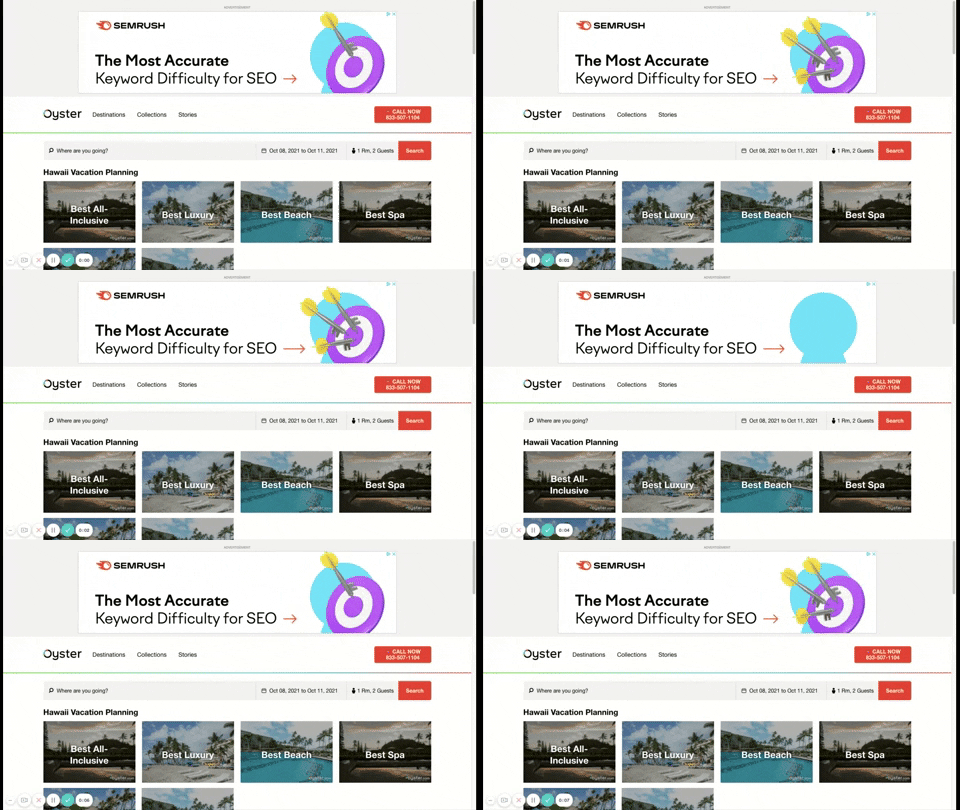
An example of an animated Semrush retargeting ad
2. Sticky web banner ad for Jira Software
Placement: Right-hand column (sticky)
Why it works: This right-hand column banner ad is “sticky.” So, even as a reader keeps scrolling, the banner ad remains fixed on the screen, helping to increase its visibility.
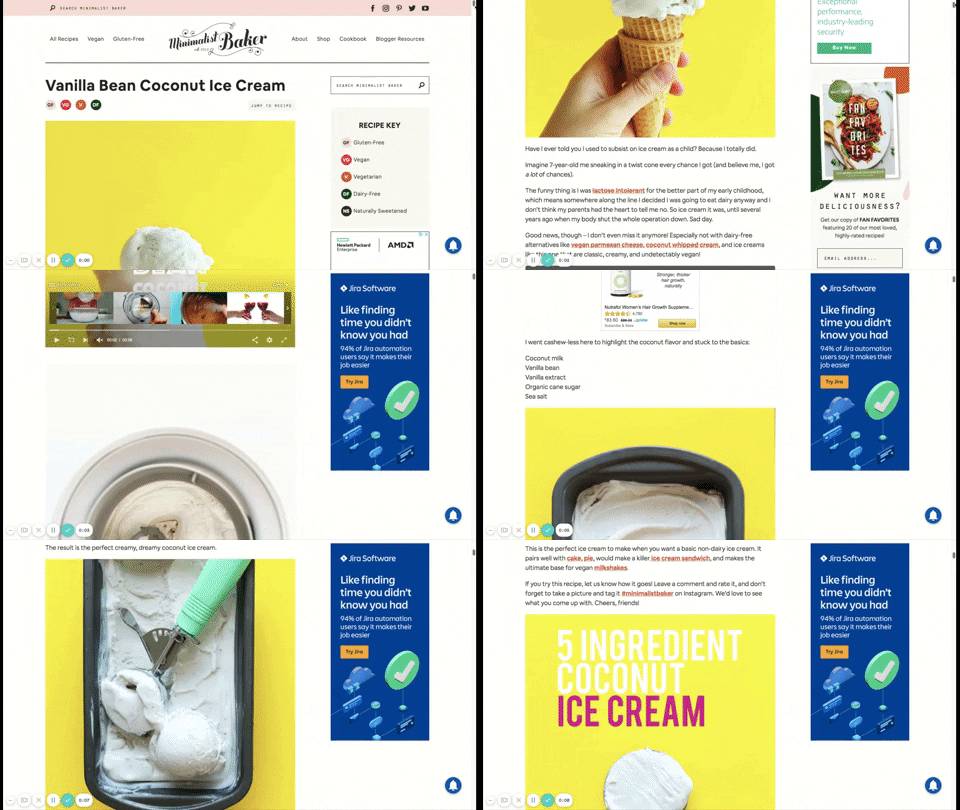
A sticky web banner ad stays put while you scroll down the page.
3. Game-like Airbnb banner ad
Placement: Top horizontal
Why it works: It has a gamification feel to it. This strategy piques curiosity and holds a visitor’s attention as they wait to see what it will land on, and in return, keeps a reader interested and more likely to click the call-to-action button.
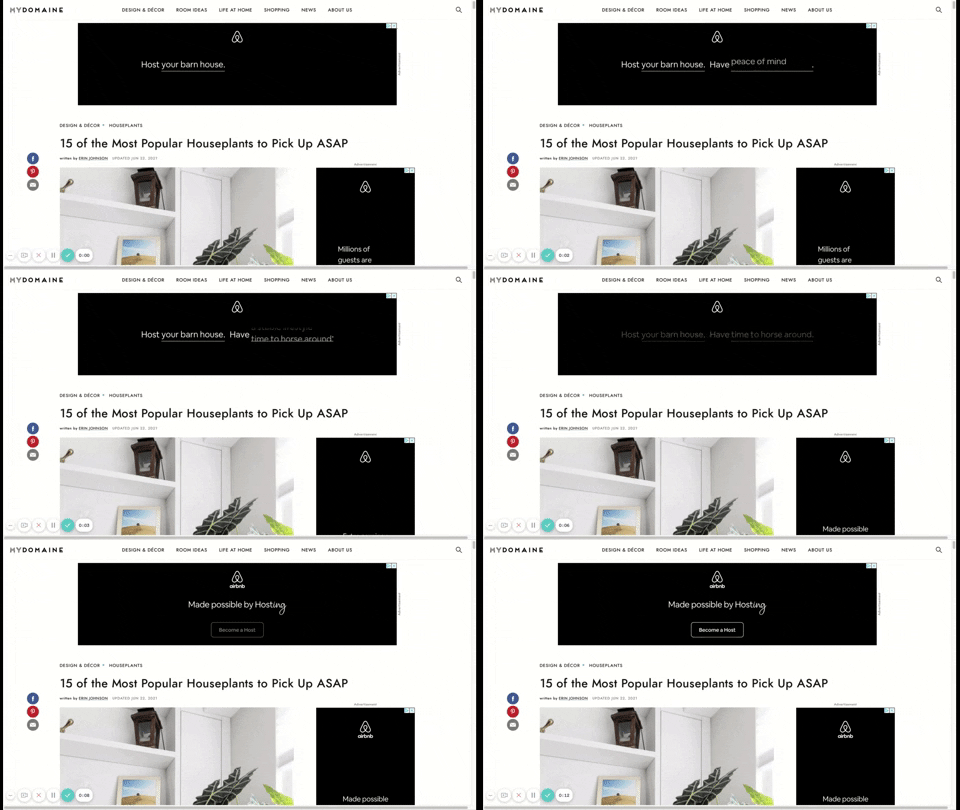
An animated, game-like banner ad that catches attention with motion
4. Problem-focused ad for APDerm
Placement: Right-hand column and bottom horizontal
Why it works: What this ad does really well is provide a solution based on a reader’s problem; in this case, skin troubles. Therefore, a local dermatology practice is a well-fitting banner ad for this skincare website.
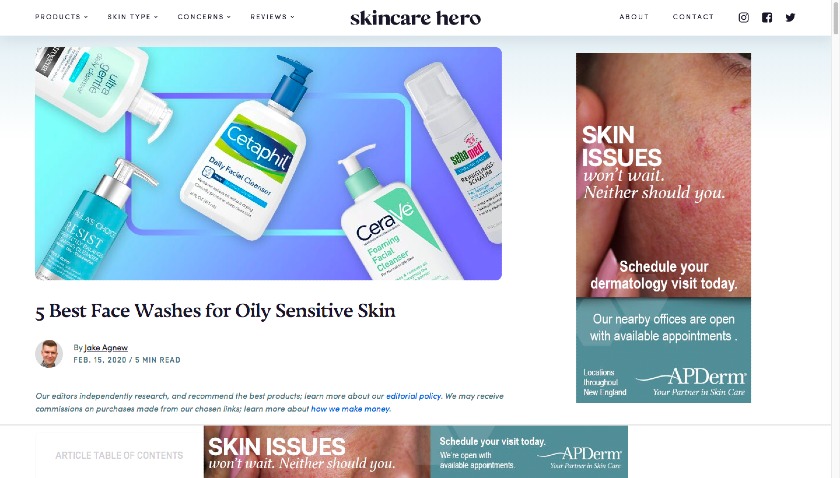
An example of a banner ad that uses a common pain point to engage the reader.
5. Inline ad placement for Weber
Placement: In-body
Why it works: This banner ad by grill manufacturer Weber is placed in the middle of a blog post between paragraphs of text.
The placement helps readers consume the ad easily and keeps the page clean without any side-column ads. However, it stands out because it doesn’t feel obtrusive — it fits right in with the content surrounding it.
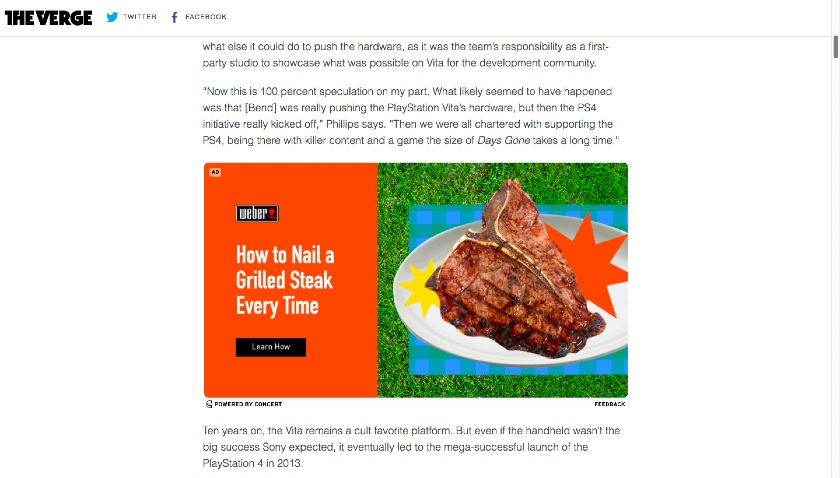
An example of an inline ad within a blog article
6. Audience overlap & ad size for De Beers Jewellers
Placement: Right-hand column
Why it works: This right-hand column banner ad for a jeweler manages to stay on-brand even without search intent. It achieves this through its ads on high-end real estate pages.
While the two industries are very different, the audience has a lot of overlap, helping increase clicks to the banner ad. It’s also far larger than the article images, making it more visually impactful.
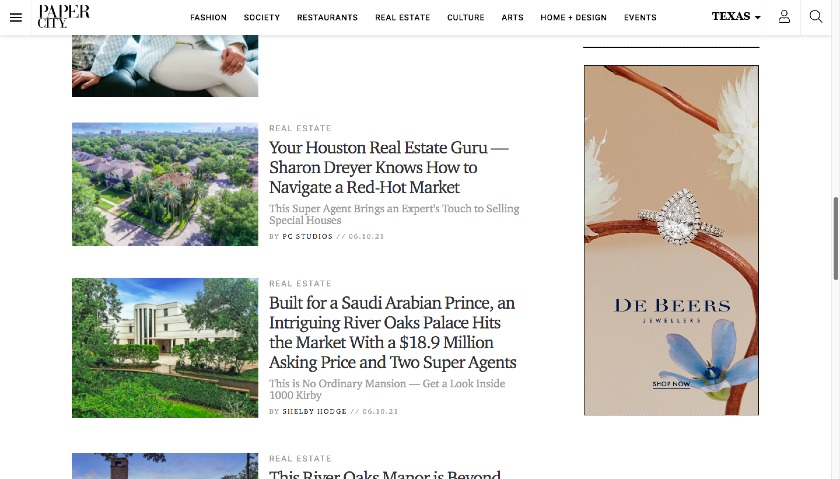
A right-side website banner ad geared toward reader demographics on a news site
7. Horizontal Hertz ad with eye-catching CTA
Placement: Bottom, horizontal
Why it works: Another retargeting ad, this Hertz banner is nestled at the bottom of an article, making it feel more organic and less interruptive.
This placement is key, given its call-to-action button, inviting readers to book a rental car — something they would be less likely to do if they are still reading an article.
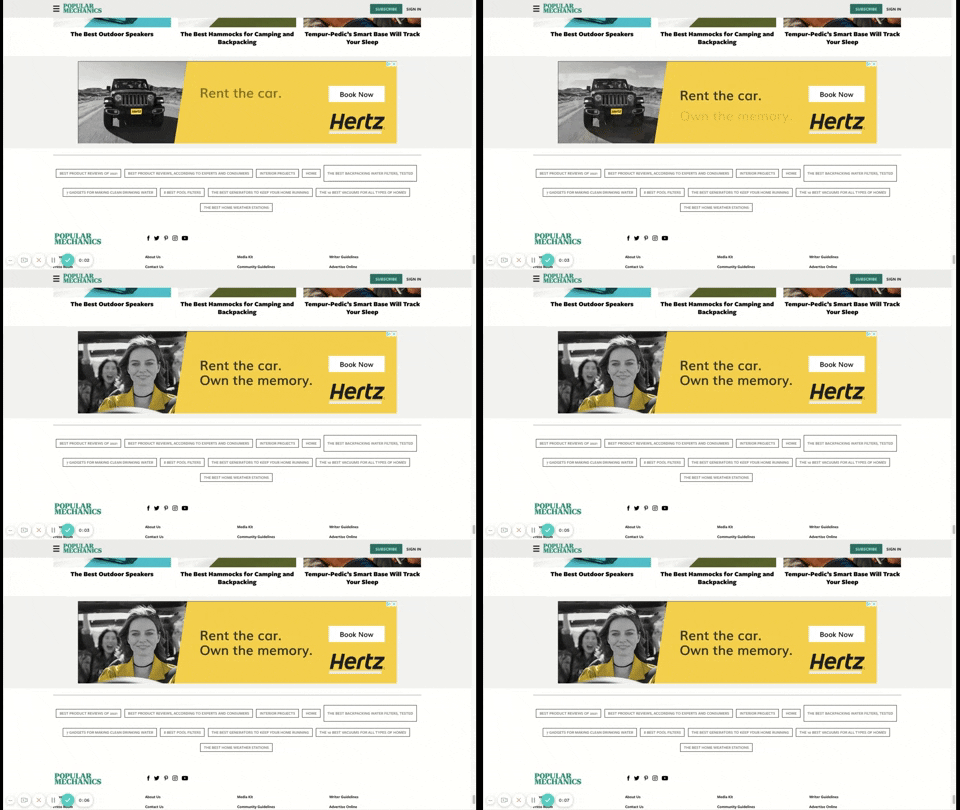
An example of an animated horizontal banner ad with eye-catching colors and changing text
8. Top billing for LinkedIn
Placement: Top, horizontal
Why it works: This LinkedIn top horizontal banner ad is effective because it’s at the top of all other content, making it more likely to be seen by its target audience.
Additionally, top horizontal banner ads tend to be less crowded than different types of ad placements, making them stand out even more.
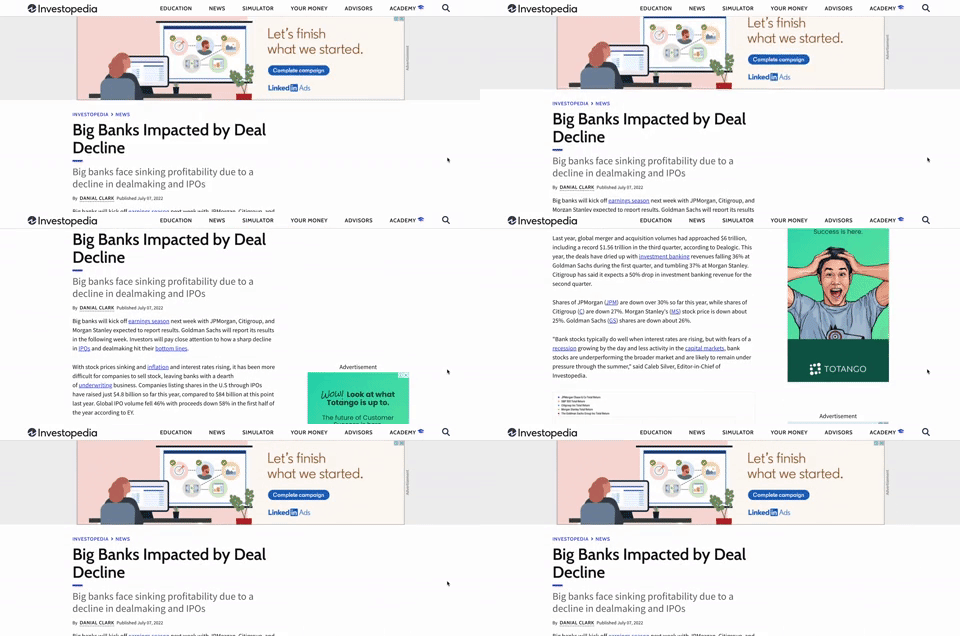
Placing a web banner at the top of the content ensures it will receive impressions.
9. Sticky QuickBooks ad draws attention to brand and CTA
Placement: Right-hand column (sticky)
Why it works: This sticky ad is a great way to improve ad viewability and dwell time. However, be careful not to overload web pages with too many ads.
The ads should be visible all the time within the viewport, and (as in this example) only one ad should be present at a time.
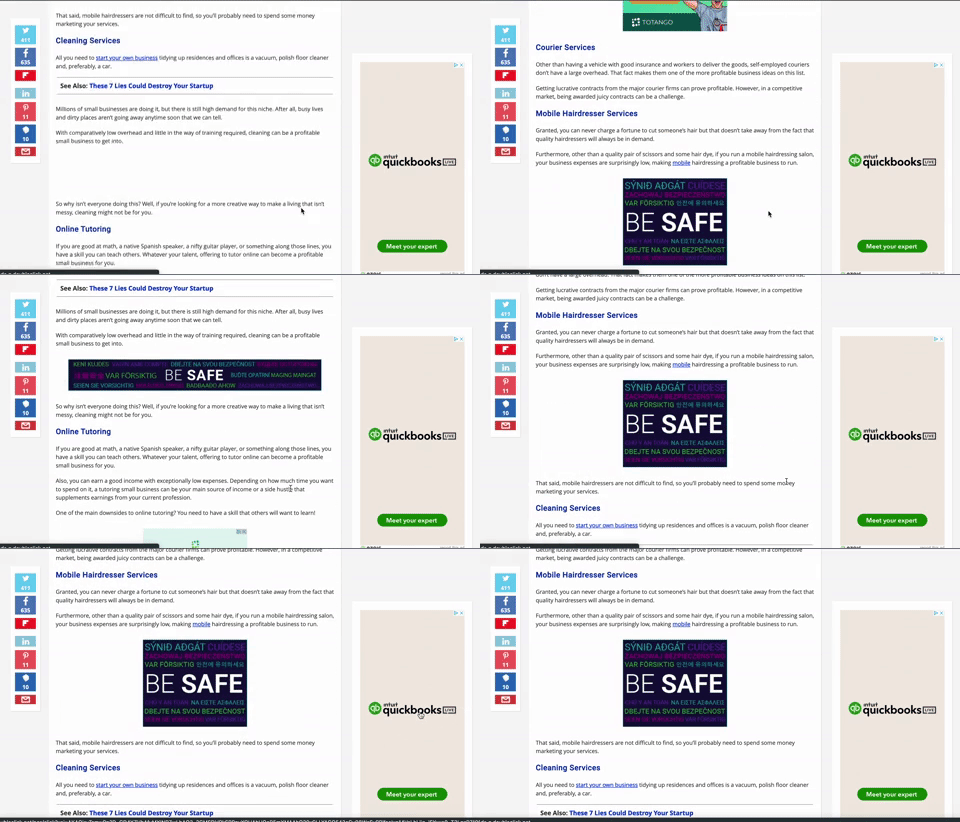
A sticky web banner ad example that doesn’t scroll with the page
10: Texas Instruments inline square web banner
Placement: In-body
Why it works: In-body ads can be effective. For one, they are often placed in the middle of the content, so readers are more likely to see and engage with them. Additionally, in-body ads come in a variety of sizes (including 300 x 250), so there’s a good chance that they will be able to fit nicely into your site’s layout.
In this example, the ad stands out because it’s not as wide as the content above or below and uses a brightly colored headline to draw attention.
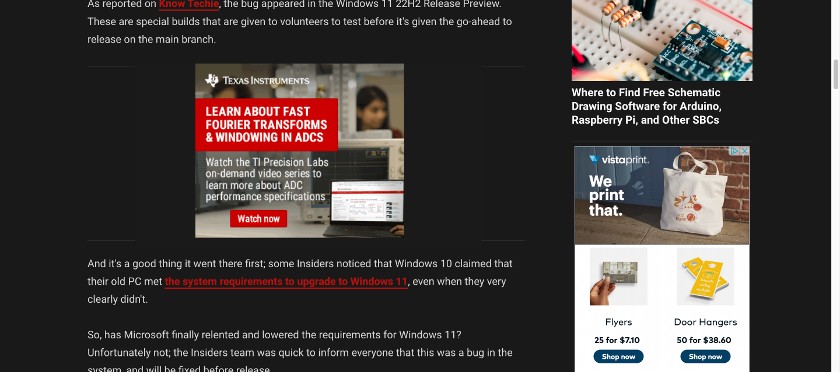
An example of an inline banner ad that feels organic to the reader experience
11. MOTO G web banner with compelling offer & intrigue
Placement: Top, horizontal
Why it works: This banner ad makes its offer ($50 off) the prominent part of the horizontal layout and directly above the call to action (Buy Now).
It’s effective for retargeting, in particular, to remind viewers about the product. It’s also animated with a feel of interaction, which draws attention and intrigues the reader.
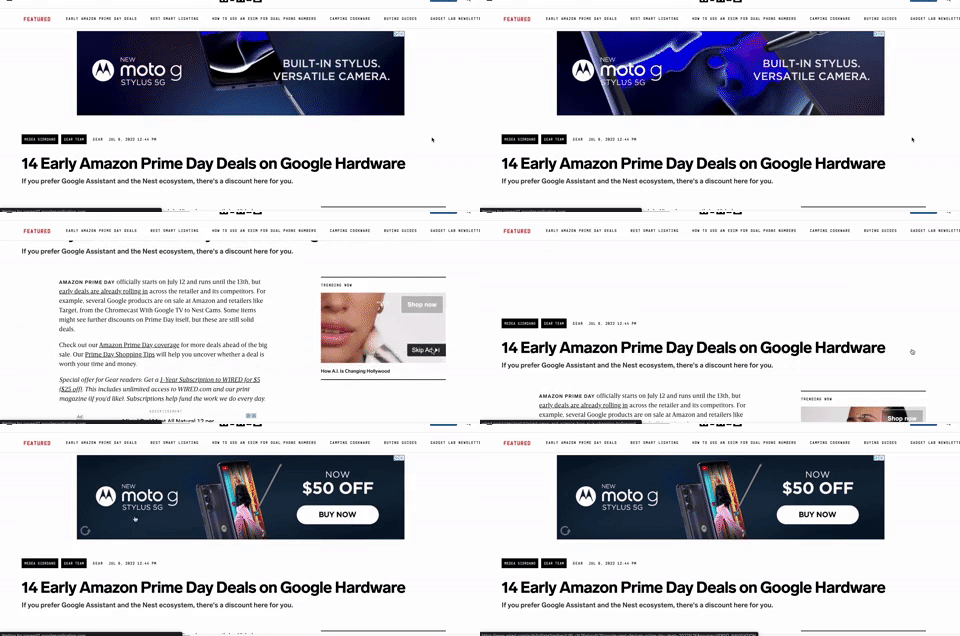
A web banner ad example with a clear CTA, branding, and animation
12. Horizontal sticky ad by Shopify
Placement: Bottom horizontal sticky ad
Why it works: Horizontal sticky ads are similar to regular horizontal ads, except they are placed at the bottom of a web page instead of on top. This placement can be more effective as users are more likely to see them as they scroll down the page.
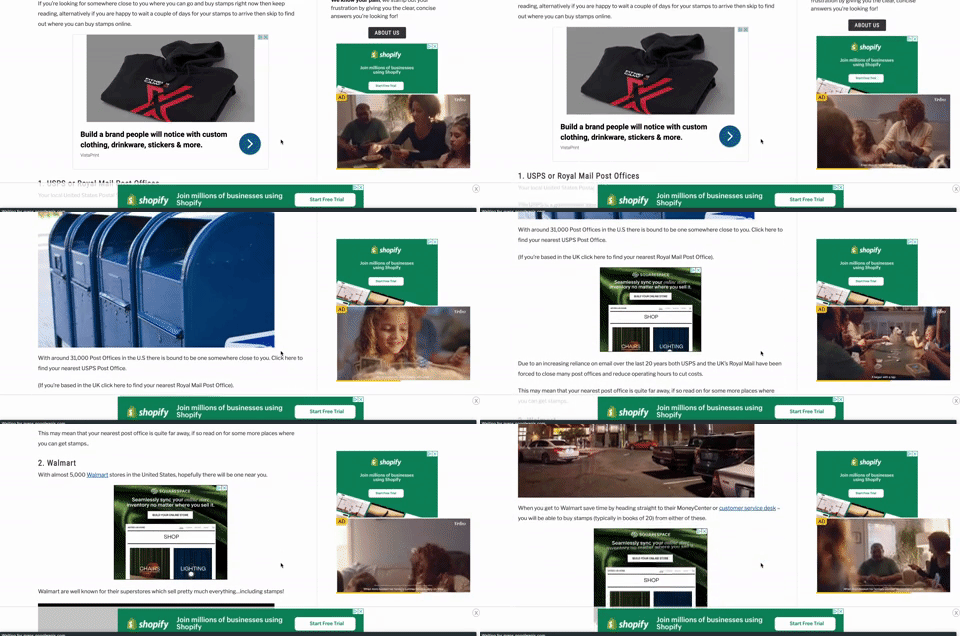
A web banner ad that sticks to the bottom of the screen, staying in the reader’s sightline
13. ZoomShift inline ad with pop-out
Placement: In-body
Why it works: This banner ad is placed within the content of a web page or article instead of in the sidebars or other less conspicuous locations.
It works because, as the reader scrolls past the ad, a pop-out ad is also displayed to draw the reader’s attention, making it even more likely to be seen by readers who are already engaged with the content on the page.
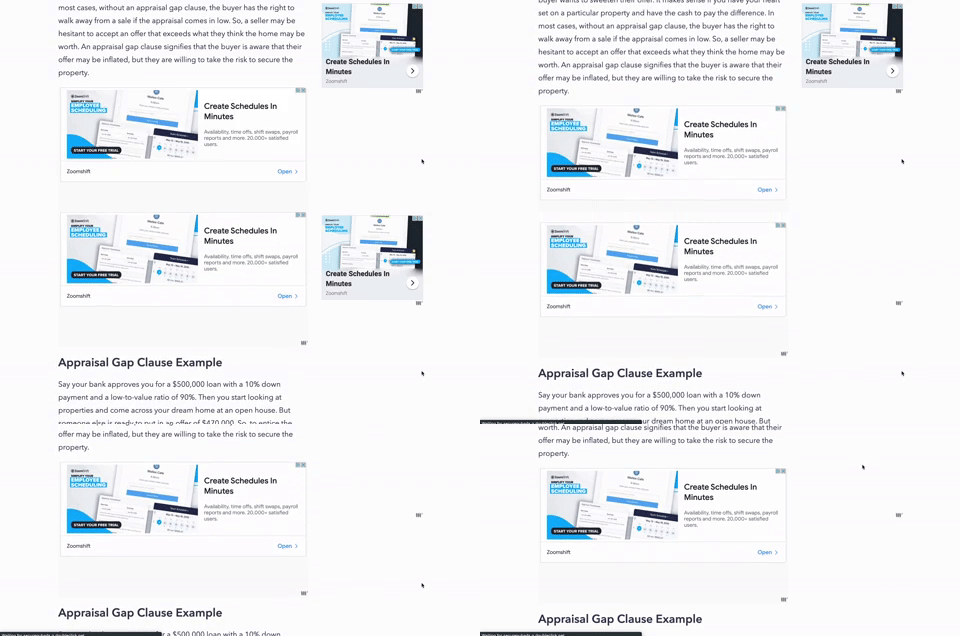
Scroll-triggered web banner ad example
Frequently asked questions (FAQs)
Whether Google search ads or display ads are better for your business depends on your business type, marketing goals, budget, and target audience. Companies selling need-based goods and services will usually find that search ads are more effective. But those marketing desirable goods or services (e.g., the latest tech gadget, business software, or new shoes) will find that display ads work well.
Bottom line
Web banners (aka banner ads or display ads) are image and text or video-based digital advertisements on sites, such as blogs and media outlets. They’re an affordable and accessible type of digital advertising and a good option to get your small business in front of audiences.
There is no single magic formula for making web banners work, so it all comes down to testing, recording, and recalibrating to get the results you want.